
benpolaabjjganjkmhbdppijcfimlgdb

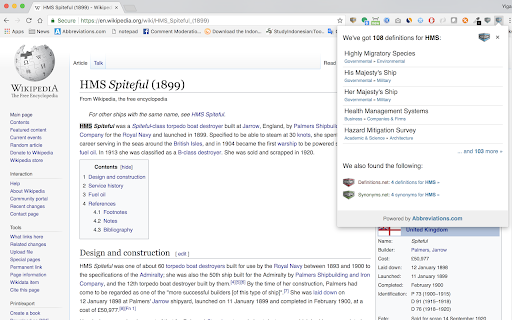
Get instant explanation for any acronym or abbreviation that hits you anywhere on the web! Abbreviations.com is the world's largest and most comprehensive directory and search engine for acronyms, abbreviations and initialisms on the Internet. Abbreviations.com holds hundreds of thousands of entries organized by a large variety of categories from computing and the Web to governmental, medicine and business and it is expanding daily. To use this extension simply select a word on any web page you're visiting and click on the extension icon. A pop-up window will open with all possible explanations for the selected word. Note: The extension will not work in tabs that were open prior to installation. After installing this extension, either reload your open tabs or restart Chrome.

Google Search by date - horizontal bar
Always show the date selection in a horizontal menu. Adds 6 months, 2 years & 5 years and custom search ranges. Update April 10 2024: The extension has been updated and works again. - Always visible date/time selection menu - One click for each option - Adds 6 months, 2 years & 5 years buttons - Easier to access custom range - Shows shortened amount of results - Shows full results count & search speed in tooltip - Lag / CLS free

Dictionary, Thesaurus & Reference
Quick access to reference pages on thefreedictionary.com and freethesaurus.com. For Reference options, highlight a word and use the right-click menu, or click the toolbar button. By default, the keyboard shortcut for opening the Popup is Alt+T. To change the shortcut, paste this into the address bar: chrome://extensions/shortcuts All languages supported by thefreedictionary.com are available in this extension. See the Options page for details (right-click the toolbar button and select "Options"). This extension is not affiliated with thefreedictionary.com or freethesaurus.com.

Crammer: Save time using AI
Provides text analytics to the webpage using artificial intelligence to quickly find what you are looking for and save time We read on average 15 articles a day but how much do we take from each of them. We often lose interest quickly and don't read the part of the article that matters. Crammer is a Chrome extension tool that uses Artificial Intelligence to analyse and find the key phrases of an article you are reading online. It then shows you the locations of key phrases you select so you can quickly find what you are looking for. ⚡ Think of it as a way of having a contents or glossary for a web page. 🔎 A popup appears over the web page once the text analytics has completed. The great part is that this popup is fully re-sizable and can be dragged anywhere when clicking on the 'Key Phrases' title. If it is getting in the way at all, there is a toggle switch button to hide and show the popup window. BONUS #1 🎁: Able to perform analysis in 7 languages 🌍 and many more languages are on the way! BONUS #2 🎁: Now shows a badge for each phrase displaying how many times it is mentioned on the web page!

Grammar.com
Check your text and writing for style, spelling and grammar problems everywhere on the web All the grammar you need to succeed in life! Enhance your writing everywhere on the web! Grammar.com will make sure your messages, documents, and blog media posts are clear, error-free, and professional. Adding the Grammar.com extension to your browser means that your spelling and grammar will be corrected and verified on your web-based email, Facebook & Twitter, and anywhere else you communicate on the internet. To use this extension simply select the text you'd like to verify and click on the extension icon. A pop-up window will open with all possible grammar corrections and suggestions for the selected text. Note: The extension will not work in tabs that were open prior to installation. After installing this extension, either reload your open tabs or restart Chrome.
