
beeffbkpmcalapmgiaioleinbdbhepim
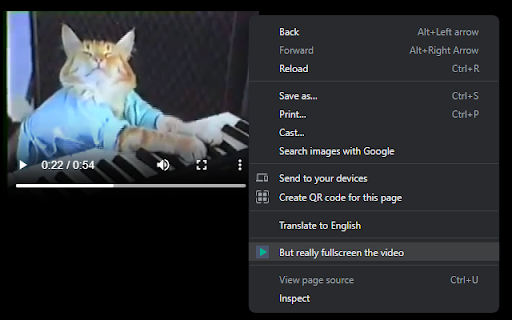
But really fullscreen the video

Video Maximizer - Zoom to Fill
Quickly and securely zoom videos to fill your browser on most sites. Control the size when fullscreen is too big. VIDEO MAXIMIZER: FILL YOUR BROWSER WINDOW, NOT YOUR SCREEN. Video Maximizer is a free, open-source tool that expands videos to fill your entire browser window. It provides a true "Theater Mode" for almost any site, hiding comments and sidebars so only the video, its playback controls, and captions are visible. It is the perfect solution for multitasking in other tabs or for users with large monitors who find standard "full-screen" mode too overwhelming. • Windowed Full-Screen: Hides everything except the video, fitting it perfectly to your browser window. • High Compatibility: Supports video playback controls and Closed Captions (CC) on most websites. • Resizable Viewing: Simply resize your browser window to make the video larger or smaller. • 100% Private: Operates locally on your device with no tracking. It always asks for permission before running on a new site. • Speed Control: Adjust playback speed on many popular streaming platforms. SAFE AND FREE • Open Source: Ad-free and completely free since 2013! If you find a bug, please report it on GitHub.

Windowed Fullscreen for Videos
Works with most websites that include videos through the HTML5 tag, including videos that are embedded through iFrames and videos on websites that use shadow roots. Options: Enable / disable the extension for specific websites, and adjust button positioning so it doesn't interfere with other video overlays. You may report websites that are not compatible with this extension, but this usually happens due to websites being coded in exceptionally weird ways, so it might not always be possible for me to fix the problem. Please blame the website and not the extension :-)

FullscreenEverything
Fullscreen everything in your browser's web page F11 key allows you to fullscreen whole web page. If you want to fullscreen arbitrary elements on a web page, try FullscreenEverything! Usage: * click FullscreenEverything to enter the selecting mode * in selecting mode, the element will be highlighted when the cursor hovers on it * in selecting mode, by clicking the highlighted element to fullscreen it * in selecting mode, press the Esc key to exit without fullscreen anything

Full Screen Video
A chrome extension to play HTML5 Video element without a full screen option, such as YT shorts and Instagram reels, in full screen. A chrome extension to play HTML5 Video element in full screen. It lets you play videos without a full screen option, such as YouTube shorts and Instagram/Facebook reels, in full screen. After turning the extension ON by toggling the switch provided via the extension popup, you'll see a full screen button on the top right corner of each compatible video. You can then go full screen by clicking this button. Alternatively you can press the Shift + V shortcut keys to go full screen on the current video.
