
bdjlkpmifpfahoefpjkmaiggmpbelfdi

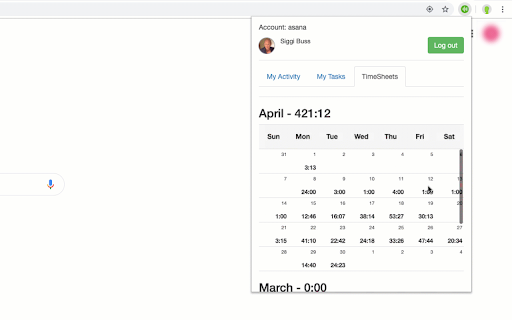

zistemo is the smartest app for instant time tracking and expense tracking. Stay organized, boost productivity and save time. Zistemo extension Easy to use employee time tracking software for reporting, invoicing and attendance time. Zistemo integrates seamless with a number of project management tools, that lets you easily start a timer or log time manually. You find embed time tracking functionality inside their interface. So, skip app switching. Zistemo is the smartest app for instant time tracking and expense tracking. Stay organized, boost productivity and save time. Zistemo Overview Zistemo® is the leading project time tracking tool for professional teams and individual users. It helps people to easily track the time spent on various projects, analyze and enhance productivity. Use zistemo on the web or on your favorite mobile devices – either way, all your data gets synced live, 24/7 and you can instantly access it at any time.

ClickUp: Tasks, Screenshots, Email, Time
ClickUp is a productivity platform that makes your personal and work lives more productive, saving you time. ClickUp's revolutionary Chrome Extension replaces five separate apps, virtually allowing you to do anything! 1. Create Tasks & Save Websites as Tasks 2. Time Tracking: Easily attach time to ClickUp tasks 3. Screenshots: Capture, mark up, and edit screenshots 4. Email: Create tasks and attach emails to tasks 5. Notepad ClickUp is free forever for up to 100MB of files storage. Installing the Chrome Extension 1. Click ADD TO CHROME 2. Click Add extension in the next popup 3. Click the ClickUp extension icon at the top of your browser window. 4. Log in to your ClickUp Account 5. Select the Workspace(s) that should have access Creating a new task 1. Select the "New Task" tab 2. Write a title for your task 3. Add assignees and a due date 4. Write a description for your task. (Pro tip: Use Markdown Shortcuts in your description fast rich text editing) 5. Click Create New Task Bookmark a site as a task 1. Click on the Bookmark tab 2. This automatically sets the page title & URL as the task title 3. You can also add a description here 4. Then you'll also be given the option to attach a screenshot of the website to the task by clicking Include screenshot Set a Default List Save a default destination for tasks making this the fastest way to add new tasks! Simply locate a task in the extension and select it to begin tracking time. From the Time Spent window, you are able to view time logged on recent tasks and even remove time that was accidentally logged. Back in the ClickUp task, the time has been logged, and we can even start the extension's timer from within the task. Screenshots: capture, mark up, and edit screenshots Capture Capture your entire browser tab or select a certain area to add to a task or download to your computer Attach Attach the file to an existing task or create a new one Mark Up The extension grants you extremely detailed mark up functionality: Paintbrush - draw what you want on top of the screenshot - set a color and brush size Arrow, line, circle, square - quickly add shapes to highlight areas of the screenshot - set a color and brush size Text - add notes right onto a screenshot - set a color, size, and substrate (background) Blur - select an area of the screen you would like to remain hidden. Numbers - drop increasing numbered markers on your screenshot - dragging and dropping allows you to create a box with the number - perfect for sharing steps with a team member Pointer - select things you've already added to the screenshot and make adjustments Undo / Redo Attach to comments 1. Take a screenshot with the Chrome Extension 2. With the screenshot still in the extension, open a task in ClickUp 3. Open the comment editor 4. Click the "Chrome attachment" button Email: Create tasks and attach emails to tasks Capture an email Click the Add to ClickUp button in your email to generate a full HTML record of the email. Attach emails to tasks and create tasks from emails ClickUp will attach the email to a task or create a brand new one with the email attachment included so you can quickly view, jump back, or download the email! For more info, check out our doc on attaching emails to ClickUp! You can also access your ClickUp notes from any page. Open the extension to the Notepad tab, and all of your notes are available from ClickUp. Your notes will sync across all your devices. Use Markdown Shortcuts and Rich Text in any note. When hovering over a note, you will be able to rename the note, archive, delete, and convert the note to a task. While inside a note, at the bottom are the options to see earlier versions of the note, open the fullscreen editor, as well as the option to convert the note to a task. The ClickUp button gives you quick access to the Notepad, Bookmarks, Screenshots, Time Tracking, and creating a task from any webpage. To move the button, click and drag it to any spot on the page. To hide the button, hover over the x icon. You can choose to hide the button for the current session, always for the current website you're on, or turn them off all together.

TimeTrack Timer
Timer for TimeTrack Enterprise TimeTrack Timer for project time tracking. Switch between projects with only one click. See latest used projects. Change language, default project or task / activity. You need TimeTrack Enterprise account in order to use the Timer.

Asana Navigator
Enhance navigation for Asana -- less mouse moves and key presses. Update May 2022: - Migrated to manifest v3 - Convert task section feature is still not fully working - Asana tabs are no longer reloaded when the extension is updated to a newer version. Please manually reload Asana tabs when it doesn't work well This is an unofficial Google Chrome / Firefox extension to enhance navigation for Asana tasks. It has functionality to: - Search tasks in the currently open project or user (Advanced search - Tab+/ or Tab+;) - Go back to what you were doing before visiting Inbox (Tab+J) - Show arrows and jump to previous/next sibling subtasks (Shift+Tab+↑/↓) - Show drop-down list of all sibling subtasks to jump to them (Shift+Tab+→) - Add keyboard shortcuts to attach files (Tab+V and Tab+1/2/3/4/5) - Add keyboard shortcuts to open more actions (Tab+.) - Replace text in task description (Tab+E) - Convert to subtask (set new parent task) (Tab+G) - Convert task to section and vice versa (Tab+: or Shift+Tab+:) Not fully working - Show additional keyboard shortcuts in the list (only with Cmd/Ctrl+/) All done seamlessly in Asana UI, in your localized language, using the same CSS used by Asana (at least I try as much as possible). Each feature can be switched on/off in the extension options, which is accessible by going to chrome://extensions > Asana Navigator > Details > Extension options, or in Firefox, about:addons > Asana Navigator > Preferences. If this extension doesn't work well, please try reloading the Asana task page. This is an open source project and you can see the source code at: https://github.com/ShunSakurai/asana-navigator Firefox extension: https://addons.mozilla.org/en-US/firefox/addon/asana-navigator

Tracking Time | Time Tracker Button
Enhance your preferred web project manager with the Time Tracker Button and get automatic timesheets. Enhance your favorite work apps with the TrackingTime extension and get automatic timesheets. The TrackingTime extension brings effortless time tracking to more than 60 popular project management and productivity apps like Asana, Trello, Notion, ClickUp, and many more. It integrates directly into the tools your team already uses—no setup required. Track time effortlessly Start tracking tasks right inside your workflow. The extension automatically detects the task and project you’re working on and syncs it to your TrackingTime account. No manual input, no configuration—just click and track. All your time data, all in one place With teams using different tools across departments, the TrackingTime extension makes it easy for everyone to track time in their own workflow. All data is stored centrally, making timesheets, billing, and team reporting a breeze.
