
bcjiagkgnilmcngacjlfhmpdmbhbjcah
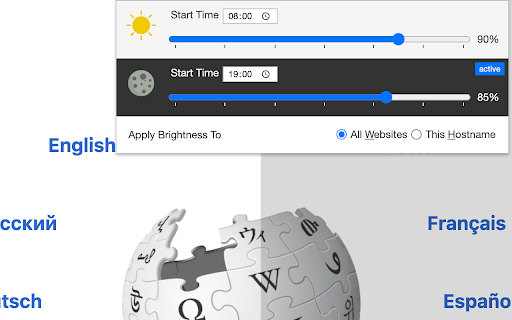

Control your browser's global screen brightness to use sites that do not support the native dark theme This extension reduces or increases the screen brightness level for both daytime and nighttime periods based on user-defined values. It helps the websites that do not support the native dark theme. Also, it can increase the brightness of websites that are too dark. It reduces the eyestrain while reading documents online when dark mode is not supported. The extension offers two different values for daytime and nighttime duration to enhance usability. Features: 1. Control the darkness level of all websites or just a single hostname 2. You can increase or decrease the brightness level of a website 3. Supports keyboard shortcuts for every action. 4. You can disable the extension on a single website or entirely 5. Control the brightness level from 0% (completely dark) to 120% (20% brighter than the original) 6. Supports two different methods to decrease the brightness level. Notes: 1. By setting the brightness level to 100%, the extension does not affect browser tabs (does not inject any CSS styling) 2. It is recommended to configure the start time for both daytime and nighttime. By default, daytime starts at 08:00, and nighttime starts at 19:00. 3. By adding a website to the exception list, brightness control is turned off for this website. You can use this feature to turn off the extension on websites that support native dark mode. 4. This extension does not reduce the screen brightness when printing a webpage. There is a CSS selector that only affects "screen" type displays. What is the difference between this extension and other dark mode extensions (e.g. "Dark Reader™" or "Turn Off the Lights™" (I do not own these two extensions))? These extensions manipulate the styling of all elements by using custom stylesheets. They convert the light theme to dark. This extension only injects a filter to reduce or increase the original brighness. So it does not perform any resource-intensive operations and does not alter the website's styling.

Dim the Internet - Turn down the brightness.
Sometimes websites don't support dark mode, so just turn down the brightness. Made with ❤️ by ae.studio Same Day Skunkworks Division

Adjust Page Brightness - Control Tab Brightness🔅
Customize webpage brightness with advanced features including auto-adjustment, site-specific settings, and night mode filter. ## Adjust Page Brightness - Control Tab Brightness 🔅 Customize your browsing experience with precise brightness control and advanced features for every website you visit. ### Adjust Page Brightness Key Features: - 🔘 Global On/Off Toggle - 🎚️ Precise brightness control (1% to 200%) - 🌓 Automatic day/night mode - 🎯 Site-specific settings - 🌙 Night mode filter with customizable color - 📊 Usage statistics and analytics - ⌨️ Keyboard shortcuts (Ctrl+Shift+↑/↓) - 🖱️ Quick access via right-click menu - 💾 Export settings and statistics ### How It Works: 1. Click the extension icon to open the control panel 2. Use the slider to adjust brightness 3. Enable auto-mode for automatic day/night adjustments 4. Save site-specific settings for your favorite websites 5. Right-click anywhere on a webpage to quickly add it to your managed sites 6. Monitor usage with built-in analytics ### Easy Access Options: - Extension popup for detailed controls - Right-click context menu for quick site addition - Keyboard shortcuts for instant adjustments - Badge showing current brightness level ### 🎯 Perfect For: - 👀 Reducing eye strain - 💻 Late night browsing - 📱 Different lighting conditions - 🎮 Gaming websites - 📖 Reading articles ### 🆘 Screen Dimmer Support: For support or feature requests, please visit our GitHub repository or contact us through the Chrome Web Store. ✅ Site Settings Improvements: 🔧 Fixed issue where settings were saved immediately when you clicked the "Edit settings" button 🌐 You can now see and manage ALL your registered sites instead of just the last 4 🔍 Added search functionality so you can search through your registered sites 🎛️ Improved Editing Experience: 📝 New editing mode - Now you can clearly see which site you are working on 💾 New "Save Site Changes" button - You can consciously save your changes 🔄 Your site settings have been saved and loaded more reliably 🌍 Language Support: 🌐 Multi-language support infrastructure added 🇬🇧 English language package prepared 🔤 The plugin will now be able to automatically display its content according to your browser language 🔘 Global On/Off Toggle Turn the extension on/off for all sites at once! 🌐 Enhanced Site Management Easier site list control with favicons

Brightness Lowerer
A Chrome extension to lower the brightness of the browser with zero invasion of privacy. Brightness Lowerer, minimal code and not going to track/read anything on your tabs.

Volume Booster
Chrome Extension for Boosting Volume Past Max Settings The FIRST extension to increase and amplify your max volume! 20 MILLION TOTAL INSTALLS! Join OVER TWO MILLION happy WEEKLY ACTIVE users! Boost your volume up to 1000%! Unleash the power of sound, no matter what speakers or headphones you're using. I made this extension so I could blast music on my laptop. Pick how much louder you want the sound to be on audio from any chrome tab. This will work on any audio coming from any tab, and has been successfully tested on both Mac and Windows. If you are on Windows and are having issues with Fullscreen, press F11. If you are on Mac, maximize the window and then press cmd+shift+F. If using earphones or small laptop speakers, moving the slider past the 1/4 of the slider will lead to crackling noise. I am not responsible for any damage done to your speakers/earphones. Please use this extension with care, especially with moving the slider to the red section. I also don’t want anyone to hurt their ears by playing anything too loud — so be careful! I’ve chosen to add support for the Hearing Health Foundation to this extension, so when you use it and buy stuff online, they get some free donations. That means I added some affiliate links within the extension to generate those donations, but you can always turn off the entire donation functionality at any point.
