
bcflbfdlpegakpncdgmejelcolhmfkjh

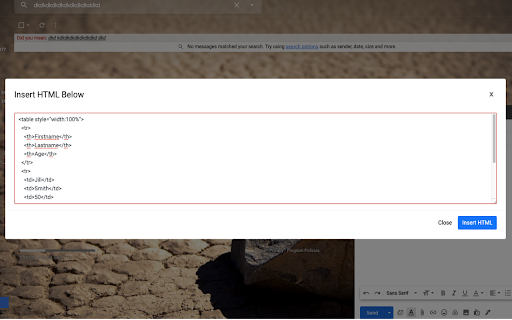
Easily insert custom HTML into your Gmail emails with this handy extension. Create and preview your custom emails directly in Gmail. Easily insert custom HTML into your Gmail emails with this handy extension. Perfect for marketers, designers, and anyone looking to enhance their emails with personalized, beautifully formatted content. Create and preview your custom emails directly in Gmail. Insert HTML into Gmail email offers the possibility to send HTML email templates from Gmail to your email subscribers list. Edit Gmail email templates with email builder: - https://designmodo.com/postcards/ Transform your Gmail experience with Insert HTML email – the ultimate tool for seamlessly inserting custom HTML email templates directly into your Gmail email compose window. Whether you're a email marketer, email designer, or business professional, our extension offers unmatched ease and versatility, allowing you to send visually stunning emails that captivate and convert. Key Features: - Design Email Templates: Use the Postcards email builder by Designmodo to create beautiful templates: https://designmodo.com/postcards/ - Access Free HTML Email Templates: Download free templates from Designmodo: https://designmodo.com/email-templates/ - Gmail Embed Guide: https://designmodo.com/embed-html-email-gmail/ - One-Click HTML Insertion: Effortlessly import and insert your HTML email templates into Gmail with just a single click—no technical skills required! - Live Preview & Edit: Instantly preview how your email will look in your recipient's inbox, with the ability to make real-time edits for perfection. - Responsive & Cross-Client Compatible: Ensure your emails look great on any device or email client. Our extension supports responsive design, so your message is clear and impactful wherever it's viewed. - User-Friendly Interface: Designed with simplicity in mind, our interface is intuitive and easy to navigate, making professional email creation accessible to everyone. - Supports All HTML Elements: From tables and images to inline CSS and custom fonts, create and send complex HTML emails without worrying about compatibility issues. - Save & Reuse Templates: Save your favorite templates within the extension for quick access, allowing you to maintain brand consistency and save time on repeated tasks. Why Choose Insert HTML Email by Designmodo? - Fast & Reliable: No more copying and pasting code or struggling with formatting issues. Our extension ensures your HTML email is correctly inserted every time, eliminating hassle and frustration. - Security & Privacy Focused: We prioritize your privacy. Your data stays secure, and we never store or access your email content. Perfect for: ✅ Email Newsletters ✅ Discount sales and promotions ✅ Party invitations and RSVPs ✅ Congratulations and celebratory messages ✅ Holiday greetings and seasonal offers ✅ Event reminders and announcements (e.g., reminders to pay bills, register for events) ✅ Common email responses (e.g., intake forms, troubleshooting instructions, follow-ups) ✅ Product launches and updates ✅ Customer onboarding and welcome emails ✅ Surveys and feedback requests ✅ Thank you notes and appreciation emails ✅ Press releases and company news ✅ Personal and business branding emails ✅ Job offers and interview invitations ✅ Milestone celebrations (e.g., anniversaries, birthdays) ✅ Recurring monthly or weekly updates ✅ Appointment confirmations and reminders ✅ Invitations to webinars, workshops, and other online events ✅ E-commerce order confirmations and shipping notifications ✅ Customer service responses and support follow-ups ✅ Charity and fundraising campaigns ✅ Educational content and course updates ✅ Community and member communications ✅ Special occasion announcements (e.g., weddings, graduations, births) Dedicated Support: - Our expert team is always here to help. Whether you have a question or need assistance, we provide prompt, helpful support to ensure a smooth experience. Join thousands of professionals who trust Insert HTML by Designmodo to elevate their email marketing and communication. Install now and start sending beautiful, effective emails that stand out in the inbox!

Gmail™ Email Templates by cloudHQ
Beautiful email templates for Gmail. Design your templates or import templates from Mailchimp. With team sharing! Create and share beautiful email templates! With this Chrome extension, you can: 1) Select any template from our free library of pre-designed email templates 2) Use our intuitive email design creator to create your own email (equipped with free stock photos!) 3) Copy someone's email template to make your own by clicking on a button from any email that you received in your inbox 4) Upload your own email templates from Mailchimp or HubSpot 5) Share your email templates with your team 6) Use our HTML editor in cases where you know how to code in HTML 7) Access and send your email templates from your mobile phone Great for: ✅ Newsletters ✅ Discount sales ✅ Party invitations ✅ Congratulations ✅ Holiday greetings ✅ Event emails (like when you need to send a client a reminder to pay their bill) ✅ Common email responses (like asking a potential customer to fill out an intake form, troubleshooting instructions, etc) Open a template directly in your Gmail email compose window. Once you’ve personalized your template you’ll be able to send it out like any other email in Gmail. The email templates library is FREE to use, and we’re adding new templates all the time. 📲 Do you also want to access your email templates on your mobile phone? Just install our mobile add-on and send your email template responses while on-the-go: https://workspace.google.com/marketplace/app/email_templates_by_cloudhq/183322770515 If you are a designer and would like to showcase your email templates, please contact marketing@cloudhq.net and include "Influencer program" in the subject line. NOTE: For easy access to your settings and other cloudHQ apps, look for the cloudHQ icon in the top right corner of your Gmail inbox. Click on it to get started! NOTE: To access Hubspot and Mailchimp templates, simply click on the Hubspot or Mailchimp tab in the template browser to install the necessary extensions. cloudHQ website: https://www.cloudhq.net/ App website: https://www.email-templates.com/ Pricing: https://www.email-templates.com/pricing Support page: https://support.cloudhq.net/category/gmail-email-templates/ Blog: https://blog.cloudhq.net Gmail, Google Shared Drive, Google Drive, and Google Workspace are trademarks of Google LLC. Use of these trademarks is subject to Google Permissions.

HTML Editor for Gmail by cloudHQ
HTML Editor for Gmail™ - code HTML email directly from Gmail Do you have HTML skills? Do wish you could customize Gmail emails to include things like: ✓ Tables ✓ Charts ✓ Call-to-action buttons ✓ Side by side images (great for social media logos!) If you answered yes to any of the above, do we ever have a treat for you! This email HTML editor is a top-of-the-line, split screen HTML editor that lets you customize Gmail email to include anything that your creativity can think of. cloudHQ. Helping your productivity, 1 click at a time. App website: https://www.html-editor-for-gmail.com/ cloudHQ website: https://www.cloudhq.net Pricing: https://www.html-editor-for-gmail.com/pricing Support page: https://support.cloudhq.net/category/browser-extensions/gmail_html Blog: https://blog.cloudhq.net Gmail, Google Calendar, and Google Workspace are trademarks of Google LLC. Use of these trademarks is subject to Google Permissions.

HTML Email Inserter for Gmail
🚀 HTML Email Inserter for Gmail Insert HTML content directly into your Gmail compose window with ease! Perfect for newsletters, templates, and beautifully formatted emails. HOW IT WORKS: 1. Click the extension icon 2. Paste your HTML code 3. Preview your content in real-time 4. Click "Insert to Gmail" - that's it! PERFECT FOR: • Marketing professionals • Newsletter creators • Web developers • Anyone who needs formatted emails Simple, lightweight, and efficient - make your Gmail emails stand out with proper HTML formatting!

Send Mass Mail + HTML inserter for Gmail
A Gmail Extension ✉️ Send Mass Mail + HTML Inserter for Gmail — Supercharge Your Gmail Campaigns with AI COMPOSE your email marketing campaigns right inside Gmail Create and send personalized campaigns to thousands of recipients directly from Gmail. Install the Send Mass Mail + HTML Inserter for Gmail Chrome extension, click “Compose,” write your message, select your list — and hit “Send Mass.” No complex tools, just Gmail. NEW: Save time with a built-in AI email assistant — generate smart, professional, and context-aware replies instantly. Perfect for sales, support, and outreach teams. SEND emails to undisclosed recipients Send mass emails as if they were personal — each recipient gets an individual email without seeing others’ addresses. Ensure privacy and boost trust in your brand. The integrated AI assistant helps you handle replies faster with intelligent suggestions tailored to your message history and tone of voice. MEASURE campaign performance All sent campaigns are stored in your Campaigns panel, where you can track deliveries, queues, and open rates. Filter and export statistics as PDF, CSV, or TXT. PERSONALIZE your messages Easily import recipient lists from Google Sheets, merge data fields, and send dynamic, personalized messages at scale. Now with AI-powered personalization: ✅ Save and reuse high-performing prompts ✅ Write follow-ups in seconds ✅ Maintain consistent tone and brand voice across emails Why choose Send Mass Mail + HTML Inserter for Gmail: ✅ Send thousands of emails in bulk ✅ Personalized emails to undisclosed recipients ✅ Real-time campaign tracking and statistics ✅ Familiar Gmail interface with advanced tools ✅ AI email assistant for faster replies and personalization ✅ Works with Google Sheets for mail merge ✅ Easy to install and use ✅ Boost your email productivity and outreach efficiency 🔑 Keywords: email automation, Gmail bulk sender, AI email assistant, mass email for Gmail, mail merge Gmail, email campaign tracking, email productivity, Google Sheets email merge
