
bcfkgmbapddmkhpdmfojiaoimliaphlh
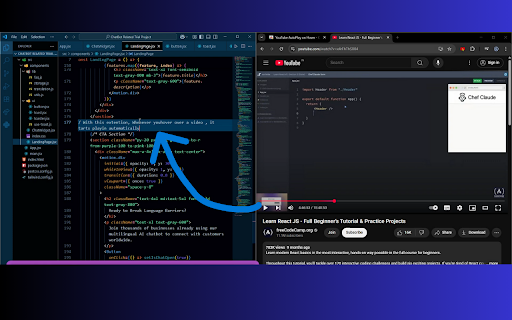

Hover to autoplay YouTube videos with instant toggle, delay, preview, whitelist, and blacklist options. Transform how you watch YouTube videos while multitasking! AutoPlay on Hover is an easy-to-use browser extension that brings videos to life the moment you hover over them. As soon as your mouse touches a YouTube video, it will automatically start playing—no need to click or press any buttons. When you move your mouse away, the video stops on its own, so you’re always in control without any extra effort. This extension is perfect for students, young professionals, or anyone who likes to learn and work at the same time. Imagine watching a coding tutorial or a how-to guide on YouTube while writing code in your favorite text editor. With AutoPlay on Hover, you can learn new skills or follow step-by-step instructions without having to switch windows or pause the action manually. It’s all about making your experience smoother and more efficient. Whether you’re doing schoolwork, coding your next big project, or just looking for a fun way to learn something new, AutoPlay on Hover makes it simple. It saves you time and keeps your focus on what matters. Multitasking has never been this seamless! Enjoy the best of both worlds—effortless video playback and hands-free pausing—right from your browser.

Autoskip for Youtube™ Ads
In 2025, enjoy YouTube™ the way it was meant to be, ad-free and uninterrupted!! Autoskip for YouTube™ is the ultimate YouTube™ ad blocker that helps you skip YouTube™ ads automatically, ensuring uninterrupted video streaming. Used by thousands globally, this Chrome ad blocker extension eliminates the need to manually click "Skip Ad," making it the perfect tool to block YouTube™ ads and enhance your viewing experience. Automatic Ad Skipping: This extension allows you to auto skip ads YouTube™ videos effortlessly, saving you time and delivering seamless playback. Block YouTube™ Ads: Removes pre-roll ads, banners, pop-ups, and sidebar ads, functioning as a reliable YouTube™ video ad blocker. Faster Video Loading: By preventing pre-roll ads, it speeds up video loading, making your streaming smoother. YouTube™ Live Stream Ad Blocker: Blocks ads during live streams, enhancing your real-time viewing experience. Block Video Ads Everywhere: Whether on YouTube™, Vimeo, or embedded videos, this extension ensures ad-free streaming across platforms How to Use Autoskip for YouTube™ Ads? Install the Extension: Click "Add to Chrome" to install this Chrome ad blocker extension. Skip YouTube™ Ads Automatically: The extension will automatically block ads, including banners and pop-ups, without requiring any extra effort. Enhanced Viewing: Enjoy a distraction-free experience with the best YouTube™ ad blocker and block video ads efficiently Why Choose Autoskip for YouTube™? Autoskip for YouTube™ is the ultimate solution to block YouTube™ ads and enhance your video streaming. This YouTube™ video ad blocker skips ads automatically and blocks various types of interruptions across platforms, including live streams and embedded videos. Whether you're looking for a tool to skip YouTube™ ads automatically, auto skip ads YouTube™, or need a reliable YouTube™ live stream ad blocker, Autoskip for YouTube™ is the perfect choice. Focus on what you love without delays or distractions, and enjoy faster, smoother streaming today. 1. Will Autoskip for YouTube™ work on all video platforms? Yes, this extension supports YouTube™, Vimeo, and several other popular video platforms. It also blocks ads on YouTube™ videos embedded in external sites. No, in fact, Autoskip for YouTube™ helps speed up video loading by blocking pre-roll ads. Yes, Autoskip effectively blocks ads even during live streams, allowing for uninterrupted viewing. Yes, Autoskip for YouTube™ Ads is free to use, providing ad-blocking benefits without additional cost.

Looper for YouTube
Auto replay videos with ONE-CLICK, able to customise features such as AUTO LOOP toggle, setting loop counts and loop portion. ♥♥♥♥♥♥♥♥♥♥♥♥♥♥♥♥♥♥♥♥♥♥♥♥♥♥♥♥ Please rate ★★★★★ if you like it ♥♥♥♥♥♥♥♥♥♥♥♥♥♥♥♥♥♥♥♥♥♥♥♥♥♥♥♥ Have you ever wanted to watch to the same video on the YouTube™ without pressing replay button every time at the end of the video? With Looper for YouTube you will get a loop button under the YouTube player. After you press the button, video will repeat itself infinitely. Key Features: - ** Able to set default auto loop on every video ** - Able to set loop in a portion/range - Able to set loop how many time you want - Uses Content Script without background page >> means less memory used - Able to use keyboard shortcut 'P' to start loop - Set "&loop=10" in url to start loop for 10 times - Set "&start=00:10&end=01:00" to start loop from 10s to 1 min - When loop button pressed playlist auto-play will be disabled - Able to set "continue the playlist" after loop number of times - Match latest (2026) YouTube style - Translation display according to YouTube language * Any issues and suggestions with this extension, please submit a support request instead of leaving in reviews which is hard to follow and response. * Hope you enjoy this extension. Please rate 5 stars and leave a review, this is a key motivation for me to keep updating the extension.

TubeAdFree: Auto Skip & Block Ads for YouTube
Watch YouTube without interruptions. Auto-skip video ads, block banners, enjoy clean viewing—100% free, private, and fast. 🚀 Instant Ad Skipping Auto-skip video ads the moment they're skippable—no manual clicking needed. 🛡️ Clean Player Experience Remove banner ads, overlays, and pop-ups for distraction-free watching. 🔒 100% Private No tracking. No data collection. Everything runs locally in your browser. ⚙️ Zero Setup Required Install and start watching—works immediately on youtube.com. 📊 Track Your Savings See ads blocked and time saved right in the toolbar popup. 🎬 Perfect For ✓ Students watching educational videos and tutorials ✓ Music lovers enjoying uninterrupted playlists ✓ Content creators researching videos and trends ✓ Everyone who wants a cleaner YouTube experience 🔐 Privacy You Can Trust Your data stays yours. TubeAdFree runs entirely in your browser with zero external servers. ✓ No sign-ups or accounts required ✓ No personal data collected ✓ No browsing history tracked ✓ Built with Manifest V3 security standards Permissions We Use (And Why): • declarativeNetRequest – Block ad requests before they load • scripting – Remove ad overlays and banners from YouTube pages • storage – Save your preferences locally (never leaves your device) • tabs – Detect YouTube tabs to apply ad blocking only where needed Rate us 5 stars and help others discover distraction-free YouTube watching! YouTube™ is a trademark of Google LLC. TubeAdFree is an independent browser extension not affiliated with or endorsed by YouTube or Google LLC.

AdShield - Ultimate Ad Blocker for YouTube
Skip the ads. Watch YouTube. Block pre-roll, mid-roll, and banner ads instantly. Fast, lightweight, privacy-focused. No more waiting for skip buttons. No more sitting through unskippable 30-second ads. Just press play. AdShield blocks pre-roll and mid-roll video ads before they even start. It also removes those annoying banner overlays and hides sponsored results when you search. When YouTube detects your ad blocker and tries to stop playback, AdShield handles it automatically. Our blocking rules update in the background, so you stay ahead of YouTube's detection without lifting a finger. When fraudulent ads show, the extension reports them to help get scams removed from the platform. Install once. Forget it exists. Just enjoy the show.
