
bcfcapocaillaifbiefjabaikkchghko
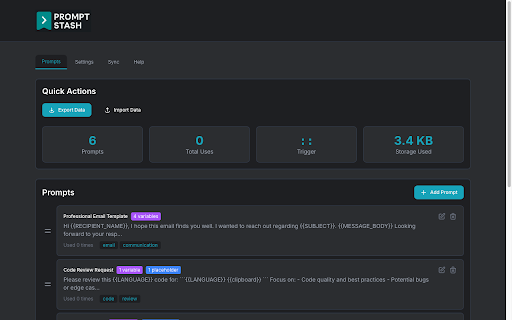


Save & reuse AI prompts with smart templates. Works in ChatGPT, Claude, Gemini, Perplexity & Grok. 100% private, no account needed. Stop wasting time retyping the same AI prompts over and over. Prompt Stash is a prompt engineering toolkit for Chrome that turns your best prompts into reusable smart templates. Save once, insert anywhere with a keystroke. Works natively in ChatGPT, Claude, Google Gemini, Perplexity, and Grok - or any other website. 10x Faster AI Workflows Type :: to instantly search and insert any saved prompt. No more switching tabs or digging through notes apps. One keystroke, done. Smart Templates with Variables Add {{variables}} to make any prompt reusable. Example: "Review this {{language}} code for {{issue}}" adapts to any language or concern. Chain modifiers like {{text | trim | uppercase}} for formatting, URL encoding, and JSON escaping. Your Data Stays Private Everything stored locally in your browser. No accounts, no servers, no data collection. Optional Google Drive sync uses your own private appDataFolder. You control your data. Works Across Devices Sync your prompt library across Chrome, Firefox, Edge, and Brave with optional Google Drive sync. Access your prompts everywhere you work. - ChatGPT (OpenAI) - Claude (Anthropic) — NEW - Google Gemini - Perplexity - Grok - Any website with a text input 1. Install the extension 2. Save your first prompt from any AI chat or right-click selected text 3. Add {{variables}} to make it reusable 4. Type :: to search and insert prompts anywhere 5. Optional: Enable Google Drive sync for cross-device access Most prompt tools require creating an account, subscribing to a plan, or trusting a third-party cloud with your data. Prompt Stash requires none of that. Your prompts live locally in your browser by default, and if you want to sync across devices, it uses your own Google Drive — not our servers. That sync works across Chrome, Edge, Brave, and Firefox, so your prompt library follows you regardless of which browser you use. No other prompt manager offers true cross-browser sync without requiring an account on their platform. Prompt Stash also works directly inside your AI chats. Save a prompt, add variables and modifiers, and reuse it without ever leaving the page. Template modifiers let you transform values with pipe syntax: {{variable | modifier}}. Available modifiers include uppercase, lowercase, trim, percent-encode, and json-stringify. Chain multiple modifiers for complex transformations. - Type :: in any text field to search your prompts instantly - Click "+ Create New Prompt" in the search overlay to save on the fly - Right-click any text on any webpage to save it as a template - Use descriptive variable names like {{programming_language}} instead of {{lang}} - Tag your prompts for instant filtering and organization - Export regularly to back up your growing prompt library PREVIOUS UPDATES - v1.1.0: Claude integration, in-extension feedback form, SaveDialog/SearchOverlay/tag field fixes - v1.0.6: Grok duplicate overlay fix, insertMode setting fix - v1.0.5: Firefox storage quota fix, cross-browser improvements - v1.0.4: Enhanced Perplexity and Grok integration, UI improvements - v1.0.3: Context menu integration, sync improvements - v1.0.2: Added Perplexity and Grok support, Google Drive sync - v1.0.1: Stability improvements and bug fixes - v1.0.0: Major UI overhaul and enhanced search Your prompts are valuable. Stop losing them. Install Prompt Stash and save your first prompt in under 30 seconds.

Grok / GPT Prompt Saver
Save, organize, and deploy custom prompts with dynamic variables for Grok.com and ChatGPT.com. Whether you’re a power user, educator, or creative, this extension streamlines your workflow by letting you save and reuse prompts with ease. Say goodbye to repetitive typing and hello to efficiency! With Grok / GPT Prompt Saver, you can create prompts with dynamic variables—perfect for tailoring responses without rewriting from scratch. Add single-line or multi-line variables like [name] or [topic], and watch them seamlessly integrate into your prompts. The real-time preview shows exactly how your final text will look, with resolved variables highlighted for clarity. Save your prompts in a customizable folder system with drag-and-drop organization, making it simple to keep everything tidy. Need to deploy a prompt? One click pastes it directly into Grok or ChatGPT’s input field—or copy it to your clipboard for use anywhere. Clear pasted prompts effortlessly to reset your workspace. Worried about losing your work? Backup your prompts as a JSON file or import them later to merge or overwrite existing ones. Designed for simplicity and power, this extension requires minimal permissions: activeTab to paste prompts, downloads for backups, storage to save your data, and host permissions for grok.com and chatgpt.com integration. No remote code, no fuss—just a clean, local solution built for AI enthusiasts. Perfect for brainstorming, coding, teaching, or chatting, Grok / GPT Prompt Saver puts your prompts at your fingertips. Download now and take control of your AI conversations! 1.0.2 -fixed prompt preview to now show characters inputted in the prompt text field -fixed issue where characters were not pasting into the chatgpt.com prompt field -fixed issue where the variable switch turns off the first time when reopening the extension after loading a saved prompt with variables -added a 10 variable max limit due to performance issues -added character restrictions on prompt names to prevent corrupt saves (only letters, numbers, spaces, underscores, and hyphens are allowed)

Open Prompt Manager
Open Source Prompt Manager for ChatGPT, Claude, Gemini, Grok and more. --- Free, open-source prompt manager. Save, organize, and load your AI prompts across ChatGPT, Claude, Gemini, Grok, and other LLMs - with full privacy. Organize your best prompts, switch between models instantly, and streamline your workflow. Whether you’re a prompt engineer, researcher, or just an AI enthusiast, Open Prompt Manager gives you the tools to manage your prompt library with speed and simplicity. - Multi-service compatibility: Works with ChatGPT, Claude, Gemini, Grok, and 15 other LLMs. - **NEW** : Custom website support : now supports any website you want to use it on :) - Create your prompt library : Save, tag, and organize your prompts for quick access. - One-click prompts: Get your prompts sent in a single click. - Variables support: Create reusable prompts with dynamic placeholders. - Import / Export: Backup or share your prompts with others. - Lightweight & private: No login required, no data collection, no hidden costs. - Customizable UI: Auto dark-mode, hot-corner trigger, keyboard shortcuts, and more. - 100% free & open source, transparent and community-driven. - Works everywhere: Compatible with ChatGPT, Claude, Gemini, Grok, and 15 other LLMs. - Privacy-first: No data leaves your browser. - Boost productivity: Save time by organizing your prompts once and reusing them anywhere. - Keep a library of ChatGPT prompts for writing, coding, marketing, or learning. - Quickly switch between LLMs prompts for side-by-side benchmarking - Store prompts for customer support, content creation, or research workflows. - Share prompt collections with teammates via import/export. Open Prompt Manager runs entirely locally in your browser. No logins, no accounts, no tracking. Your prompts belong to you — always. 👉 Install Open Prompt Manager today and simplify your AI workflow with a free, open-source prompt manager built for the future of LLMs.

Awesome Prompts: Prompt Manager for ChatGPT, Claude, Gemini & Perplexity
Save, organize & reuse prompts for ChatGPT, Claude, Gemini, Perplexity & Grok—smart sidebar, one-click insert, no copy-paste. ✨ Your Prompt Library for ChatGPT, Claude, Gemini, Perplexity & Grok Stop repeating yourself. Awesome Prompts adds a smart sidebar directly inside your favorite AI tools—save, organize, and reuse your best prompts with one click. No login required, no copy-paste, no wasted time. Whether you're a student, creator, developer, or entrepreneur—Awesome Prompts keeps your best prompts one click away, right where you work. 👉 Personal Prompt Library – Save and reuse your best ChatGPT, Claude, Gemini, Perplexity & Grok prompts in one place 👉 One-Click Insert – Use any saved prompt instantly—no copy-paste, no switching tabs 👉 Favorites for Quick Access – Pin your go-to prompts for fast reuse anytime 👉 Prompt Placeholders – Insert custom info using smart variables—no manual editing needed 👉 Sidebar Integration – Your prompt library appears automatically inside ChatGPT, Claude, Gemini, Perplexity & Grok 👉 Save from Anywhere – Highlight text on any webpage, right-click, and save it to your prompt library instantly 👉 Starter Pack Included – Comes preloaded with proven, high-quality prompt templates to get you started 1. Install the extension 2. Open ChatGPT, Claude, Gemini, Perplexity or Grok—the Awesome Prompts sidebar appears automatically 3. Save, organize, and reuse your prompts with one click 📌 No login required 📌 Works directly inside ChatGPT, Claude, Gemini, Perplexity & Grok 📌 Free to use, with optional upgrades Stop copy-pasting. Start working smarter—with Awesome Prompts, your prompts finally have a permanent home.

PromptStash - ChatGPT, Grok & Gemini veo AI Prompt Manager by lowtouch.ai
Organize & deploy AI prompts across ChatGPT, Perplexity, Copilot, Google AI Studio, Gemini and more PromptStash is a powerful Chrome extension designed to streamline the creation, management, and deployment of AI prompt templates across all major AI platforms. • ChatGPT→ excellent for structure and writing flow • Gemini → ideal for creative brainstorming and visual concepts • Google AI Studio (Veo + Flow) → perfect for video generation, multimodal workflows, and dynamic AI chains • Perplexity → great for research with verified sources • Claude → strong in deep reasoning and ethical clarity One AI can’t do it all. Some are great at logic, others at creativity, others at research. Promstash helps you use the right brain for the right task. Designed for enterprise users, creators, and no-code enthusiasts, it eliminates the hassle of juggling text in separate apps. With a sleek, responsive interface, PromptStash ensures a seamless, productive workflow across devices. 📂 Create & Save Templates – Build prompts with names & tags for easy retrieval. ✏️ Edit & Update – Update pre-built or custom templates with a simple, clean interface. 🔗 Dynamic Placeholders – Add placeholders (e.g., {{goal}}, {{scene1}}) and preview results instantly. ⭐ Favorites – Pin up to 10 templates for quick access. 🔍 Search & Organize – Find prompts by name or tags with advanced tag management. 📤 Fetch & Send – Insert prompts directly into supported AI tools or copy for others. 🖥️ Responsive Design – Optimized for all screen sizes with dark/light themes & fullscreen toggle. 📚 Preloaded Templates – Industry-specific starter libraries to get you going fast. 🪟 Movable Popup – Position the widget wherever you like. • System Templates now update automatically, ensuring you always have access to the latest templates without having to update the extension. • A Manual Refresh option has been added near the search bar, allowing you to refresh System Templates at any time. • Improved performance and reliability with faster loading and smoother searches. • Clear separation between System Templates and User Templates: System Templates are read-only. You can save a System Template as a User Template and customize it freely. • Improved Fetch behavior: When a System Template is open, Fetch creates a new User Template. When a User Template is open, Fetch updates its content. • Export behavior updated: Exports include only User Templates. System Templates are excluded from exports. • Background updates do not interrupt your workflow, ensuring a smooth experience.
