
bcddhhapididnllhibcidgmiojengdag

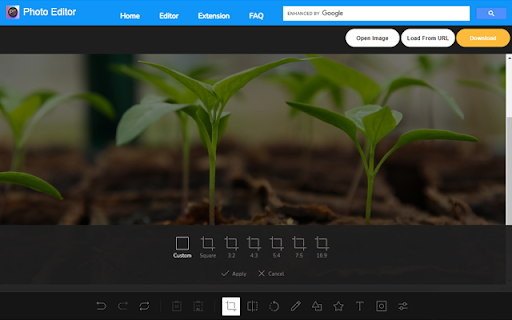

You can modify image text, image text, image watermark, rotation, filter, crop, flip, color. And get the DataURL of the picture. Right-click the picture to edit online! Edit pictures online, you can modify text, image text, image watermark, rotation, filter, crop, flip, color. And get the DataURL of the picture. Features Load image to canvas Undo/Redo (With shortcut) Crop Flip Rotation Free drawing Line drawing Shape Icon Text Mask Filter Image Filter

fixPhoto - photo editor
📌 Why you should consider this: ✪ Complete photo editor in popup window. ✪ Grab an image from websites, edit and then replace it. ✪ Annotate & Edit before taking a screenshot. ✪ Edit screenshot with full-featured editor. ✪ Auto-save in picked local folder. ✪ Pure & clean code that powers fastest performance. ✪ No third-party libraries are used. ✪ No tracking. 📌 == Features == ✅ Grab image from website Grab any image and uploaded image file on websites for editing. copy : copy image in clipboard Replace: Replace edited image with original image. Download : Download image to disk. Site's upload: Upload edited image to website. If website doesn't accept over limit size, then compress image with photoAstra. After compression, photoAstra replaces current image with a compressed image. If your image's resolution doesn't match with website requirement, then resize image with photoAstra. After resizing, photoAstra replaces current image with resized image. If you want to add watermark and want to protect your image from copied before publish on internet. then add your company watermark with photoAstra watermark tool If you want to insert text , shadow, border in image ⚠️ Note:One gotcha After picking image from os file explorer, popup window close in stable chrome (only work in chrome dev). Chrome said that they launched this api since chrome 99 but it is not available in stable version. Please copy and paste image or re-open popup window manually.

PaintCloud image editor for photos & graphics, and image converter
The PaintCloud Image Editor extension is a powerful and easy-to-use image editing tool that offers a wide range of features to enhance and manipulate images, photos and graphics on-the-go. With this extension, users can crop, resize, rotate, flip, draw, add shapes and text, apply filters, adjust brightness, contrast, saturation, and more. Key features of the extension include: • Easy-to-use interface: The extension provides a user-friendly interface that allows users to easily navigate through various editing tools and options. • Crop and resize: Users can crop and resize images to meet their specific requirements and dimensions. • Option to support various display sizes. (allows you to use the editor features on your web pages at least over 550 * 450 sizes • Drawing and shapes: Users have the option to draw freehand on images or add predefined shapes like squares, circles, and arrows. • Text overlay: Users can add text overlays to images, choosing from a variety of fonts, sizes, and colors. • Filters and adjustments: The extension offers a range of filters and adjustments to enhance the appearance of images, such as brightness, contrast, saturation, hue, and more. • Undo and redo: Users can easily undo or redo any changes made to the image, providing flexibility and control over the editing process. • Other multiple functions: Load image to canvas, flip, rotation, free drawing, line drawing, shape, icon and mask filter. • Has a white and black theme, and you can modify the theme file to customize it. Overall, the PaintCloud Image Editor extension is a versatile and comprehensive tool for editing images, photos and graphics on-the-go, offering a wide array of features to meet the needs of both casual users and professionals alike.

Image editor PaintMagick for photos
PaintMagick to create and edit photos and images online using a web browser PaintMagick is an image editor for photos and draws with advanced drawing features, effects and filters. It allows to create and edit images directly in the web browser. You can create images, paste from clipboard (ctrl+v) or upload from computer (using menu or drag & drop). Everything stays in your web browser. - Files: open images, directories, URL, drag and drop, save, print. - Edit: undo, cut, copy, paste, selection, paste from clipboard. - Image: information, EXIF, trim, zoom, resize (Hermite resample, default resize), rotate, flip, color corrections, etc - Layers: multiple layers system, differences, merge, flatten, Transparency support. - Effects: Black and White, Blur (box, Gaussian, stack, zoom), Bulge/Pinch, ... - Tools like pencil or brush. - Help: keyboard shortcuts, translations.

Image Editor
Install for edit your images quickly. Install this extension & edit your Photos quickly. Dont pay for Photoshop again, use this free photo editing software today! Need to edit your photos? Our software Image Editor supports the most popular photo formats such as JPG/ JPEG / PNG / GIF Download your favorite photos from Instagram and Whatsapp, save them onto your computer and then begin editing your photos today. You can download and edit any image/images using our photo editor software. Print out your favorite photos later on after you have finished the photo editing process. After you finish editing your photos, you can display them in a photo gallery. Our photo editor provides plenty of features such as Adding rounded corners to your photos Change the brightness of your photos Change the contrast Add Filters to the photo Blur the photo if you want a more historical feel To begin using our software, simply install and open the photo you wish to edit. Disclaimer: Please note this extension is NOT made by Google and is made by an independent development team. All copyrights belong to their respective owners. Google doesn’t endorse or sponsor this Chrome extension. Image Editor is not owned by, is not licensed by and is not a subsidiary of Google Inc.
