
bbplgdmjnpfmmnjhdkdkcgifbjofmkfg
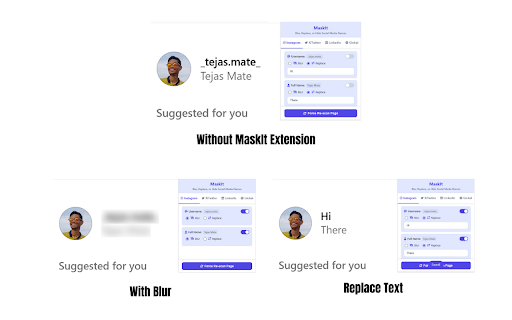
Blur, replace, or hide your username, full name, and other words on social media profiles. Take control of your online identity with MaskIt! Ever wanted to browse social media, take a screenshot, or share your screen during a presentation without exposing your name and personal details? MaskIt is the ultimate privacy tool that lets you selectively blur or completely replace your identity on Instagram, Twitter/X, and LinkedIn. With just a few clicks, you can instantly obscure your username, full name, and even a custom list of sensitive words (like your company or project names). Our goal is to give you peace of mind, allowing you to use the web on your own terms. Key Features: ✨ Dual Masking Modes: Choose between a subtle Blur effect (which reveals on hover) or a complete Replace function that swaps text with a placeholder like [username]. 🎯 Platform-Specific Control: Set different rules for Instagram, Twitter/X, and LinkedIn. What you hide on one platform doesn't have to affect the others. 🌐 Global Word List: Create a list of custom words to be masked everywhere, ensuring consistent privacy across all supported sites. ⌨️ Powerful Keyboard Shortcuts: Use Ctrl+Shift+X to instantly toggle all masks on or off for the current site, and Ctrl+Shift+H to force a re-scan of the page. 🔒 100% Private and Secure: MaskIt operates entirely on your computer. We do not track, collect, or store any of your data. Your privacy is our priority. Perfect For: Professionals who need to share their screen during demos without revealing personal profile info. Content Creators making tutorials or live-streaming. Privacy-conscious users who want an extra layer of anonymity while browsing. Install MaskIt today and take the first step towards a more private and secure social media experience

Cradlepoint ZTEdge
Enhance browsing experience and security with this extension. This tool integrates with Cradlepoint services to provide additional layers of protection and efficiency while you navigate the web. This extension has the ability to: - Connect you automatically to Cradlepoint proxy servers. - Download and install SSL/TLS security certificates required for secure gateway connectivity. - Inspect your network for security vulnerabilities. - Scan files on download/upload process using Anti-Virus (AV), Content Disarm and Reconstruction (CDR) and other technologies. - Manage secure browsing sessions for enhanced protection. The extension may prompt you to download and trust a CA certificate (ericomshield.crt) from the proxy server to enable secure communication between your browser and the Cradlepoint ZTEdge security gateway. This certificate is necessary for the extension to properly inspect and protect your web traffic. New Features & Improvements: v3.0.6: - Improve certificate checking and installation pipeline. - Support file handling in "Allow" access mode. - Support file handling in pac excluded views. v3.0.4: - Implemented scanning and sanitization for files introduced via drag-and-drop. (Directory drag-and-drop excluded — restricted by Chrome extension APIs) - Resolved bugs in the certificate download endpoint and associated page behavior. - General maintenance fixes and stability updates.

ZeroBlur
Have you ever recorded a product demo just to realize it contains sensitive data, like personal emails or your customers' data? It happens all the time in most SaaS companies. If you've been recording a video, you might want to avoid redoing the whole recording by post-editing it and adding blur on sensitive data. If you are running a webinar or a live call, it could be too late, and some attendees could have already made a screenshot of some private information you didn't intend to make public. If all of this sounds familiar, ZeroBlur is the perfect companion for you! With ZeroBlur, you can select specific elements or areas of your app or website that you want to be blurred. Choose if you're going to blur them only on one particular page or site-wide, and you're good to go! Never again show your sensitive data during your calls and demos! Forget video post-production to blur out data! Everything will be already blurred when you hit the record button!

Sentinel
A browser extension that blocks ads and trackers. Tired of intrusive ads, relentless trackers, and websites silently building a profile of you? Sentinel is your comprehensive digital shield, designed to give you back control over your online experience. Why Install Sentinel? Enjoy a Cleaner, Faster Web: Sentinel eliminates annoying ads, pop-ups, and auto-playing videos, making web pages load faster and look cleaner. Say goodbye to distractions and hello to seamless browsing. Reclaim Your Privacy: We block thousands of third-party trackers that follow you across the web, collecting data about your habits and interests. With Sentinel, your online activity stays private. Advanced Fingerprinting Protection: Modern websites use sophisticated techniques to uniquely identify your browser, even without cookies. Sentinel actively combats these methods by: AudioContext Protection: Prevents sites from using your audio hardware to create a unique fingerprint. WebGL Protection: Masks detailed graphics card information that can be used for identification. Canvas Fingerprinting Protection: Intercepts attempts to generate a unique ID from how your browser renders hidden graphics. Enhanced Security: By blocking malicious ads (malvertising) and known tracking domains, Sentinel adds an extra layer of security against online threats. Lightweight and Efficient: Sentinel is designed to be powerful yet light on your system resources, ensuring a smooth browsing experience without slowdowns. Easy to Use: Install and go! Sentinel works quietly in the background, but you can easily access stats and customize protection levels for specific sites if needed. Take control of your digital footprint. Install Sentinel today for a safer, faster, and more private internet.

blurweb.app
Blur any element text, image, input or paragraphs with single click. 🔒 Blurweb.app - Protect Your Sensitive Data on the Web Instantly! 🔒 Whether you're recording, screen sharing, or presenting online, blurweb.app ensures your sensitive information remains private. No editing required! 🎥✨ Easily blur text, paragraphs, images, inputs, or any selected elements with just one click. Now featuring a new 'Keep Blur' function that maintains your blur settings even after a reload. 🔄 💨 Single Click Blur: Effortlessly blur headings, paragraphs, images, or videos with just one click. 🖍️ Blur Area: Draw a rectangle anywhere on the page, and we'll blur it while keeping it in place. 🔄 Keep Blur: Click 'Keep Blur' before applying any blurs to maintain them after reloading or revisiting the URL. 🔧 Customizable: Control blur intensity, clear all blurs with a click, and even blur selected text. Plus, hide tab titles & icons for added privacy. 🔥 Use Cases 🔥 📺 Content creators: Protect sensitive information while live streaming or recording. 🏢 Agency owners: Share client projects securely during presentations or demos. 👩🏫 Teachers: Keep students' personal information confidential during online classes. 💼 Professionals: Safeguard sensitive company data during remote meetings. 🛍️ Online shoppers: Conceal personal details while sharing screens for shopping assistance. 🎮 Gamers: Hide private in-game chats or messages while live streaming. ✅ Pros Easy to use: Simply click to blur any element on the page. Customizable: Adjust blur intensity, hide tab titles & icons. Versatile: Suitable for various professional and personal use cases. ❌ Cons Requires a license: Visit blurweb.app to purchase your license. Limited compatibility: May not work with certain websites or web elements. 🛍️ Frequently Bought Together 🛍️ blurscreen.app: Blur anything on your screen. quickpresent.app: One-click worry-free screen sharing. Join 5000+ content creators, agency owners, teachers, and more who already trust blurweb.app for their privacy needs. Visit blurweb.app to grab your license today! 🚀 🎉 Enjoy a more secure and private browsing experience with blurweb.app! 🎉
