
bbkbjiehfkggfkbampigbbakecijicdm
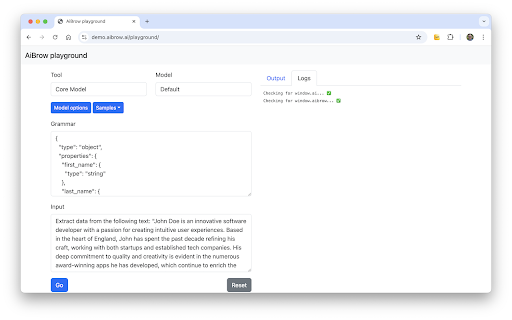


Run small AI language models locally on your machine, allowing you to develop with the window.aibrow and window.ai APIs. AiBrow brings local AI to your web browser. It runs small AI language models locally on your machine, allowing you to prompt the AI in the Playground and also develop with the window.aibrow and the built-in AI APIs. FOR USERS: bring small language models to the web, running locally on your machine. FOR DEVELOPERS: enhance your web pages with the window.aibrow and polyfilled built-in AI APIs that allow your pages to prompt small language models on the user's device.

Page Assist - A Web UI for Local AI Models
Use your locally running AI models to assist you in your web browsing. Page Assist - A Sidebar and Web UI for Your Local AI Models Utilize your own AI models running locally to interact with while you browse or as a web UI for your local AI model provider like Ollama, Chrome AI etc.. Repo: https://github.com/n4ze3m/page-assist - Sidebar for various tasks - Support for vision models - A minimal web UI for local AI models - Internet search - Chat with PDF on Sidebar - Chat wit Documents (pdf,csv,txt,md,docx) - Tab Mention (beta) - MCP Client Support (beta) - Memory support (beta) - Ollama - [Beta] Chrome AI (Gemini Nano) - OpenAI-compatible API support (LLaMA.cpp, LM Studio, Llamafile, vLLM and many more providers).

Window AI
Use your own AI models on the web Window is the simplest way to connect AI models to the web. Use a variety of models for text generation and 3D creations (new!). FOR USERS: bring your own models to the web, including ones running locally. Set up your models once, and use them everywhere. FOR DEVELOPERS: no need to pay for OpenAI or other language model APIs. Make model-agnostic & multi-media AI apps. Users can try them for free. Configure your models once; after that, a web app can request your permission to send a prompt to your chosen model. You get visibility on what's being asked and when. Discover Window AI apps with live usage metrics on https://openrouter.ai. FOR MODEL PROVIDERS: access more users on the web, without needing developers to change their code. Supported text models: - OpenAI's GPT-3.5, GPT-3.5 16k, and GPT-4 - Google's PaLM 2 Chat and Code Chat (Bison) - Anthropic's Claude, Claude Instant, and Claude 100k - Local models like Alpaca, Llama, and GPT4All. See https://www.localai.app/ - Together's GPT NeoXT 20B - Cohere Xlarge

AI assistant
Use AI Assistant Chrome Extension for ai coding assistant and ai chat online productivity with smart, instant help in your browser. Use the Power of AI in Your Browser with AI Assistant – Your Smart Chrome Companion Welcome to AI Assistant, the ultimate ai chrome extension designed to supercharge your productivity, creativity, and curiosity. Whether you're coding, writing, researching, or just want to ask questions, our smart chatbot is ready to help—right from your browser. Now you can enjoy the ease of conversation with artificial intelligence while browsing, working, or learning. With just one click, unlock an intelligent assistant that does it all. Your All-in-One AI Assistant App in Chrome The AI Assistant app is more than just a chatbot. It combines the power of multiple tools into one sleek chrome chatbot. Whether you're looking for a free for pc, need assisted writing, or want an research assistant, this extension has you covered. With seamless integration into Chrome, AI Assistant becomes your always-available personal assistant, offering support for everyday tasks, schoolwork, professional projects, and more. Top Features of AI Assistant – Built for Everyone 1️⃣ Instant access to chat online from any tab 2️⃣ A powerful code assistant for developers 3️⃣ Easy-to-use interface, perfect for beginners 4️⃣ Fast answer generator for research and Q&A 5️⃣ On-demand chatbot and google assistant alternative Why Choose AI Assistant for Chrome? Fast and accurate answers to any question Intuitive design with no learning curve Versatile tool for students, professionals, and creators Great support for chat, questions, and real-time feedback Smart AI Coding Assistant for Developers If you’re a coder, the built-in this chat is your new friend. Need to debug, write snippets, or explore new languages? The code assistant helps you: ➤ Write clean, efficient code ➤ Fix bugs in seconds ➤ Learn new programming skills ➤ Generate examples and templates instantly Effortless Writing with AI Assisted Writing Tools ✍️ Whether you’re writing essays, emails, or content, the ai assisted writing features help you: Overcome writer's block Rewrite and improve your text Generate ideas and outlines Save time and boost quality With assistance, you can write smarter, not harder. Use AI Chatbot to Ask Anything, Anytime 🤖 Tap into artificial intelligence ask anything mode and start a conversation with artificial intelligence on any topic. Whether it’s science, tech, history, or life advice, just ask questions and get meaningful, accurate responses. ▸ Real-time ai chatbot ▸ Deep, thoughtful answers ▸ Great alternative to traditional search Perfect for Everyday Use Need to schedule your day? Just ask your personal assistant. Working on a report? Get help from your ai research assistant. Coding an app? Ask your chatbot. Learn How to Use AI the Easy Way AI Assistant helps you understand how to use through simple interactions. You’ll discover how assist can transform your work, learning, and browsing. Let the extension guide you into the future of inteligencia artificial right from Chrome. Free AI for PC Users – No Cost, Just Power This free chat for pc Chrome extension gives you premium features without hidden fees. Whether you’re using Windows, Mac, or Chromebook, your app is always ready to help. Boost Your Productivity With Assist AI in Chrome With this chatbot, your browser becomes a command center. Multitask like a pro with: • Quick answers to tough questions • Writing help, coding support, and brainstorming • Integration with daily tasks and workflows Chat Online – Always Available 💬 Use chatbot online when you need ideas, answers, or just want to talk. It’s your always-on chatbot. ▸ Available 24/7 ▸ Safe and secure ▸ Smarter every day Get Started with Chrome AI Assistant Now It takes just seconds to install the chrome. Add the extension, open a new tab, and start chatting with your intelligent partner. Whether you want to ask questions, get assistance, or use it as your go-to assistant app, it’s all just a click away. Join the AGI Revolution 🚀 Thousands are already using the chrome extension to stay ahead. Don’t fall behind. Embrace conversation with artificial intelligence, explore assist tools, and redefine how you work, create, and learn.

Driveway: AI Screenshot Guides, SOPs, & Demos
Automatically create step-by-step training guides with screenshots by recording your browser-based workflows. Streamline Your Workflow Training with Driveway Welcome to Driveway, one Chrome Extension for your guides, demos and walkthroughs. Driveway records you clicks and writes step-by-step instructions. Show off your product with Help Center Demos and In-App Walkthroughs. Driveway is the ultimate solution for effortlessly creating step-by-step training guides with perfectly cropped screenshots. Our goal is to help you get work done faster by automating the processes. ⏰ Time-Consuming Documentation — Driveway saves you hours during the documentation process. Driveway created AI-generated text descriptions and voiceovers to better communicate your work flow. ⚒️ Complex Editing Tools — Driveway automatically generates perfectly cropped screenshots, eliminating the need for specialized skills. When editing a guide, Driveway offers auto-redact and mark-up features. 📆 Outdated Content — Driveways are easy to edit. With shared links and embeds, update content automatically without having to republish your website. Plus you can share new guides in the tools your team is already using, like Notion, Google Docs, and more. 🚗 Here's Some Common Uses for Driveway — Save Time — Easy Updates — Capture Processes Anywhere — Perfectly Cropped Screenshots — Customizable Guides — Data Safety and Compliance — Effortless Sharing — Multi-Knowledge Base Sync — Detailed Analytics 👯♀️ Who is Driveway For? Driveway is perfect for a wide range of use cases, including: — Customer Support: Create proactive support documentations and keep help centers up-to-date with the help of Driveway guides. — Customer Success: Need to show customers how to use a feature or communicate a product update? Record your workflow with Driveway, and help your customers with step-by-step support that can be sent in one singular guide. — Human Resources (HR): If you’re looking for a better way to onboard new hires, then Driveway is the way to go. With interactive guides you new employees can learn valuable tools and ramp up their product skills in no time. — Marketing: For a better way to release feature updates, Driveway guides provide a branded and organized approach to how-to guides. Say goodbye to wasted time over perfecting screenshots and copy - Driveway’s AI does it for you! Plus you can use your company’s colors and logo for your Driveway guides. — Sales: Maybe you want to enable sales people or maybe you want a better way to demo the product. Driveway can help your sales people with both. Driveway’s highlight feature helps your features stand-out during demos. With interactive guides you can also train your employees on better sales tactics in real-time! — Anyone with knowledge to share! At the end of the day, Driveway an be used in many ways. From sales to customer support and how-to guides to demos unlock our tools potential and try Driveway today!
