
bbgffajddcanfakglhfdfikbmpgodjjo
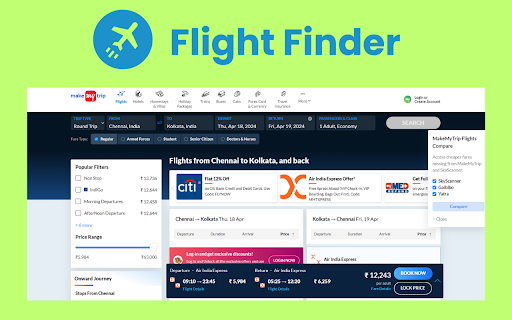
Activate this extension for seamless flight deal comparison in just a click Stop Wasting Time Searching for Flights! Install the Flight er chrome extension and discover the cheapest fares with just one click. ✈️ Enter your travel details on MakeMyTrip, and watch as our extension instantly opens Skyscanner, Goibibo, and Yatra in separate tabs. Easily compare prices and find the best deal across top travel platforms without re-entering your info! ⏱️ Save time, save money, and travel smarter! Key features of Flight finder chrome extension Effortless Flight Comparison: Easily compare airfare deals across different platforms with a single click, which helps to save user's time and effort. Instant Price Comparison: Do not bother to search a place by yourself and find the best fares on different websites with the help of re-entering travel data. Top Travel Platforms Integration: Connects with the well-known travel portals such as Skyscanner, Goibibo, and Yatra, which makes it possible to cover flights with a wide range of airlines. Time and Money Savings: Save your time by not looking for the best deals on different sites and save your money by finding the lowest fares without any problem. Let us begin by opening the Chrome Web Store.Look for the Flight Finder Chrome Extension and install it. Add an extension to the bookmark bar for quick and easy access. Then Navigate to MakeMyTrip website, and enter your travel destinations and dates, for instance. Simply click on the extension icon to reveal three websites on the right-hand side. Then, click on "Compare." Instantly, the results from leading sites such as SkyScanner, Goibibo, and Yatra will appear in separate tabs. Compare prices quickly and easily and make sure that you get the best deals for your trip and save both time and money at the same time.

Proxy Extension
Chrome Proxy Extension — IP switch manager for secure browsing. Easily change proxies, connect with free simple helper! Use Proxy Extension — a Chrome extension that ensures secure fast internet access. Change your IP address with a single click and bypass any restrictions with maximum anonymity. This is the perfect solution for those who care about privacy, want to protect their data online. Whether you're accessing restricted websites or enhancing your security on public Wi-Fi. 🎯 Proxy Add-on for Chrome: Optimize your browsing experience with a powerful tool for managing your connection. This is a simple and effective way to hide your real IP address, ensure data confidentiality, access any content without restrictions. ⭐ Advanced Features ✔ Fast connection through a reliable proxy server chrome extension. ✔ High-speed performance without connection loss. ✔ Complete privacy and data protection, secure browsing with traffic. ✔ Seamless performance even with high network loads. Setup Proxy Chrome Extension, you no longer need to worry about security. It automatically connects to high-performance servers, ensuring a stable connection and protecting your traffic from potential threats. 💢 Key Functions ➤ Global server connections for unrestricted navigating, anonymity exploring web pages. ➤ Easy free IP addresses changer extension, protection of data in public Wi-Fi networks. ➤ High-speed connection without delays, no limitations for uninterrupted perusing. ➤ Intuitive interface for easy add proxies to chrome no unnecessary settings. 🤝 User-Friendly and Accessible ♥ Easy installation of proxy extension chrome. ♥ No complicated configurations required. ♥ One-click activation for instant protection. 💯 Accessibility and Security ❱ Unlock any content without restrictions, servers ensure constant access to resources. ❱ Guaranteed protection of your personal data, fully secure traffic without tracking. ❱ Maintain access to region-locked websites and services regardless of your location. 🔐 Maximum Privacy Protection ◉ Secure traffic encryption ensures anonymity. ◉ No logging of user activity for complete privacy. ◉ Safe browsing in public networks without risk. ◉ Full compliance with security standards and regulations. ◉ Automatic proxies servers selection for performance. 💎 Who Benefits from chrome proxy extension? ■ Users looking for a stable ip changer extension for anonymous browsing. ■ Freelancers working with international clients who require access to region-locked services. ■ Gamers wanting to reduce ping and latency in online games. ■ Business professionals requiring access to restricted resources and confidential networks. ■ Streaming enthusiasts bypassing geo-restrictions to watch their favorite content. ■ Journalists and activists ensuring safe online communication in high-risk areas. ■ Travelers needing secure internet access abroad without exposing their real location. 👑 Popular Use Cases for Proxy Extension for Chrome: ✓ Accessing blocked websites and platforms. ✓ Working with international services that impose regional restrictions. ✓ Anonymous browsing without tracking or data collection. ✓ Enhancing security when working online, especially in public networks. ✓ Protecting personal data from hackers and unauthorized access. ✓ Bypassing corporate or government network restrictions. ✓ Preventing websites from tracking your online activities. 🚨 How to Install? ⓵ Open Chrome Web Store. ⓶ Search for "proxy extension for chrome". ⓷ Click "Add" to activate the extension. ⓸ Enable the extension for immediate use and protection. 🖍️ Frequently Asked Questions (FAQs) ❓ Is it safe to use a proxy plugin? All connections are encrypted, and the extension does not collect user data. You can be assured of your privacy when with. ❓ Can I choose the country of connection? Yes! Simple proxy switcher manager offers servers in multiple countries, allowing you to select the best connection for convenient access to content worldwide. ❓ Does the proxy server settings chrome work in incognito mode? Absolutely! Simply enable the for use in private mode, and enjoy secure, anonymous browsing even in incognito mode. Switch Proxy Extension is a simple and reliable way to maintain online privacy and security. Connect now and explore the limitless possibilities of the web! No more restrictions, just a free and secure internet with total privacy at your fingertips.

Automatic Clicker
Enable this chrome extension to simplify your tasks and automate repetitive clicking easily. Tired of endless clicking and scrolling? Our powerful Chrome extension takes care of these repetitive tasks, allowing you to focus on what truly matters. With this efficient tool, you can automate monotonous actions, saving valuable time for more important activities It doesn’t matter if you’re gaming, doing projects, or just browsing the website: this extension makes your job easier and faster. Try the Automatic Clicker Chrome Extension right now and discover how simple automation is. Key Features of this Chrome Extension Customizable Click Intervals: Set your desired click intervals, such as 1 second or 2 seconds, for complete control over automation. Scrolling Automation: Automate scrolling with an interval of your choice, such as 3 seconds, to navigate through pages or games effortlessly. Keyboard Shortcuts for Efficiency: Start clicking with Ctrl + Comma, stop with Ctrl + Period, and begin scrolling with Ctrl + Slash. Game-Optimized Performance: Perfect for games like Minecraft, where repetitive clicking can be automated to enhance your experience. Install the Extension: Drive to the Web Store and install The Automatic Clicker Chrome Extension and pin it to chrome browser Start Clicking: To start clicking, press Ctrl + Comma and then set the number of click to be 10 for instance. Choose ,the length of clicks it should be 1 or 2 seconds depending with the nature of the task at hand. Start Scrolling: To start scrolling you press Ctrl + Slash and the scrolling starts automatically. Choose how long each item in the list would take to scroll, for example 3 seconds. Customize Settings: There is a settings button which should be pressed to set the time intervals and adjust the automation. Professionals: Ignores form filling, data entry and also web scraping. Students: Flawlessly browse through the database of eBooks and research papers. Everyone: Lead effective automatic clicking and scrolling. Improves gameplay drawing the Perl script for mining and building in Minecraft. Enhances browsing: Makes going through long documents faster and smoother. Easy to use: To work with the proposed VPLS service quickly and conveniently, they use keyboard shortcuts.

Easy Extension Manager
Effortlessly Manage Your Chrome Extensions Easy Extension Manager is your all-in-one tool for optimizing and organizing Chrome extensions. Easily search, sort, snapshot, export, and import your extension setups in JSON format—all with a user-friendly interface. ☆ Complete List: View all your installed extensions from a single popup. ☆ Snapshot: Save and load your extension setups with a single click. ☆ Export & Import: Backup or restore your extension configurations in JSON format ☆ Toggle Extensions: Easily enable or disable extensions to improve performance. ☆ Sort Options: Sort extensions alphabetically or by enabled/disabled status for quick access. ☆ Quick Search: Find specific extensions quickly and easily. ☆ Dark Mode: Switch between dark and light themes for better viewing. ☆ Context Menu: Right-click for powerful options ☆ Disable All Extensions to temporarily boost performance. ☆ Enable All Extensions with one click. Effortlessly back up and restore your extension snapshots in JSON format. Export & Import Highlights: ☆ Backup Snapshots: Export your extension setups as JSON files for safekeeping. ☆ Restore Setups: Import your saved configurations and apply them instantly. ☆ Auto Save Snapshots: Automatically back up your latest extension setup, ensuring it's always up to date. ============================== Why Choose Easy Extension Manager? Easy Extension Manager simplifies managing Chrome extensions. Stay organized, perform backups and restores easily, and streamline your workflow. With powerful search and sorting with features like Snapshots, Export & Import, and Auto Save, managing extensions has never been simpler. Take control of your extensions today with Easy Extension Manager—the smarter way to manage Chrome.

Exploratory Testing Extension
Chrome extension for exploratory testing A Chrome extension designed for making web exploratory testing easier Features: - 🐛 Quickly create and track bugs, notes, ideas and questions - 📸 Capture full page or custom cropped screenshots - 🔗 Automatically track URLs for each annotation created - 🔍 Advanced filtering of annotations by type in reports - 📊 Visualize testing data through interactive charts - 👁️ View screenshot previews instantly on hover - 💾 Export testing sessions to JSON, CSV or HTML formats - 🤝 Share and collaborate by importing/exporting sessions
