
bbdefjbkdegboapdmjgehondplmfinek
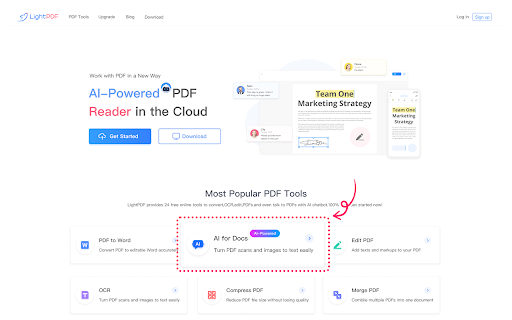
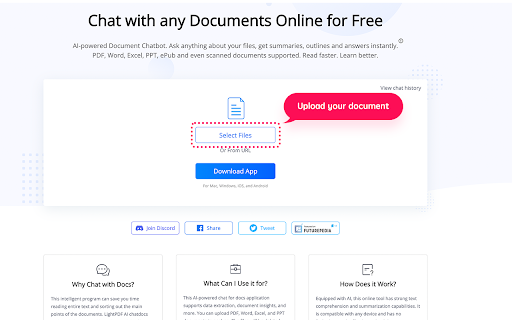
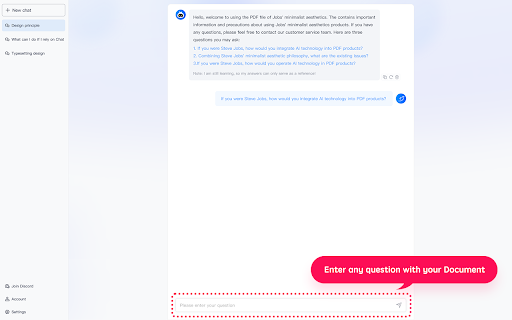
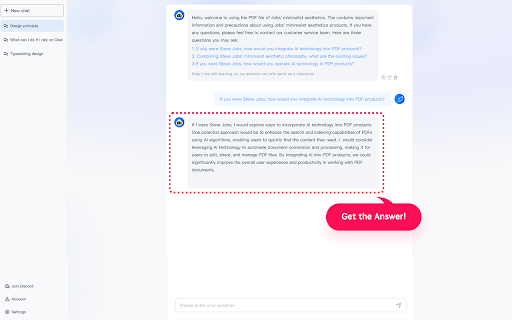

The best free ChatPDF AI extension. Chat with documents & website, quickly get summaries and data extraction. LightPDF, AI-powered, is a must-have all-in-one free PDF program for your work and study. You can use it to summarize and chat with PDFs and other documents, quickly get the key information from the files! And it takes the advantage of AI to help you easily extract texts from scans and turn into editable formats. Install it and it can be your PDF converter, editor, reader, and cloud-based PDF storage. What LightPDF can do 🌟Chat with PDFs, scans, webpage, and Office documents ● Ask questions to the chatbot about your file and it will answer you with cited sources ● Quickly output results in markdown and table formats ● Chat with PDFs, scans, url link, Excel, Word, PPT, and ePub documents ● Share chat sessions to others 🌟Convert and OCR PDFs ● Convert PDF to Word, JPG, PNG, Excel, PPT, and TXT, as well as turn Word, PPT, Excel, JPG, PNG, and CAD formats to PDF ● Equipped with OCR technology to recognize and extract texts from images and PDF scans, and turn into docx, xlsx, pptx, pdf, and txt formats ● Convert multiple documents at the same time and quickly get your work done 🌟Cloud-based PDF Editor & Reader ● Edit, sign, and add images to a PDF file ● Highlight, draw markups, and insert notes into PDF ● Protect and unlock PDF documents ● Add text and image watermarks to a PDF ● Compress PDF files with a few clicks ● Merge multiple PDF documents into one ● Extract PDF pages ● Read PDFs, add bookmarks, search and annotate ● Print PDFs directly from your devices ● Auto-sync PDFs in order to work with PDFs on the go. No more worry about losing data 🌟New Way for Teamwork ● Share files via links with your team and invite multiple people to view, edit, highlight, sign, and add comments on the same PDF at the same time ● Set permissions to keep PDF security under control ● Upload the file to the cloud, and access it on any device ● Star files as favorites to quickly find and open them ------------------------------------------------------------------------------- If you need any help or have suggestions on LightPDF, please feel free to contact us. We can't keep making progress without your voice.

Annotate pdf
Need to annotate pdf? Easily add text or images, highlight, comment, and sign pdf! Online pdf editor right in your browser. A simple yet powerful pdf annotator. Seamlessly annotate, type on, and sign pdf. Make notes, comments and corrections, add drawings, designs, and photos. ✅ How to annotate a pdf 📌 Open a pdf document Open any pdf file directly within your Chrome browser. No download of heavyweight software. Open a document of any size instantly. 📌 Add text If you ever asked yourself how to write on a pdf, here's a solution. Insert text anywhere on the document, whether it's to add comments, annotations, or additional information. Use standard or Google fonts. 📌 Add shapes (arrow, line, rectangles, circle) Emphasize key points with arrows, highlight important sections with rectangles, or draw attention with circles. 📌 Draw freehand Draw a signature or just unleash your creativity with the freehand drawing tool, allowing you to jot down notes or sketch directly on the pdf. 📌 Insert image or photo Enhance your document with images. Insert png or jpeg files seamlessly, perfect for adding logos, signatures, or illustrations. 📌 Move, resize, delete any object Enjoy full control over your annotations. Easily manipulate, resize, or delete any text, shape, or image. 📌 Save document Save your annotated document effortlessly, preserving all your additions and modifications for future reference. 🚀 Quick start 1. Click Add to Chrome to install the extension to your browser. 2. Click the Extensions icon (puzzle) at the top right of Chrome and pin the annotate pdf extension to your toolbar. 3. Click the annotate pdf icon whenever you need to use our pdf editor. ✅ When it comes to enhancing your document-editing experience, our powerful pdf editing tools are designed to meet your every need. With the capability of adding text, drawings, or images, our platform empowers you to make precise modifications without compromising the document's integrity. Say goodbye to the hassle of cumbersome software installations – our pdf annotator ensures a seamless and hassle-free process, making the task of editing pdf a breeze. ⚡ Annotate pdf - who can benefit from it? 1️⃣ Legal professionals and lawyers: - Streamline document review, annotation, and signature processes. - Highlight key legal points and add comments for case analysis. 2️⃣ Students and researchers: - Annotate research papers, textbooks, and lecture notes with ease. - Make notes directly on study materials for efficient learning. 3️⃣ Business professionals: - Collaborate on contracts, proposals, and reports with annotations. - Add signatures and comments for effective communication within teams. 4️⃣ Teachers and Educators: - Provide feedback on assignments and coursework directly on documents. - Enhance educational materials with personalized annotations. 5️⃣ Freelancers and Creatives: - Collaborate on design projects by adding annotations and feedback directly to visual elements - Sign and approve creative documents effortlessly. 🔥 Unlocking the potential to edit pdf files has never been this straightforward. Whether you're looking to update a contract, add annotations to a report, or make any other necessary modifications, our intuitive interface and advanced features cater to users of all levels. If you're asking yourself how to edit pdf on mac or windows, annotate pdf is the right choice. ❓ So how to edit a pdf? 📍 Install the extension: 🚀 Begin by clicking Add to Chrome to seamlessly install the annotate pdf extension directly from the Chrome Web Store. Enhance accessibility by pinning the extension icon to your Chrome toolbar, ensuring quick access whenever you need to annotate pdf online. 📍 Open a pdf file directly: 🚀 Simply click on the pinned extension icon to open any pdf document directly within your Chrome browser without the need for additional software. 📍 Edit pdf right from the Google search results: 🚀 Whenever you search for pdf documents, you will notice small red buttons next to search results. Just click the button to instantly open the document in the online pdf editor. 📍 Modify pdf right in your Chrome pdf viewer: 🚀 When you open a pdf file in your Chrome browser, pay attention to a red circle button in the top right corner. Click the button to instantly proceed to edit pdf online. 📍 Annotate pdf: 🚀 Utilize the intuitive tools to type on pdf, add comments, notes, and annotations, enhancing your document with personalized and informative content. 📍 Insert images: 🚀 Enhance visual appeal by clicking on the image tool. Insert png or jpg files effortlessly, perfect for logos, signatures, or additional visual elements. 📍 Manipulate objects with ease: 🚀 Enjoy full control over your pdf annotation. Click and drag to move, resize, or delete any object, ensuring precision and customization. 📍 Draw freehand: 🚀 Unleash creativity with the freehand drawing tool. Click, drag, and sketch directly onto the document pages, adding a personal touch to your documents. 📍 Highlight text: 🚀 Improve document readability by selecting the highlight tool. Click and drag to emphasize important text fragments with customizable colors. 📍 Ensure privacy with whiteout: 🚀 Safeguard sensitive information by clicking the whiteout tool. Cover or whiten out specific content, adding an extra layer of privacy and confidentiality. 📍 Save and share: 🚀 Click on the save icon to effortlessly save your annotated work. ✔ Why annotate pdf: ✅ Simple but powerful way to edit pdf on windows or mac ✅ Easy to use ✅ Continuous improvement ✅ Online pdf annotator - no need to download, install or register ✅ Fast and lightweight pdf reader: opens large documents in no time ✅ Supports Google fonts ✅ Quick and friendly customer support: your voice matters! ❤︎ Made with love: we are eager to make it the full scale online pdf editor Annotate pdf is your all-in-one solution for elevating your everyday experience. Add annotate pdf to Chrome now and make editable pdf in no time! 👍 📧 Contact us If you have any questions, suggestions or feature requests, feel free to send a message to support@annotatepdf.io. We are more than happy to help!

LightPDF Translator - Free AI Translator
Free AI-powered translator for any word, phrase, and sentence across multi-language as you browse the web. Say goodbye to language barriers with LightPDF Translator! This lightweight Chrome extension seamlessly integrates into your browser, offering a powerful AI translator for reading, working, and studying—all within Chrome. Simply customize your preferred language in the settings, and LightPDF Translator will automatically translate entire webpage instantly while preserving the original layout. Unlike translator extensions that only show translations, LightPDF Translator displays side-by-side comparisons of the original text and translated text - ideal for language learners to study grammar and expressions. Simply highlight any word or phrase for instant translation, ensuring seamless workflow and study sessions. 1. Instant AI Translation LightPDF Translator lets you quickly translate web content into your preferred languages quickly. No more navigation through complicated interface - just install the extension and enjoy real-time translation as you browse. 2. Full-Page Translation Translate entire webpages instantly. Whether it's a short paragraph or a lengthy article, LightPDF Translator automatically displays the original text alongside the translation for easy comparison. 3. Text-Selection Translation Highlight any text for quick translation. Simply select words or phrases, and LightPDF Translator will automatically detect and translate them into your target language - perfect for quick reference without interrupting your flow. 4. Diverse Language Support Supports 20 languages at the moment, including English, Spanish, French, German, Chinese, Japanese,and any 13 others - even minor languages are covered. More languages will be added soon! 5. AI-Powered Accurate Translation Leverage different LLM models, LightPDF Translator delivers precise, context-aware translations for a nature and seamless experience. 6. More Translation Service from LightPDF You can also translate PDFs, images, and videos with other tools from LightPDF. 7. Privacy and Data Security LightPDF takes users' privacy and data security as our top concern. We will not store your translated content on our server. All your sensitive information remains confidential to yourself. 8. Feedbacks and Complaints We value your feedback and complaints. If you have any suggestions, feedbacks and complaints when using our tool, please email us at support@lightpdf.com. We also appreciate your rating and review if you like us. How to Use LightPDF Translator Extension: 1. Once installed, open a webpage on your Chrome and launch this extension. 2. Configure the AI model and your target language. 3. Click Translate and let the AI translate the full-page content for you. 4. You can also highlight specific text for quick, on-the-spot translations. Perfect For: 1. Language Leaners: Study grammar, vocabulary, and expressions with the side-by-side translation. 2. Professionals: Communicate and collaborate across languages without barriers. 3. Students: Simplify research and study in multiple foreign languages. 4. Others: Navigate foreign websites and content effortlessly. Download now to experience the power of LightPDF Translator in your webpage browsing without foreign language barriers!

Write on PDF
Enhance your files with Write on PDF! Easily draw on PDF and use this Chrome Extension as a PDF filler to edit documents quickly. 📝 Enhance your document workflow with the Write on PDF Chrome Extension! Whether you need to modify, annotate, or simply manage your documents, this tool is your ultimate solution. 📑 Are you wondering how to write on a doc? Write on PDF makes it incredibly easy. Just upload your file and start using our intuitive interface to add text wherever you need. This feature is perfect for both professionals and students who need to fill out forms or add comments to their documents. 👥 Write on PDF is not just about writing; it's a comprehensive pdf filler that allows you to seamlessly edit PDFs online. You can: ✏️ If you need to change PDF online, our extension has got you covered. Adjust, rewrite, or completely overhaul your files without the need for complicated software. This is editing made easy. 🌍 For those who frequently ask "how can i edit a pdf," our tool provides a straightforward answer. With functionalities like customize your PDFs exactly how you want them. 🔸 As a pdf editor online, Write on PDF offers tools, making it ideal for creative professionals and anyone who needs to make detailed annotations or artistic additions to their documents. 🎨 Many users find the ability to add text to docs particularly useful for quickly filling in dates, signatures, and more. This makes Write on PDF an essential tool for anyone looking to: 🔝 How to write on a pdf? Modify PDF online with ease using our array of editing tools. These tools make it simple to adjust your documents in real-time, ensuring your documents always meet your afneeds. With our edit document feature, you can: ① Change fonts and colors ② Resize and align text ③ Add or remove pages 🌐 As a versatile online document editor, Write on PDF is perfect for professionals who need to edit documents on the go. It supports multiple formats, ensuring that your editing process is as efficient as possible. ✨ When it comes to editing PDFs, our free online editor stands out by offering robust functionality without any cost. Write on PDF free allows you to: ▸ Use all basic editing features ▸ Save and share documents instantly ▸ Access your files from anywhere 📊 How to annotate a PDF? Highlight text, add notes, and mark up your files to make studying or reviewing documents easier than ever. 🎉 For those needing to know how to type on PDF, our tool provides an easy-to-use interface that lets you enter text directly onto your pages. This is particularly useful for filling out applications or official forms that require typed responses. ➤ Drag and drop to rearrange pages ➤ Edit pdf online ➤ Rotate and crop pages 🌟 Lastly, our document editor is more than just a PDF tool. It’s a comprehensive solution designed to handle all types of documents, making it the only editor you’ll ever need. Whether you’re editing a report, drafting a letter, or finalizing a contract, our PDF editor web is here to help. 📈 For those curious about how to edit a document: · Choose a write on document tool that suits your needs. · Open the write on pdf online service in your web browser. · Upload the file write on file to the platform. · Select the write on a pdf tool within the application to start editing. · Use the write text on pdf feature to insert your text. · Utilize the write on file online tools to save your changes automatically. · Download the modified write on file to your device. · If necessary, use the app to write on to make further edits on-the-go. 🚀 With text editor online, take control of your documents today and experience a new level of efficiency and productivity. 📲 How to type on pdf for academic purposes? - Use an online write on service to edit documents directly in your browser. - Download a write on pdf app for more mobile-friendly editing. - Try write free tools available online for basic text additions. - Explore advanced features with an app to adding images or changing layouts. - Open a write on pdf file online platform when you need to collaborate with others in real-time. 👥 If you're looking for a comprehensive solution to how can you write in a pdf Write on PDF is your go-to platform. This online document editor provides everything you need to: ❗️ Streamline document management ❗️ Enhance collaboration among team members with draw on PDF. ❗️ Securely store and access your files online

Boss Hub | Agents
Boss Hub | Integrating 100+ GPT4 Agents,Copilot into your browser deeply, using powerful AI technology(Gemini,GPT4,Bing,Claude,Poe). It is one of the world's most powerful browser plugins hub. Supports 100+ AI Agents. ✅ Boss Hub Supports multiple forms, such as bar form, window form, full screen form ✅ Boss Hub built-in 11+ Powerful AI, including GPT-4, ChatGPT, Microsoft Azure AI. ✅ Boss Hub built-in 7+ AI Add-ons & Agents & Copilot. 5. Supported Countries Or Regions? Iran, Afghanistan, and North Korea are not supported. And mailboxes(163, qq...) in mainland China are not supported either.
