
bbankpafbjmbjmbbolonmgoibfapeifp
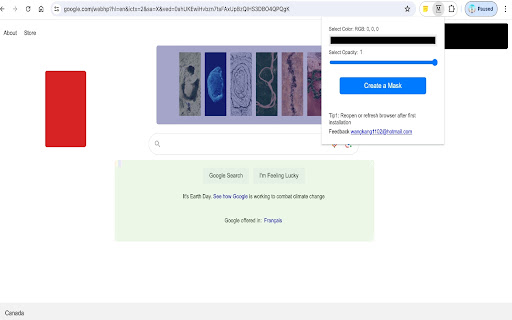

This Chrome extension lets you hide parts of web pages that distract you, like subtitles or annoying ads This Chrome extension lets you hide parts of web pages that distract you, like subtitles or annoying ads, so you can focus on what you want to see, like watching a movie or reading an article. [Chinese(中文)] 这个 Chrome 扩展让你隐藏网页上分散注意力的部分,比如字幕或讨厌的广告,这样你就可以专注于你想看的内容,比如看电影或阅读文章。 [Spanish (Español)] Esta extensión de Chrome te permite ocultar partes de páginas web que te distraen, como subtítulos o molestos anuncios, para que puedas concentrarte en lo que quieres ver, como ver una película o leer un artículo. [French (Français)] Cette extension Chrome vous permet de masquer les parties des pages Web qui vous distraient, comme les sous-titres ou les publicités ennuyeuses, afin que vous puissiez vous concentrer sur ce que vous voulez voir, comme regarder un film ou lire un article.

Urban Browser Guard
Urban Browser Guard safeguards your online privacy and blocks harmful content, including malicious websites and intrusive ads Urban Browser Guard Chrome extension adds a security layer that blocks access to malicious websites while filtering out annoying ads and other unwanted content. Urban Browser Guard protects your digital fingerprints from leaking into the wrong hands and prevents identity theft, malware ads, and phishing attempts, whether you’re in a public place or at home. ⛏️ Mining Site Alerts: Receive alerts about cryptocurrency mining websites that could compromise your device's performance and security. 🧹 Clear Cache and History: Clear your browser cache and history, ensuring your data stays private. 🚫 Block Analytics Requests: Easily block analytics requests that track your online behavior. 🛡️ Advance browser protection: Blocking access to malicious sites and ads, anti phishing, and improving secure browsing and private internet security. 🆕🤖 Chat AI Anonymizer - Personal data protection (Optional Feature): When enabled and approved, Urban Browser Guard warns you before sending AI chat messages that may contain personal information (such as names, phone numbers, ID numbers, passport details, SSN, TIN, or MAC addresses). Detection backend based is analyzed in a de-identified and anonymized manner and is available only to users who opt in. When using the optional Advance browser protection features, you enjoy anti-phishing, anti-malware, blocking access to malicious sites and blocking malicious ads for your browsing. To use these safe browsing and AI chat protection features, subject to your acceptance of the prominent disclosures provided for each, we will process browsing information. We further encourage you to review our privacy policy before installing the Urban browser guard extension, available here: Privacy Policy https://www.urban-vpn.com/about-us/privacy-policy-urban-browser-guard/ This extension is an all-in-one browser protection solution. You don't need to download additional software → click "Add to Chrome" to install the extension, and you're set to browse freely. Urban Browser Guard is a comprehensive Chrome browser extension for securing your connection. It will not slow your browser’s performance and will not affect bandwidth. ⚡Browser protection updates and fixes. ⚙️ UI/UX and settings updates.

Hide That!
This extension can hide or remove selected elements on a page. Useful for removing invasive adverts, banners and overlays. The primary feature of this extension allows users to hide any element on the page with a simple right-click menu action. Advanced features on the Options page also allows the user to automatically close invasive popup windows, as well as automatically hide selected elements when the page is loading. Several other customizable settings are also available on the Options page. NOTE: - The primary right-click functionality of this extension does not permanently hide the element. Any page refresh will bring back the full page as intended. To automatically hide elements when loading a page please try the ‘Automatic Hiding’ feature on the Options page. - Once the extension is added to Chrome, any pages you already have open will need to be refreshed for the extension to start working. - The icon menu for chrome extensions should display to the right of the address bar (a puzzle piece). 3.7.0 (13th April 2024): - Added ability to close “about:blank” popups when opened from a specified website. - Displays “unsaved changes” warning message on the Options page. 3.6.0 (14th April 2023): - Migrated to new Chrome extension manifest version 3. 3.5.0 (18th November 2022): - Added "Show Auto Hidden" button in the icon menu to redisplay automatically hidden elements. - Added "Rerun Auto Hide" button in the icon menu to rerun automatic hiding. 3.4.0 (8th September 2022): - Added a user-friend option for the Automatic Hiding feature in the icon menu (“Set Auto Hide”) which will automatically generate the necessary element selectors for all your hidden elements on the current page. - Set newly added items as green, to indicate they are unsaved. 3.3 (21st March 2021): - Switched to using Chrome's local storage for storing the settings data (instead of syncing the data to your Google account). This allows for a higher data storage limit. 3.1 (22nd December 2020): - General improvements and bug fixes - Added option to show/hide help text on the Options page. 3.0 (29th November 2020): - Added new ‘Automatic Hiding’ feature on the Options page. - Split the ‘Advanced Features’ section on the Options page into the ‘Automatic Closing’ section and the new ‘Automatic Hiding’ section. - Improved help text and advanced feature explanations. - I apologise if any of your Option settings for this extension were reset upon upgrading to version 3.0. 2.2 (6th September 2020): - Added new 'Export Settings' section to the Options page. This will allow a user to import/export their settings. 2.1 (9th January 2020): - Enhanced the 'Advanced Features' option that closes listed popup sites. There is now a dropdown list that displays the address of recent new tabs or popups. This means the user doesn't have to manually capture the initial address of the popup site. 2.0 (December 2019): - Added new 'Advanced Features' section to the Options page. - Added 'Advanced Features' option that can immediately close listed popup sites.

Ad Remover - Ad Blocker for Chrome
The extension blocks all types of internet ads, including banner, text, popup, and video ads. Ad Remover is one of Chrome's most effective ad blockers with over 400K daily active users enjoying complete peace of mind on the Internet. Ad Remover blocks all types of internet ads, including banners, texts, pop-ups, and video ads. Enjoy YouTube, Facebook, MSN, and all your favorite websites without ads or trackers! We tested Ad Remover on the 1,800 most popular websites and on average websites loaded 44% faster and used 19% lesser data with it installed. ★ Block annoying ads ✓ Instantly block ads and pop-ups across YouTube, Facebook and your favorite websites. ✓ Enjoy a clean browsing experience from page to page ★ Improve browsing speeds ✓ Increase page load performance across all devices ✓ Use less data every time you go online ★ Protect yourself online ✓ Identify and block trackers and other malware ✓ Keep sensitive information secure from identity theft Try Ad Remover for FREE today! Using Ad Remover is easy. Simply click the blue "Add to Chrome" button, follow the instructions to enable it, and start enjoying all your favorite sites completely ad-free! Ad Remover will automatically start blocking ads across the Internet and protect you from tracking cookies that can track all your activity and personal information. Just sit back and enjoy a peaceful Internet with Ad Remover! Need assistance? Click on the Support tab to contact us

Page Plain Text
Chrome extension that shows page plain text and allows you to edit or download the text [Features] - Shows page plain text (keyboard shortcut: Ctrl + Shift + 1) - Extracts text from the selection on the page - Text editing - Download page plain text (keyboard shortcut: Ctrl + Shift + 2) - Removes all formatting from text - Removes all advertising to focus only on the content of the text - Copy text to use it in other documents (keyboard shortcut: Ctrl + Shift + 3) - Zoom In and Zoom Out text to improve legibility (keyboard shortcut: Ctrl + ➕ / Ctrl + ➖) - Contextual menu to quickly copy or download the plain text of the current page - Dark Mode color scheme [Keyboard Shortcuts] To change the keyboard shortcuts of the extensions you can go here: chrome://extensions/shortcuts [Links] - My Home page: https://www.vincenzodevivo.com/ - My GitHub: https://github.com/deltavi ... or you can buy my books on Amazon 📚 www.amazon.it/Vincenzo-De-Vivo/e/B09MPTBBFY
