
banknjcfbmhcbebgekpcenheaghfcood
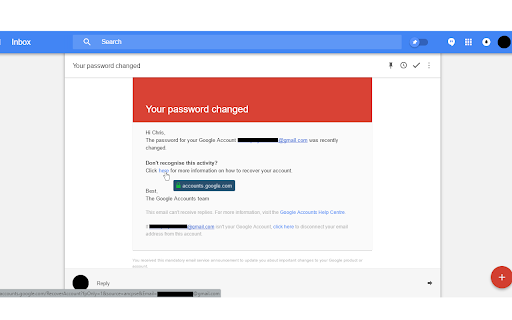
Makes website links more transparent and accessible, enhancing your awareness of your navigational security and privacy. This is a user experience improvement extension that reveals web links' destination in a more user-friendly and customisable tooltip, simply by moving your mouse over a link; by default, it highlights a URL's domain for links to external websites (customisable in the extension's Options menu) and thus enables more transparent links, improving explicit awareness of your navigation to an external website. One potential use case for Clear Links is to make you more easily aware of phishing email scams by allowing you to inspect a link's destination domain and allowing you to check if the destination is as expected -- identifying malicious links. It is important to note that this extension does not identify malicious links for you, instead, it informs you of links to external sites so you can make the decision yourself. By default, links to pages within the same website/hostname do not have a tooltip appear. This can be changed in the Options menu. This will make a fine addition to your security and privacy digital toolbelt. Code repository and release notes can be viewed on GitHub: https://github.com/ChristopherBull/Clear-Links/

MyCache
MyCache automatically stores saved copies of the pages you visit. MyCache is a Chrome extension for saving copies of the pages you visit automatically or on request for offline viewing. It also provides a user interface for viewing all pages stored in the filesystem. By using MyCache you agree to the terms of use and privacy policy (https://github.com/msindwan/msindwan.github.io/wiki/MyCache-Terms-of-Use-and-Privacy-Policy) MyCache does not send your data to the vendor or any third-party vendors. All files are saved on your desktop. If saving all files by default, please make sure to keep sensitive files saved by MyCache safe and secure.

Security Tweaks
Improve your online security with few tweaks via toolbar popup! Security Tweaks is an extension that helps you improve your security while browsing by using eight different techniques. Simply open toolbar popup UI and mark a desired tweak. Please note that, only few tweaks are selected by default. There are few settings (related to JavaScript, inline-script and cookie) available in toolbar popup to adjust. Currently there are 8 tweaks available for this add-on: 1. Block most common ads. 2. Block third-party JavaScript. 3. Enable safe-browsing. 4. Block cookies. 5. Block inline-script. 6. Block Flash contents. 7. Disable window.eval(). 8. Block most common malware URLs. Note 1: I have made this extension with Yubi's collaboration. This add-on is inspired by Speed Tweaks made by Yubi: https://chrome.google.com/webstore/detail/speed-tweaks/afebilemcaepdkmhmibgmnpfppnjimjf Note 2: to report bugs, please fill the bug report form in the addon's homepage (https://mybrowseraddon.com/security-tweaks.html).

WebAPI Blocker
Easily block (nullify) undesired Web API(s) and improve your privacy. WebAPI Blocker is a lite addon that lets you easily block and nullify a desired web API. Simply open the toolbar popup UI and choose an API from the drop-down list (top left side). Then, click on the (+) button to add the item to the API list. Once you add an item, you can remove it from the list by clicking on the "remove" button next to each item. Moreover, you can deactivate an item by removing the checkmark from the list. There is also a "reload" button at the top toolbar to reload the active tab. On the right side, you can add desired domains to the whitelist table. Please enter a domain name in the input field and then click on the (+) sign to add it to the table. To remove a domain, please click on the cross sign next to each item. Note: please be careful when you block (nullify) a web API. Because certain API(s) may cause websites to not fully load or even make them unresponsive. Therefore, please do enough research before disabling an API. To report bugs, please fill the bug report form on the addon's homepage (https://mybrowseraddon.com/webapi-blocker.html).

GPeeker
Preview a web page from another web page without actually navigated. Features: * Press your favorite hotkey while hovering a link to open a popup with a preview of that link. * The ability to make GPeeker ignore specific domains. This extension allows you to preview any link without actually navigate to it. Just hover your mouse to the desired link, press the Shift key, and boom! You will see a popup with all the content from this link. Press Shift again, and boom! You will navigate to this page. Of course, You can customize the Shift key.
