
balofnakdmjkblbagimhljnknfgnlpoh


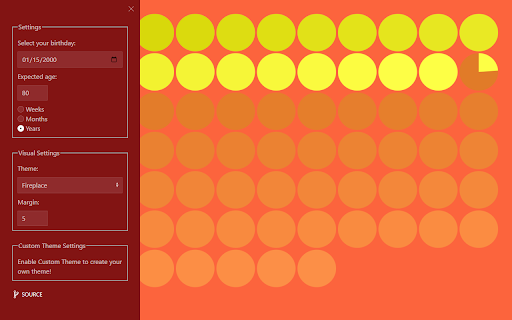
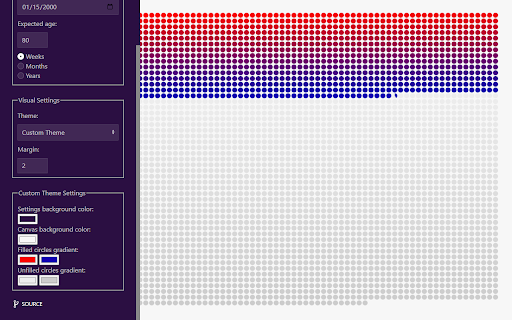
A New Tab extension that shows you how much of your life you've lived. Transforms your New Tab page into a customizable visualization of the Wait But Why life calendar. Personalize your experience by setting your birthday, expected life expectancy, and creating your own custom themes.

Memento Mori New Tab
Display an inspirational countdown of how long you have left to live. Complete with customisable inspiring backgrounds and quotes. Replace the default new tab with a timeline showing how many weeks of your life you have consumed already - and how many are left! Memento Mori is Latin for 'remember that you must die'. It's used as a reminder of the inevitability of death. Rather than be morbid it's aimed at reminding you to make the most of the time you have left and live more in the moment - YOLO! The countdown is shown over the top of (customisable) images, with optional inspiring quotes displayed too. This update also adds the ability to add events to the timeline. Future iterations will add these features: * add extra languages * search Unsplash images directly from extension * upload your own images ## Images Currently images are limited to displaying images using a URL. This is in part due to browser restrictions in story image data. Future version may allow the user to "upload" their own images. Future version may also allow user to search for Unsplash images from within the extension and apply them automatically (without the need to paste the URL) ## ChangeLog 1.0.0.0 Improve calculations. Add editable quotes/events. Make the number of years / columns editable.

LifeLeft
Visualize the amount of time you have left. LifeLeft replaces your new tab page with a visualization of the time you have left until your chosen life expectancy. Remind yourself to make the most of everyday with this browser extension. "If you live each day as if it were your last, someday you'll be right. Every morning I looked in the mirror and asked myself: If today were the last day of my life, would I want to do what I do today?" — Steve Jobs This work was inspired by the following article on Wait But Why: https://waitbutwhy.com/2015/12/the-tail-end.html All visualization preferences are stored locally to protect your privacy.

Days Matter Countdown Timer Date Calendar
This is a Chrome Extension that supports: Days Matter, Countdown, Timer, Date, Calendar, Flash sale, Spike and so on ** This is a beta version. For the stable version, please visit ** The stable version of the Chrome extension can be downloaded from the Chrome Web Store. Here is the link:

Dumb Stats
Monitor fun statistics about your web activity with Dumb Stats. Dumb Stats tracks user actions such as clicking, scrolling, typing, and opening pages and calculates fun statistics about these actions. You can know - How many calories you burn by clicking a mouse; - How many meters of web pages you scroll every day; - What novel you could have typed with your number of keypresses; - How much time approximately you have spent browsing internet. [ Please, pay attention ] - Because of the Chrome restrictions, Dumb Stats do not work on the Web Store pages and pages such as “new tab”. In order to see how it works, please, open any other website and try it there. - After installing the extension, reload the previously opened pages if you want the extension to count them as “viewed pages”. Clicks, scroll, and keystrokes are calculated without reloading. - We do not collect or store any of your personal information. Data about the number of clicks, scrolls, keystrokes, and pages viewed is stored in your browser’s local storage. Press the reset button, if you want to clear the previously collected data and set everything to zero. We hope you enjoy Dumb Stats!
