
baihclafgjcinmhpihghmjihoemollpi
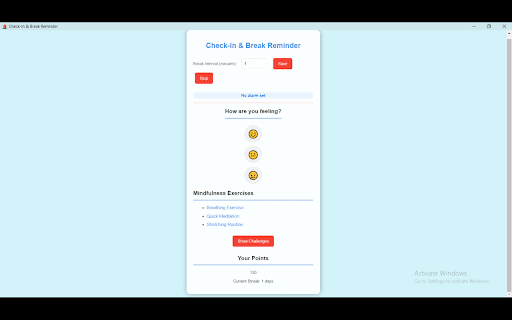


A simple extension to remind you to take breaks and track your progress. - Break Reminder :- Boost Your Productivity and Well-being! Take regular breaks and maintain your well-being with the Break Reminder Chrome extension. Designed for those who spend long hours working on their computers, this extension helps you stay productive and healthy by reminding you to take breaks at optimal intervals. - Daily Streak Tracking: Keep track of your daily break habits and earn points for consistency. Visual streak counters help you stay motivated. - Mood Check-ins: Monitor your mood throughout the day and reflect on how breaks affect your well-being. - Mindfulness Exercises: Access a variety of guided exercises to help you relax and recharge during breaks. - Customizable Break Intervals: Set your preferred break times to match your workflow and ensure you're taking breaks when you need them. - Visual Countdown Timer: Always know when your next break is due with a countdown timer that's easy to follow.

Take a Break
Reminds you to take a break at a customizable time frame. Take a Break is an extension that helps you easily set specific time frames to take a break. Before using the addon, please open the options page and adjust the settings. Then, click on the ON|OFF switch, and wait for the break to take effect. Once you see the notification (either in popup or desktop notifications) please click on the - START - button to initiate the break. If you want to finish this break and wait for the next break, please click on the - Finish - button. Alternatively, you can click on the - SKIP - button and wait for the next break. The default notification type is opening a new tab. If you want to change it to - Desktop - notifications, please visit the options page and mark the related option. Within the popup UI, there is an ON|OFF switch which enables you to activate or deactivate the addon. If you have a feature request or found a bug to report, please fill the bug report form on the addon's homepage (https://mybrowseraddon.com/take-a-break.html).

StandUp: break reminder at work
The simplest, most reliable break reminder - your wellness companion at work 🚀 Core Features ⭐️ Hourly reminders to break free from your desk ⭐️ One-minute breaks for water, chat, and relaxation ⭐️ Achievement tracking for every wellness break ⭐️ Clean interface, zero learning curve ℹ️ About Chrome's Permission Warning: You may see a warning that says "read your browsing history" - this is because we use Chrome's windows API to create popup reminders. We do NOT read any browsing data. Every time you stand up, you're investing in your health. Join millions of office workers and let StandUp help you find the perfect balance between work and wellness.

Best Reminder App - Set tab & note reminders
Schedule reminder notifications for tabs or notes and create custom intervals for days of the week or time increments. Remind yourself of that interesting article you just found, daily tasks, drink water, get up and walk around, or maybe just to check a website again. The extension allows you to easily set reminders for tab URLs and/or notes. You will receive a Chrome notification for the date and time of the reminder. 🚨🚨 Important Note! 🚨🚨 Make sure that you have notifications for Chrome and Chrome Notification Helpers enabled. The reminder notifications will not show if this is not enabled. You can check this by going to your browser settings and searching for notifications. Or, by checking the system settings on your computer. For Windows users, there is a video here that shows how to allow notifications - https://www.youtube.com/watch?v=qudjOsPWpMQ 🆕 New! - Cloud Sync and Email Reminders - Sync your reminders across devices and receive email notifications even when your browser is closed (subscription) 🆕 New! - View and manage your past reminders — filter, sort, search, and recreate them. You can also check whether each notification was acknowledged. 🆕 New! - Set default reminder options (Include URL, text, sound) for the extension popup. 🆕 New! - Add custom time intervals for "quick reminders". These will show in the extension popup and right-click context menu, if enabled. 🆕 New! - Reminders page - Filter, sort, search, and edit your reminders. Also, export your current reminders in .CSV format. 🆕 New! - Right-click and create reminders with selected text or page URL from the context menu (turn on in settings). Create a reminder just by right-clicking on a page or link. 🆕 New! - Settings page - show number of upcoming reminders on extension icon. 🔒 Privacy and Offline Functionality: All your reminders function offline, meaning your data is stored locally and never leaves your browser. This ensures your privacy and security. ☕ Add daily reminders: Add price tracker reminders, remember to check your flight status, drink water every hour, or anything else you can think of. 🔄 Repeating Reminders: Forget the hassle of setting multiple alarms. Customize your alerts to repeat at intervals spanning minutes to weeks or specific days. It's the simple solution to managing recurring tasks, meetings, and habits! 🏗️ Custom Schedules for Time Intervals: Set your reminders for specific dates and times or choose recurring intervals in minutes, hours, days, or weeks. 🖱️ Right-click and create "quick reminders": Right-click on any webpage to quickly create a reminder for 30 minutes, 1 hour, 1 day, or 1 week. This is useful for creating reminders for webpages without having to open the extension popup. 🔈 Include Sound: Enable sound notifications to play when your reminder notification pops up. 🗓️ Flexible Day Scheduling: Get reminded on specific days of the week—weekends, weekdays, individual days like Mondays or Thursdays, or select multiple days like Mondays, Wednesdays, and Fridays. 🙌 Simple and Easy to Use: Add reminders in just a few clicks. No need to open a separate app or tab. The interface is clean and straightforward, so you can focus and not get distracted with clunky UIs or features you don't need. ⏰ Rich Notifications: Include the tab URL by default, or personalize your reminder with custom text. 1. Install the extension. 2. Browse to a tab you want to be reminded of or use the extension popup to enter a custom note. 3. Include URLs and notes 🔗 Include Tab URL: Switch this on to link your reminder to the current webpage. When the reminder notification pops up, clicking on it will open the linked URL, allowing you to close the tab after setting the reminder. 🖊️ Include Note Text: Activate this to access a text area to jot down notes for your reminder. This is useful for adding detailed information to your tasks. 💥 For immediate reminders, use one of the quick options: 'in 30 mins', 'in 1 hour', 'in 1 day', or 'in 1 week'. 5. Set Date and Time Configuration 🗓️ Date: Choose a future date for your reminder. For repeating reminders, the blue dot signifies the 'first' date in the series. 🕟 Time: Set a future time when you want the reminder to alert you. Make sure that both date and time are set ahead of the current time to ensure proper scheduling. From the 'Repeat' dropdown, select how often you want the reminder to occur. Your choices can range from once to recurring patterns like daily or weekly. The starting date of this sequence is indicated by a blue dot. Hit the 'Remind me' button to save your reminder. You can close the tab after setting the reminder, since clicking on the reminder notification will reopen the URL when it’s time. The 'Upcoming' section allows you to see all reminders that are set. Make sure that notifications are enabled for the browser. Notifications have to be enabled for the browser, not just the extension. You can check this by going to your browser settings and searching for notifications. Or, by checking the system settings on your computer. Find out what's changed in the official subreddit: https://www.reddit.com/r/bestreminderapp/

Break Timer
Set a break timer to focus on your work. Our focus app will improve your productivity. Use a online timer to ease eye strain. ⏳ Meet a break timer - Chrome extension designed to remind you to take regular breaks. No need to worry about losing track of time - we have you covered. ⚙️ Key features include 1️⃣ Customizable break intervals 2️⃣ Audible and visual alerts 3️⃣ Simple and intuitive interface 4️⃣ Includes the pomodoro method timer 5️⃣ Setting up takes just a few clicks ⏰ This break timer perfect for Studying Working Any other online tasks ✨ Benefits of using our extension 💠 Improved focus 💠 Enhanced productivity timer features 💠 Better time management skills 💠 Reduced stress and burnout 🤩 Ideal for all users Professionals seeking a work and break timer to optimize productivity Students needing a focus to enhance study efficiency Anyone aiming to balance work and rest effectively 🦾 Top features 👇 We offer several unique features to suit any routine 💡 Flexible intervals: Set timers that work for you - whether it’s every 5, 10, or 25 minutes. 💡 Reminder sounds: Choose from different sounds to alert you when it’s time to take a pause. 💡 Customizable snooze: Running late? Use the snooze option to delay your timer. 💡 Lunch reminders: Set your thirty minute timer for a well-deserved lunch enjoy. 💡 Focus tools: Stay on task with custom work and break intervals. 🌟 Why choose us over other extensions ➤ User-friendly interface: Clean and intuitive design makes setting up your break schedules a breeze. ➤ Customizable settings: For quick refreshers, use the 5 minute break timer. Or longer timer for other tasks. ➤ Multi-device sync: Access your settings across multiple devices with ease. ➤ Regular updates: We constantly improve our extension based on user feedback. ➤ Audio & visual alerts: Both sound and pop-ups to catch your attention. 📲 How to get started 🤳 We take the hassle out of break management. Once you set it up, you’ll receive automatic reminders without needing to check the time. 1) Install the break timer extension from the Chrome Web Store. 2) Customize your break intervals and notifications. 3) Start working, and let the extension remind you when it’s time to pause. 4) Enjoy countdown features with both audio and visual alerts for a well-rounded experience. 💎 Tips for maximizing productivity 📍 Use the timing app to eliminate distractions during work sessions. 📍 When working on tasks that need intense focus, set an alarm for longer timing. 📍 Schedule regular pauses using our app to maintain energy levels. 📍 Try the 30 minute lunch break timer to ensure you take adequate meal breaks. 📍 Leverage the countdown timer to keep track of remaining time. ❓ What is our app? 🗣 Break timer is an extension that reminds you to take breaks at set intervals. It helps you balance focus and rest to improve productivity and well-being. ❓ How do I install the extension? 🗣 Visit the Chrome Web Store and click on the “Add to Chrome” button for the our app. The break timer download is quick and easy. ❓ Is this timer online? 🗣 Yes, our app operates directly in your Chrome browser, so no downloads are required. ❓ Can I set a timer for long study sessions? 🗣 Absolutely! Use the 25 minute timer or customize the interval for longer study periods. ❓ Is this extension available offline? 🗣 Currently, this application requires an online connection, making it a reliable online tool. ❓ Can I use this app for the pomodoro technique? 🗣 Absolutely! Our pomodoro method timer is perfect for breaking your work into focused intervals. ✨ Stay productive, stay balanced Privacy and security: We prioritize your privacy. Rest assured, our app does not collect any personal data. Enhance your workflow: Our app integrates smoothly with your daily activities. Whether you need a long lunch time or a short timer, it adapts to your needs. Stay focused with pomofocus: Pomo helps you maintain concentration during work periods and reminds you when it’s time to rest. 👩💻 Customize your experience 🔹 Set precise intervals: Choose any duration, like the five minute timer for quick breaks. 🔹 Visual colors: Select from various colors to make your experience more engaging. 🔹 Multi-language support: Available in multiple languages for global users. 🔹 Accessibility options: Adjust settings for visual and hearing preferences. 🔹 Notifications: Get desktop notifications from a break timer even when you are browsing other tabs. 🎯 Who can benefit from our timer app 🔸 Remote workers: Maintain a healthy work-life balance. 🔸 Students: Use it as a study break timer to improve learning efficiency. 🔸 Freelancers: Manage your time effectively between projects. 🌼 Why regular pauses matter ♦️ Taking breaks can significantly boost your productivity and creativity. ♦️ Our clock timer app serves as your digital assistant to ensure you don’t skip these essential pauses. 🕕 Time management made easy 🔺 With our application, managing your time becomes effortless. 🔺 Use the time tracker app to set up sessions, and let the extension handle the rest. 🔺 Whether it’s a 10 minute break timer or a custom duration, you have full control. 💭 Final thoughts 📌 Don’t let burnout hinder your success. Incorporate regular breaks into your routine with break timer. 📌 We value your feedback! Contact us with any questions or suggestions. 📌 Making time for rest isn’t just beneficial - it’s essential. 📌 With tools like the break timer extension, you can ensure you’re giving yourself the downtime needed to recharge and maintain peak productivity. 📌 Start taking control of your time and energy. Break timer is here to support your journey towards better productivity and well-being.
