
baddnjodadaepjfkphnnoomaajjakcpa
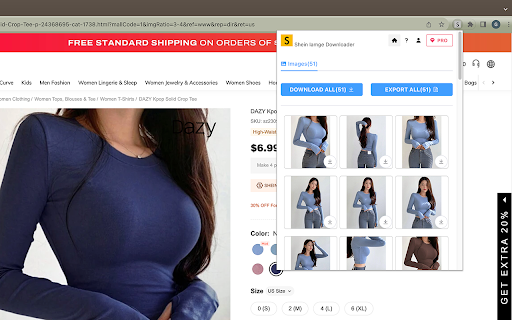

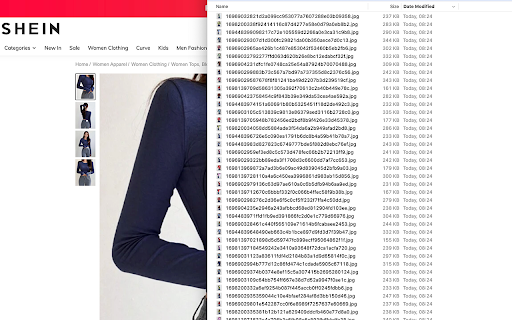
🎉🛍️ Elevate your Shein shopping experience with our powerful Google Chrome extension, designed to bring you closer to your favorite products through high-definition images. Download just one click. 📸 Key Features: 1️⃣ Effortless HD Image Downloads: Bid farewell to the tedious task of saving images one by one. Our extension empowers you to download all high-definition images associated with a Shein product with just a single click. Whether you seek inspiration or desire to curate a personal collection, we've got you covered! 💫✨ 2️⃣ Streamlined Image Downloads: Need to download individual product images? Our plugin simplifies the process, allowing you to effortlessly save images one by one. Organizing and preserving your favorite visuals has never been more convenient. 💾💡 3️⃣ Export HD Image URLs: Seeking comprehensive data about Shein products? Our extension enables you to export all image URLs with just one click. Seamlessly create a CSV file for analysis, research, or any other purpose you may have. 📊📋 Enhance your Shein browsing experience and unlock a world of possibilities with our feature-rich extension. Take control of your Shein shopping journey today! 🚀💻 Note: This extension is an independent creation and is not affiliated with or endorsed by Shein. ❗️🔒

Image downloader - Imageye
Find and download all images on a web page with Image downloader. With this Image Downloader, you can find, browse, convert and download all the images present on a web page. Additionally, you can: - Filter based on pixel width and height - Filter based on URL - Bulk download all images at once - Select which images you want to download - Check the size of each image - Copy the URL of the original image - Choose between various layout options - Support all major websites (Instagram, Facebook, Twitter, ...) - Perform a reverse image search - Convert .webp to .jpg - Convert any image type to webp, jpg or png (If you are a web dev and you need to convert all the images of a webpage you can now do it in one click) - Side Panel - Sort by Position in page - Capture selection (beta) Imageye - Image Downloader is a tool that helps you find the images published on a web page. The images may be protected by copyright and you should always assume that they are. Before reusing an image, make sure you check its license and the specific terms of reuse. Do not use any image, illustration or photograph without researching its copyright status first.

Shein Images Downloader - Download Images, Videos & Excel Export
Scrape, extract, and gather high-resolution Shein product images and videos instantly. Bulk image scraper with Excel export. The ultimate Chrome extension to scrape, extract, and gather Shein images and download product photos effortlessly. Extract images from Shein, gather high-quality product pictures, and scrape Shein videos from any product page with one click—no coding required. Perfect for sellers, designers, dropshippers, and researchers who need to extract product images and gather Shein content fast. ✓ Image Scraper & Extractor: Scrape and extract images from Shein product pages automatically ✓ High-Resolution Downloads: Download all product images in original quality ✓ Video Scraper: Scrape and download Shein product videos ✓ Bulk Image Gatherer: Gather and scrape multiple images, download as organized ZIP files ✓ Excel Export: Export scraped and extracted product data (SKU, color, name, URLs) to Excel ✓ All Image Types: Extract main images, variants, and description pictures ✓ One-Click Extraction: Simple interface to extract and scrape product images, no coding needed ✓ Batch Processing: Gather images in bulk for efficient workflow 1. Open any Shein product page 2. Click the Shein Images Extractor extension icon 3. Extract individual images or use "Gather All" for bulk download 4. Download extracted images as ZIP files or individually 5. Export gathered product data to Excel for easy organization 6. All extracted files saved directly to your computer PERFECT FOR: • Sellers & Dropshippers: Extract and scrape product images to build catalogs quickly • Designers: Gather images for inspiration and reference materials • Researchers: Extract and analyze product image data and trends • Content Creators: Scrape high-quality product visuals for content • E-commerce Stores: Bulk extract images for inventory management • Marketing Teams: Gather product photos for campaigns and analysis Get started extracting and scraping Shein images with essential features for free. Upgrade for advanced extraction functionality and bulk gathering when you need it. • Extract Product Images: Gather all product photos from Shein listings • Bulk Image Extraction: Extract multiple product images simultaneously • Image Gatherer Tool: Gather images from Shein with automated extraction • Product Photo Extractor: Extract high-quality product photography • Variant Image Gatherer: Scrape all color and style variant images • Description Image Extractor: Extract detailed product description photos • Video Content Gatherer: Extract and download product videos • Metadata Extraction: Gather image URLs, names, and product details Your data stays completely on your device—never transmitted to our servers. We prioritize your privacy and data security. Shein is a trademark of Shein Inc. This extension is an independent tool and is not affiliated with, endorsed by, or sponsored by Shein Inc. Need help? Contact us at webstarue@gmail.com for fast assistance!

Lazada Image Saver - Download Product Images
Download all Lazada high-definition product images in batches with one click Are you still frustrated by manually right-clicking and saving Lazada product images one by one? Say goodbye to the hassle! Lazada Image Saver is the ultimate solution you've been looking for. Designed for e-commerce sellers, designers, and all Lazada users, it allows you to download high-definition product images in bulk with just one click. This lightweight, powerful, and user-friendly browser extension will revolutionize the way you get high-definition product images from Lazada, significantly boosting your productivity. 🌟 Core Features and Unique Benefits We understand your time is valuable. That's why we've eliminated unnecessary features and complex settings to provide you with the purest, most efficient downloading experience. ✅ One-Click Batch Download With just one click, you can preview and save all the main and variant images from your Lazada product page right in the extension window. Whether you're downloading a single image or saving a batch, it's a breeze. ✅ Highest Image Quality Guaranteed Our intelligent scraping technology automatically parses and downloads the highest resolution original images, ensuring every image you get is crystal clear and ready for use in marketing, design, or print projects. ✅ Smart Folder Organization Downloaded images will be automatically saved in a folder named "Lazada Downloads/Product Title," keeping your assets organized and clutter-free. ✅ Ultra-Simple User Interface No complicated panels, no tedious settings. All operations are performed in a refreshing, intuitive pop-up window. Install and use right away, with no learning curve. ✅ Security and Privacy Prioritized We respect your data privacy. All image parsing and downloading processes are performed locally on your computer; none of your information passes through our servers. Install the extension: Click the "Add to Chrome" button to add the assistant to your browser. Open a product page: Visit any Lazada product detail page you're interested in. One-click download: Click the extension icon in the top-right corner of your browser. In the pop-up window, select and download the image you need. It's that simple! Ready to boost your efficiency? Whether you need to add new products to your online store, create marketing posters, or simply save your favorite designs, the Lazada Image Saver is your best choice. Install now and experience unprecedented convenience! Technical Support and Feedback: If you have any questions or feature suggestions, please feel free to contact us via email: 8123202@gmail.com Disclaimer: This plugin is independently developed and is not affiliated with Lazada.

Lazada Downloader - Save Lazada images with one click
👏🏻 Lazada Downloader helps you easily save and download various images of Lazada products with one click. # Features ✓ Download main, variant, description images. ✓ Save all images (main, variants, descriptions) with one click. ✓ Best possible quality of images. ✓ Organize downloads with subdirectories. ✓ Save images as a ZIP file. ✓ Export image detail paths as CSV files. ✓ Open download folder after saving images. # Data Privacy All data is processed in your local computer, it never passes through our web server and no one knows what you have saved.
