
apondjajmejlodhkaenofcicoiiekghf

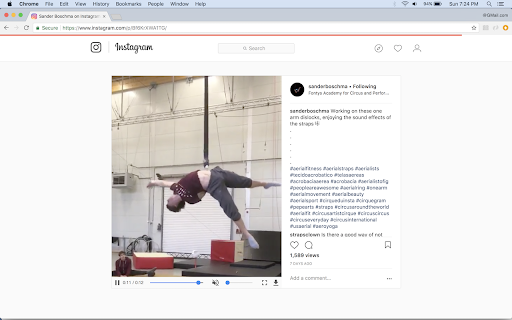


Displays player controls for video content on Instagram Video Scrubber for Instagram adds video controls to your videos on Instagram. There's an optional page-level progress indicator that's rull cute. It's salmon. Bonus Features: - Keyboard shortcuts to: * Play/pause * Jump forward/back 5s * Increase/decrease the volume of videos * Change the playback rate from: .25x - 2x * Play videos in pop-out windows. - Remember and automatically set your last video volume level. It does all these things because it cares about you as as person. About your well-being.

Instagram Media Controls (For Videos,Photos & Stories)
Adds Media Controls to Instagram like a Video scrubber and images zoom+download A simple solution for the most frustrating issue in Instagram :- ** Complete & Fully loaded Video Scrubber. ** Audio Control. ** Photo & Story Zoom & Download. ** One-Click Downloads. ** Seamless Integration. ** Customizable with colors and autohide settings. Version 3.0 :- * Now works with Instagram reels page. * Redesigned from scratch !

Kilogram
Makes Instagram pictures bigger (suitable for retina displays) Everytime I look at the instagram on proper retina display.. I am wondering why all images are post stamps sized? Not anymore! v0.4.3 update to manifest V3 v0.4.2 fixed to be working again in 2023 and beyond! v0.4.1 updated to comply with Chrome store terms v0.4.0 updated to new instagram webpage structure

Better Videos for Instagram: Playback & Volume
Easily control the playback and volume of Instagram videos. Enhances your Instagram experience by allowing easy video playback and volume adjustment. Features: - Playback/seek control - Volume control (remembered) - Autoskip support - Supports all videos on the Instagram Github: https://github.com/emirkabal/better-videos-for-instagram Legal: Instagram is a registered trademark. This extension was developed independently of Instagram, by someone who is not related or affiliated with Instagram, without any help or endorsement from them.

Tweaks for Instagram
View full-size images and videos on Instagram, and download all images in a post with a single click. View full-size images and videos on Instagram by clicking a thumbnail with Ctrl + Left Mouse Button (by default), and download all images in a post with Shift + Left Mouse Button (by default). Available on Posts, Reels, Tagged, and Explore pages. Tweaks for Instagram is an independent project and it is not affiliated with nor endorsed by Instagram. Go to the previous/next media item (or post) - Mouse Wheel Storage - for storing extension settings Downloads - for downloading photos This extension does not collect personal data from users, and it does not send any user data to a remote server. The only data it collects are extension settings, and this is stored locally on your PC.
