
apmembkcpmjhmecifhckdidppfoiajie

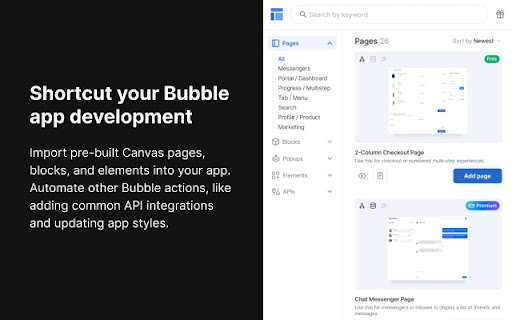

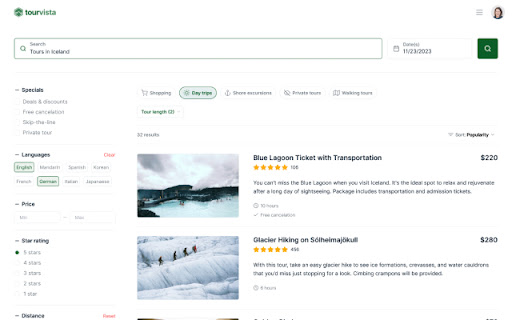
Easily add beautiful pages and blocks to your Canvas app. The fastest way to design and build Bubble apps Canvas is a no-code framework built on top of Bubble that makes creating beautiful responsive web applications easy and fast. With our comprehensive Canvas building framework, you can accelerate your build by focusing on what is truly unique about your app. Our chrome extension allows you to easily import pages, blocks, and elements from our growing library of 200+ Canvas assets. *Compatible with Bubble apps using the Canvas Base Template (https://bubble.io/template/canvas-building-framework-1541110863579x114287102114398200)

Frames
Build Bubble.io apps smarter, faster with Frames, a professional design system for your Bubble™ no-code app. Provides access to a library of professional design elements for applications built using the Bubble™ no-code software development platform.

Nocodext for Bubble
This extension extends Bubble.io editor's UI with missing features. These features, also known as Widgets are the following : [2026-05] * ERD diagram : visual overview of all your tables schema and relations * Databrowser : Get your tables and props in a glance. Run a reverse search * CommandPalette : bookmark everything and reach any element in a snap * Designer : show all elements on the page preview [2025-10] * Designer : Reveal everything in a page Stop clicking on each of many elements to unhide * Elements tree : filter by type Show only the elements of type you want to see * API connector revamped Work with API Connector reimagined * API connector & Postman Leverage the power of Postman from insde Bubble. Handle endpoints in a snap * API Navigator Overview all your API connector queries. No endless scrolling v3.0.1 : fixed options panel content fixed : enabled : revamp api connector and navigator

NoCodeFusion
The AI Bubble.io extension Build No-Code Apps Faster with AI! NoCodeFusion supercharges your Bubble.io development by generating fully functional components with AI—saving you hours of manual work. Whether you're a beginner or an expert, NoCodeFusion helps you build faster, smarter, and with more precision. 🔥 Features: ✅ AI-Powered Component Generation – Instantly create UI elements, workflows, and database structures with simple prompts. ✅ Direct Bubble Integration – Copy and paste AI-generated components straight into your Bubble editor. ✅ Pre-Built Blocks – Access pre-made elements for common app features like chat, dashboards, and forms. ✅ Speed Up Development – Reduce build time and focus on launching your app faster. 🚀 Who’s It For? 👨💻 No-Code Developers – Rapidly prototype and ship production-ready apps. 🛠️ Entrepreneurs & Startups – Validate ideas and build MVPs without hiring developers. 📈 Agencies & Freelancers – Scale your projects and increase client delivery speed. 💡 How It Works: 1️⃣ Install the extension and sign in. 2️⃣ Describe what you need—NoCodeFusion will generate the components. 3️⃣ Copy & paste them into Bubble.io. 4️⃣ Customize and launch your app faster than ever! 🔗 Get started today and build smarter with NoCodeFusion!

Simplescraper — a fast and free web scraper
A web scraper that's fast, free and simple to use. Scrape website data and table data in seconds 💡 In a hurry? Watch the short video above to see how to scrape in seconds. 💡 Simplescraper 2.0 is web scraping as it should be: automatic list detection, multi-page scraping, scheduling, saved recipes, and built-in AI that names your columns and enriches your data. Available everywhere - browser, cloud, and API - for every scale of scraping task. Try it for yourself: 1. Open Simplescraper on any website and press "Detect Lists". 2. The extension will find the data you want automatically. 3. Confirm your selection, and watch the data appear instantly, right beside the page you're browsing. 4. Click "AI Enhance" to transform, clean, or extract structured information from your data. Any type of data - product lists, search results, contact lists, social media feeds - can be scraped and enhanced in seconds. Start for free with unlimited single-page scraping in your browser, plus free credits for multiple page and cloud scraping. For powerful automation and scheduling, scale up with our Cloud scraping and API offerings. Simplescraper is your all-in-one data extraction platform. ⚡ NEW AI Property Naming: Instantly transform columns like "sc-1x2y3z" into meaningful names like "product_title" and "price". ⚡ NEW Transform scraped data with AI. Extract structured information from unstructured text, summarize content, translate languages, or clean messy data. Works with any data you've collected. ⚡ NEW Automatic List Detection: One click is all it takes. Our smart algorithm instantly scans the page and identifies all scrapable data. No more tedious setup—get the data you need in seconds. ⚡ NEW Sidepanel Interface: Scrape data without interruption. See your results in real-time while you continue to browse. ⚡ Unlimited Free Browser Scraping: Scrape any single page, as many times as you want, for free. ⚡ Scrape Anything: Automatically capture data from tables, text, images, and links. ⚡ Flexible Export: Download your data as a clean CSV or JSON file with a single click. ⚡ Save & Re-run Scrape tasks: Save scraping recipes to run again with a single click, either in the Browser or the Cloud. ⚡ One-Click Integrations: Send data directly to Google Sheets, Airtable, Zapier, Make (formerly Integromat), and more. Power-Up with Cloud Features: ⚡ Pagination & Crawling: Automatically navigate through multiple pages and links. ⚡ Historical Data Snapshots: Access all previous versions of your scraped data. - E-commerce: Scrape product listings and let AI extract prices, ratings, and specifications into clean fields - Lead Generation: Scrape contact information and have AI extract emails, phone numbers, and job titles - Content Creation: Gather data from websites and use AI to translate or reformat for your needs - Market Analysis: Collect competitor data and let AI structure it for easy comparison - AI Property Naming: Turn default column names like "sc-1x-ProductCard" into useful names like "product_title" and "price" in one click! - AI Enhance: Transform your scraped data with AI. Extract structured data, summarize content, translate text, or clean messy information - all with a single click. - All-new sidepanel experience: The extension has been completely redesigned. Scrape any website without leaving the page for a faster, more intuitive workflow. - Automatic List Detection: Click one button to automatically find all the scrapable data on a page. - Unlimited Browser Scraping: You can now scrape across multiple pages, right in your browser. - Flexible Recipes: Saved recipes can now be run either locally in your browser or in the cloud, giving you more control over how you scrape. - Selecting which data to extract is now faster, more reliable and requires fewer clicks - AI Enhance allows you to ask your data anything using AI. See the new AI Enhance tab on your saved recipe for more info - Easier cookies - add cookies to your recipe directly from the extension for data behind a login (note: using this feature will request optional permissions in order to save the cookies) - Bulk editor: edit the schedule or cookie settings for all your recipes with one click - URL generator: easily create a list of URLs to extract data from based on a single URL - Scrape speed: choose your preferred rate of data extraction - Starred recipes: star a recipe to keep it at the top of your recipe list - Improved property selector - it's now even easier to select the data you need! - Crawler can now scrape up to 5000 URLs at a time - Updated Airtable integration to optionally save metadata - Added Airtable integration - scrape any data directly into Airtable! - Added a new recipe overview section to make managing multiple recipes easier - Improved credits - unused credits now carry over to the next month - Improved selection process: easily select a single element using the new 'only this' menu option - Improved next page selection process - Design and layout improvements - CSS editor - you can now edit the CSS selector when selecting elements
