
aplndignfmehaoekalofbgocclaiapla
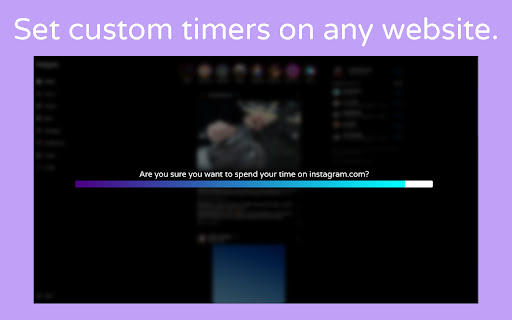
A customizable timer for any website. Are you tired of getting lost in the endless spiral of web browsing? Browsing Buffer is here to help you regain control of your time and focus on what truly matters. Browsing Buffer is a Chrome extension that allows you to set buffer timers for specific websites, making you wait and think before starting your next social scroll. Browsing Buffer encourages mindful browsing and helps to prevent time-wasting binges.

FastStream Video Player
Stream without buffering. Fix bad video players on the internet. Tired of having videos buffer with slow internet speeds? Frustrated by a website's lack of accessibility features? This extension will replace videos on websites with a video player designed for your needs. Say goodbye to buffering and hello to a more accessible video experience! 1. Automatic fragmentation and parallel requests for up to 6x faster download speeds. Watch videos without interruptions by predownloading the video in the background. 2. Advanced subtitling features include: customizable subtitle appearance, built-in OpenSubtitles support to find subtitles on the internet, and an intuitive subtitle syncing tool to adjust subtitle timings on the fly. 3. Adjustable audio dynamics (equalizer, compressor, mixer, mono, volume booster), and video settings (brightness, contrast, hue, LMS daltonization for color blindness) for your unique audiovisual preferences. 4. 20+ remappable keybinds and accessible tool buttons for easy control of the player. 5. Available in multiple languages! Translated into Spanish, Japanese, Russian, and Malay by the FastStream community. Support for more languages is coming soon! The player currently supports: - MP4 videos (.mp4) - HLS streams (.m3u8) - DASH streams (.mpd) - Youtube (download not supported on Chrome unless manually installed due to Web Store policy) To use the player, simply: 1. Go to any website you want with a video and toggle the extension on. Any video it detects will be automatically replaced with the FastStream player. 2. Alternatively, you can also simply click on or navigate to a stream manifest file (m3u8/mpd) to begin playing. 3. Navigate to a new tab and press the extension icon to go to the player. Play sources detected on other tabs through the Sources Browser. You can also drag and drop video files from your computer. Notes: - We do not officially support Brave, or other Chromium based browsers besides Chrome. Please keep in mind that not all features may be available on those platforms. - Livestreams are not supported. They will not be supported in the near future. - This player will not function with DRM protected content. This is intended. Please be mindful of how you use this tool. FastStream should not be used to infringe copyright. - This player is still a work-in-progress. Please report any bugs to the Github issue tracker here: https://github.com/Andrews54757/FastStream/issues - For your privacy, this extension does not collect telemetry. Nor does it require additional resources from the internet to function. It will work fully offline. Feel free to browse the codebase on Github. - We take accessibility concerns seriously! If you need accommodations not available in the latest version, please contact us and we will work on it ASAP. Also, please feel free to submit feature requests or suggestions on the Github issue tracker! - The default maximum size for pre-buffering is 5GB. This can be changed in the settings page. Please be mindful of your computer's storage space when changing this setting. Browsers will offload data in the RAM to the SSD if the video is too large. Frequently pre-buffering large videos can reduce the lifespan of your SSD.

Page Load Booster
Speed up page loading instantly. Works out of the box with no configuration required. Speed up webpage loading — install and go, no setup required. This extension uses hover-based preloading technology to intelligently predict and prefetch web pages before you even click, solving delays caused by traditional loading methods and delivering a faster, smoother browsing experience. How it works: - The extension listens for mouse hover events on hyperlinks. - When your mouse pointer hovers over a link, the extension preloads the linked page in the background. - The preloaded content is stored in the browser’s cache. - When you actually click the link, the page loads instantly from cache instead of waiting for a new request. Features: - Instantly active upon installation — no configuration needed - Works on most websites - Ideal for content-heavy sites like news, blogs, and e-commerce - Lightweight and privacy-friendly Privacy Notice: This extension runs entirely in your browser. It does not collect, store, or transmit any personal information or browsing data.

Tube Chip
Speed up streaming on your browser with multithreading and hardware optimization. The Chrome Extension named "Tube Chip" is designed to accelerate and improve the performance of video streaming on websites. When the user navigates to a website that contains videos, the extension detects the video format (M3U8, html, javascript, iframe player, streaming formats), and parallel processes the segmented streams using multithreading. Each segmented stream is assigned to a separate service worker, which allows the extension to preload, accelerate and fully buffer the stream. The extension also merges the Youtube Player API and hardware concurrency to detect the number of cores in the user's processor and allocate all resources to Youtube. This ensures that the video playback is smooth and does not lag. To use the extension, the user simply needs to click on the "Tube Chip" icon and download and it will be applied automatically when viewing stream. To uninstall go into chrome://extensions and press Remove.

Speed-Up Browsing OG
Speeds up browsing over the time, by adding missing Cache-Control response headers. This extension enhances the re-use of already downloaded images/scripts etc. thus speeds up loading of pages significantly. Just install this extension and enjoy speedier and faster (fastest) surfing.
