
aplaefbnohemkmngdogmbkpompjlijia
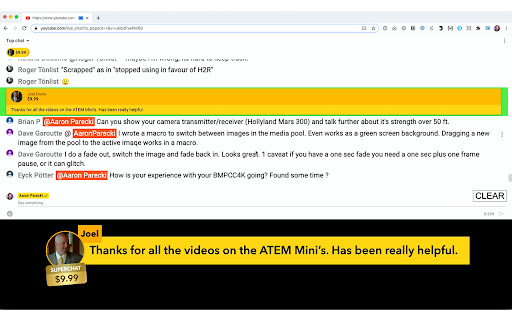
Restyle the YouTube popout chat so you can overlay it for livestreams Restyle the YouTube popout chat so you can overlay it for livestreams. Install this extension, then use the "pop out chat" feature on a YouTube live video. You can either full-screen the window and bring it into video streaming systems like the ATEM Mini to overlay the chat using a Luma or Chroma key, or you can get a remote URL to bring your chat into OBS, a YoloBox, or Lightstream Studio as a browser source! * Add the overlay window as a browser source to OBS or other software * Change the size of the comment displayed to fit more text * Change the background color of the author name and icon * Choose between showing the commenter's full name or only their first name * Configure a list of highlight words * Auto-hide messages after a set length of time * Fixes for certain avatars * Fix for scroll bar disappearing after clicking a message * Hides the moderation dropdown menu completely so that it doesn't appear on top of the chat window * Adds an option to use a persistent session ID for all your livestreams * Prevents the dropdown menu from appearing over the chats when you click them * Adds a new setting to set the remote server URL separate from the overlay window URL * Adds a barely visible white overlay on top of avatars to prevent luma key from making avatars transparent * Fixes SuperChat dollar amount display * Minor bugfixes and improvements * Hides the "Get Overlay URL" button when clicked * Updates to Google Manifest v3 for faster future review times * Adds an option to auto-hide messages after a set length of time * Highlights the active message in green in the list * Click on an active message to hide it * Minor bugfixes and improvements * Only shows the chat messages on the remote window when in browser source mode * Fixes an issue with the browser overlay on first launch * Adds a new "Get Overlay URL" button to be able to bring the chat in as a browser source to OBS or other software

ChatReplay
Watch stream archive videos with chat replay. Watch stream archive videos with chat replay. Click the button below the supported video or extension icon to open ChatReplay. Chat replays are available on selected videos of participating channels. Full list available on the website: https://chatreplay.stream/ If you enjoy this extension, please consider donating to help cover the server costs: https://ko-fi.com/chatreplay

Flow Chat for YouTube Live
Chrome Extension for Flow Chat Messages on YouTube Live. - Flow messages over the video. - Change color, size and speed for messages. - Show author and avatar on messages. - Show super chats and super stickers. - Filter banned words. - Add helper menu buttons on the chat list.

Chat Filter for YouTube Live
Chrome Extension for Filtering Chat Messages on YouTube Live.

MaxChat
Wide chat area for YouTube Live ◆features This extension spread YouTube Live chat area to the bottom of the browser. You can also press the refresh button to reload the comments. ◆If you find a problem Please contact me on Twitter (@nulltypo). I can't respond to reviews. ◆Disclaimer I'm not responsible for any loss or damage caused by this extension.
