
aojghnnmlddehickedembmcgnckpgdjn
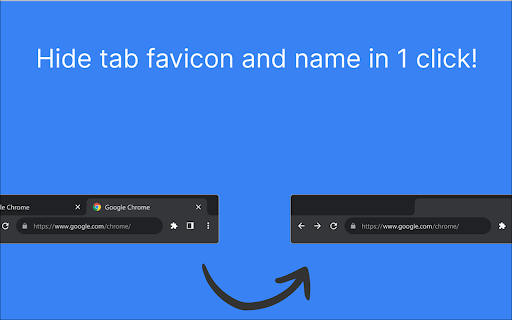
Hides favicons and tab titles 🚀 Hide Tab Info – A Cleaner, More Private Browsing Experience. Hide Tab Info protects your privacy by hiding tab names and favicons, ensuring no one can peek at your browsing activity. Whether you're working in a shared space, presenting your screen, or simply want a cleaner look, this extension has you covered. 🎯 Who is Hide Tab Info for? This extension is perfect for: ✅ Privacy-conscious users – Keep your browsing activity hidden from people around you. ✅ Minimalists – Remove visual noise and keep your browser sleek and clean. ✅ Remote workers & professionals – Maintain a polished, professional browser during screen sharing. ✅ Students & researchers – Organize multiple tabs without overwhelming text. ✅ Streamers & presenters – Prevent viewers from seeing sensitive or personal tab titles. ✨ Key Features 🔹 Hide Tab Names – Remove tab titles while keeping them fully functional. 🔹 Hide Favicons – Get rid of distracting tab icons for a cleaner look. 🔹 Quick Toggle – Enable or disable settings in one click. 🔹 Lightweight & Fast – No impact on browser performance. 🔒 Your Privacy Matters Hide Tab Info does not collect, store, or share any data. Everything happens locally, ensuring your browsing habits remain completely private. 🎨 Minimal & Modern Design Designed with simplicity in mind, Hide Tab Info integrates smoothly into your workflow with an intuitive interface and a distraction-free experience. 🚀 Download Hide Tab Info today and take control of your tabs!

Hide Site Icon
Easily and automatically hide the icon (favicon) of any website of your choice. Great for privacy. For example: Hide the current Twitter icon while surfing the internet in a public space.

Hide Tabs (Panic Button)
Easily hide and restore all open tabs with the click of a button! Hide Tabs (Panic Button) is an extension that lets you easily hide and restore all tabs. To hide (close) all tabs, please press the toolbar button once. Next time, when you click on the toolbar button again, all hidden tabs are restored to the previous state (session). To adjust the settings (i.e., show a blank hide tabs page, show badge icon text, etc.), please visit the options page and mark the desired item(s). Moreover, to hide and restore tabs, you can use the keyboard shortcut (Alt+Shift+A) instead of the toolbar button. To report bugs, please fill out the bug report form on the addon's homepage (https://mybrowseraddon.com/hide-tabs.html).

HideMyTabs
Chrome extension to tidy your browser by letting you hide, unhide, or remove tabs for a clutter-free experience HideMyTabs is a Chrome extension that lets you hide and manage your browser tabs with ease. Whether you're looking to focus on work, protect your privacy, or clean up your browser, HideMyTabs offers a smooth and efficient solution for a more organized browsing experience. Features 🔲 Hide All Tabs: Hide all tabs with a single click and open a custom URL (e.g., a new tab page). 👁️ Unhide Tabs: Instantly unhide any tab when needed. 🗑️ Remove Tabs: Permanently remove tabs from the list for a clutter-free browsing experience. 🌐 Custom URL: Set a custom URL to appear when tabs are hidden, such as a new tab page. 🚪 Hide Individual Tab: Right-click on any tab to hide it individually using the 'Hide Tab' option. 🧑💻 Stay Focused: Hide distractions with a single click to enjoy a cleaner browsing environment. 🔒 Privacy Protection: Temporarily hide tabs containing sensitive or personal information. ⚡ Boost Productivity: Keep your focus on the important tasks by hiding irrelevant tabs. 🔄 Quick Access: Unhide any tab easily with a click when you need it. No more searching through multiple tabs. Click the HideMyTabs icon in the toolbar to open the popup. Click Hide All Tabs to hide all tabs and open the custom URL you set. Right-click on any tab and select Hide Tab to hide that specific tab. To unhide tabs, click Unhide Tabs from the list of hidden tabs. Permanently remove tabs from the hidden list to keep your browsing organized. This extension makes browsing smoother, with minimal distraction. 💻 Try HideMyTabs today for a cleaner, more organized browsing experience!

Custom Tab Appearance
Customize website titles and favicons based on rules Allows you to customize website titles and favicons based on custom rules. Custom Titles: Change tab titles based on domain, title content, or regex patterns Custom Favicons: Choose from a variety of emoji icons or upload your own custom images Rule Management: Enable/disable rules Edit existing rules Import/export rules as JSON Flexible Matching: Domain matching (e.g., "github.com") Title matching (e.g., "Pull Request") RegEx matching for advanced patterns Click the extension icon to open the settings Select a match type (Domain, Title, or RegEx) Enter the pattern to match Enter the new title you want to display (Optional) Choose a favicon: Select from the emoji grid Import your own image using the "+" button Click "Add Rule" to save Enable/Disable: Toggle rules on/off using the enable/disable button Edit: Modify existing rules using the edit button Delete: Remove rules using the delete button Bulk Actions: Export all rules to a JSON file Import rules from a JSON file Remove all rules at once
