
cbaflamlbiffgoclkalmhboabeohfoke
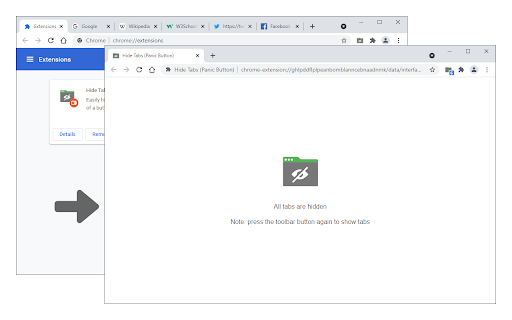

Easily hide and restore all open tabs with the click of a button! Hide Tabs (Panic Button) is an extension that lets you easily hide and restore all tabs. To hide (close) all tabs, please press the toolbar button once. Next time, when you click on the toolbar button again, all hidden tabs are restored to the previous state (session). To adjust the settings (i.e., show a blank hide tabs page, show badge icon text, etc.), please visit the options page and mark the desired item(s). Moreover, to hide and restore tabs, you can use the keyboard shortcut (Alt+Shift+A) instead of the toolbar button. To report bugs, please fill out the bug report form on the addon's homepage (https://mybrowseraddon.com/hide-tabs.html).

Tabox - Save and Share Tab Groups
Save your open tabs into collections and reopen them whenever you want in a single click! Tabox lets you save all open tabs in the current window to a "Collection". You can click on the collection to open all tabs instantly! The extension's export and import feature is especially useful for working teams that need to share list of work URLs. Want to help support Tabox? Checkout our sponsorship page! https://tabox.co/sponsorship/ Additional Features: - Save all your open tabs and tab groups to a collection - Save all windows at once! - Allow auto updating of collections once you open them (enable in settings) - Assign colors to collections for easier sorting and categorization - Export / import collections - Sync your collections across multiple devices using Google Drive - Drag & Drop to rearrange your collections Terms of Service: Tabox is completely free and does not charge for its service or cloud sync option Loss of saved tabs can happen, backup your collections to file periodically to avoid data loss

Hide!!! - Panic Button and Tab Manager
Instantly hide and restore your open tabs. Panic button for your browser tabs. Alt+Z to hide, Alt+X to restore. It's that simple. Hide!!! instantly closes your open tabs and redirects you to a decoy page, so it looks like you're always hard at work. And when your nosy boss, teacher, parent turns around, restore everything with one click :). Your tabs are never lost. Features - Toolbar panic button — click to hide or restore - Configurable decoy URL (default: Google) - Pick which tabs to hide from the current list - Optionally removes hidden tabs from browser history - Customizable keyboard shortcuts - Restore tabs into a new window - Saved tabs persist across browser restarts

Open a Closed Tabs
Reopen lost tabs instantly with Open a Closed Tab! Easily open recently closed pages with one click. Your Solution to Recovering Lost Tabs – Open a Closed Tab Extension Accidentally closed a page and need it back? This Chrome extension is here to save the day! Designed for seamless browsing, this lightweight tool helps you instantly open google chrome tabs that were closed by mistake. Whether you're researching, working, or shopping is essential for a smooth online experience. With just one click, this extension lets you open closed tabs on chrome, making it a must-have for every Chrome user. Why You Need Open a Closed Tab Losing a tab can disrupt your workflow, but this extension ensures you never lose track. Here’s why it stands out: Instant Recovery: Learn how to open recently closed sessions in seconds. User-Friendly: Simple interface to open a shuted page without hassle. Lightweight: No impact on browser speed when used this extension. This extension is perfect for anyone who wants to master how to restore a tab you just closed, especially during multitasking sessions. Effortless Tab Recovery with Chrome Lost your previous page in Chrome? Our extension is the seamless solution. Retrieve your most recent browsing session instantly with just one click. Eliminate the hassle of searching through your history for lost research or shopping sites. This tool guarantees your essential pages remain just a moment away, always accessible. The extension is packed with features to enhance your browsing: 📍 Quick Access: recivery recently shuted tab with one click. 📌 Easy selection: quickly open one, three or five last closed sessions. ➡️ Help: read how to restore shuted pages These features make it easy to find tabs and keep your workflow uninterrupted. How to Make Work More Comfortable Not sure how to open pages? Our extension is your answer. It adds a convenient button to your Chrome toolbar, allowing you to open window chrome instantly. It’s perfect for students, professionals, or anyone who needs to work comfortably at a computer. Perfect for Multitasking If you’re juggling multiple google open tabs, this extension is a game-changer. It helps you manage tabs opened during busy sessions, ensuring you can open chrome tabs without missing a beat. Here’s how it benefits multitaskers: 1️⃣ Fast Recovery: Quickly restored a closed one, three, five pages during hectic workflows. 2️⃣ No Lag: Lightweight design keeps chrome open closed tab functionality smooth. 3️⃣ Intuitive: Perfect for users learning how to load a recently closed session. Seamless Integration with Chrome This extension blends perfectly with Chrome’s ecosystem. It supports across all types of pages, from news articles to work documents. The extension’s intuitive design makes it easy without slowing down your browser. Why is our extension, and not an alternative one There are many similar tools, but none are as focused as open a closed pages. Here’s what sets it apart: 📍 Simplicity: No complex menus—just three buttons in the extension 📌 Speed: Instantly extension without delays. ➡️ Reliability: Consistently recovers chrome open tabs. This article details a Chrome extension designed for effortless retrieval of lost browser sessions. Its core benefits are: 1. Instant Access: Regain lost content in seconds with a single click, bypassing complex history menus. 2. Streamlined Workflow: Its simple, intuitive interface prevents disruption, maintaining your focus and productivity. 3. Lightweight Performance: The tool operates seamlessly without consuming excessive memory or slowing down browser speed. 4. Customizable Retrieval: Quickly open tabs: one, three, or five of your most recently lost pages to suit your immediate needs. 5. Seamless Integration: It blends perfectly into the Chrome environment for a native and hassle-free user experience. Ultimately, this extension is a essential productivity tool for anyone seeking a reliable and efficient method to recover their browsing activity. Open tabs in one click.

Undo Closed Tabs Button
Easily undo closed tabs via your browser's toolbar popup! Undo Closed Tabs Button is an extension to allow users to reopen closed tabs via the toolbar popup. To work with this addon, simply open the toolbar popup and click on the desired tab to open. By default, 25 items are shown in the popup, but you can change this from the options page. Each item has a title and a favicon (if available). Within the UI bottom section, there are few buttons. On the bottom-left side, there is a button to open all closed tabs. There is also a button to open the history tab. On the bottom-right side, the first button is to reload the UI. Next is the settings button to open the options page. The last two buttons are for the support page and donation. Note: The extension interface supports dark mode. To switch the toolbar popup interface theme to dark, please press the moon icon in the bottom-right toolbar. If you have a feature request or found a bug to report, please fill out the bug report form on the addon's homepage (https://mybrowseraddon.com/undo.html).
