
anlfldbcimgngaghpocmngggcbigcpdn
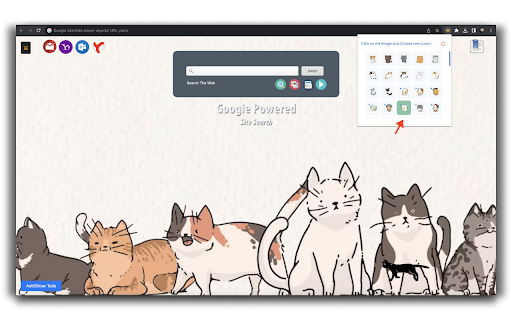

Get custom cursor for Chrome. Enjoy a special collection of cursors for cat lovers with lots of freebies. After installing this application, you can choose any of the cursors we recommend. And you can use that cursor actively on all the sites you open. Popular Mail site links: You can reach these sites by using the links in the left corner of the screen. Bookmark Link: By using the icon on the right corner of the screen, you can access your favorite links that you have added for chrome browser and delete them. Todo List: You can add new items to your Todo list using the Link in the Bottom Left corner of the screen. You can delete and edit them. Search: With the search box in the middle of the screen, you can use the search service thanks to the system using Google infrastructure. You can experience different cursors by choosing from the cursors in the list by clicking the cat tab cursor in your add-on list in the upper right corner of your chrome browser during application installation. If you want to contact us about anything. You can use mosesarlie4@gmail.com.

Custom Cursor for Chrome™
Fun custom cursors for Chrome™. Use a large collection of free cursors or upload your own. Customize your Chrome browser experience with our free collection of mouse cursors at Custom Cursor. At Custom Cursor we have created a giant collection of hand-drawn cute cursors. We have over 10,000 different packs available on our website for you to enjoy. With your help, our collection has grown so big that we divided it into categories that should fit every taste, like: - Minecraft; - Cute Cursors; - Anime mouse packs; - Memes; - Spy x Family pointer packs with Anya Forger; - Among Us; - Two types of Minimal pointers for work and studies; - Games; - Roblox; - And many, many other funny elements for you to play with. Some of our mouse pointer packs are bundled with the Custom Cursor browser extension, but most of them await you on our website. Keep an eye out for new and trending additions. To simplify navigation, we've organised our collection into Editor's Picks collections, each with a unique theme. Examples include: - Green arrows for autumn; - Christmas themed arrows; - Holidays editor's picks; - Halloween; - Custom Cursor collaboration with Daieny Schuttz; - Pink pointers editor picks; - Summer mouse decorations; - Rainbow colors; and much, much more on our website. If you can't find what you're looking for, use the "UPLOAD CURSOR" button to add your own. Manage your personal arrow collection on the Upload page and adjust cursor size in the "Manage" section. Newly added collections will be uploaded to the Custom Cursor for Chrome extension and can be found at the bottom of the collection list. Your added packs will appear in “My Collection”. Create your own collection of mouse cursors from any images with Custom Cursor Creator tool on our website. It will allow you to create new packs from almost any arrow or pointer shaped image on the internet. ------------------- ! After installing the extension, refresh previously opened tabs to use it on those pages. Note that the extension may not work on Chrome Web Store pages or the home page. Open another website (e.g., google.com) to test the extension. If you like the extension you can also check our Custom Cursor for Windows app. Preview arrow appearance by clicking on it in the extension window and moving the mouse to the empty space within the window.

Cursor Space - Custom Cursor for Chrome
Fun mouse cursors for your browser. Enjoy a large collection of custom and animated cursors Transform Your Browser with Custom Cursor Space! Welcome to Custom Cursor Space - the ultimate way to personalize your browsing experience! Say goodbye to the default mouse cursor and hello to a custom cursor for Google Chrome that reflects your style, mood, and creativity. With Cursor Space, your cursor is no longer just a pointer - it’s a statement. Whether you love animated cursors, sleek designs, or fun and quirky styles, we have the perfect options to make your browsing more exciting. Why Choose Cursor Space? - Huge Cursor Collection - Explore a vast selection of custom cursors, from cute cursors to bold and stylish designs. - Animated Cursors - Add motion to your browser with dynamic, eye-catching cursors. - Personalized Experience - Design your own custom cursor and make your browsing truly unique. - Easy Installation - Install in seconds and transform your Google Chrome cursor instantly. - Regular Updates - New cursor designs added frequently to keep your style fresh. Express Yourself with a Unique Cursor Your cursor should match your personality! Whether you're into anime cursors, meme-inspired designs, or professional and minimalist styles, we’ve got you covered. Choose from static or animated cursors to make every click fun and stylish. Create Your Own Custom Cursor Why settle for a default cursor when you can design your own? With Cursor Space, you can create a truly unique custom cursor that stands out. Choose the shape, color, and animation effects to match your mood and preferences. Install Cursor Space for Free! Enhance your Chrome browsing experience today – and the best part? It’s completely FREE! Simply install Cursor Space and start exploring a world of creativity. ✨ Make your cursor shine! Visit cursor-space.com now and transform the way you browse the web. Other options: - Promotional materials for other products are also featured on the options page.

Custom Cursor for Chrome™
Get custom cursors for Chrome. Replace your default mouse cursor with a cool custom cursor. Have fun with custom cursors for Chrome. The custom cursor extension for Chrome is a browser extension that allows users to change the appearance of their mouse cursor. The extension provides a collection of custom cursor images that users can choose from to replace the default cursor image. Once the extension is installed, users can easily activate it and browse through the available custom cursor images. They can preview each cursor image before selecting it and applying it to their browser. The custom cursor will then appear whenever they move their mouse within the browser window. This extension offers users the ability to personalize their browsing experience and add some fun or creativity to their cursor. It can also be useful for people who have difficulty seeing the default cursor or want a cursor that is easier to see or track on their screen. Overall, the custom cursor extension for Chrome is a simple and straightforward tool that adds a fun and personal touch to the browsing experience. Make your web surfing experience more enjoyable with this custom mouse cursor. It is suitable for people of all ages. Note. Please note that according to Google's rules, extensions can not work on chrome web store pages and internal pages of the Chrome browser, such as the home page, settings, downloads, etc. Also, the extension cannot customize the cursor on the browser navigation bar, such as tabs buttons, URL bar, toolbar, etc. Please open any other website (for example, google.com) after installing this extension and check how the extension will work on it.

Cute Cursors - Custom Cursor for Chrome™
Funny custom cursors for Chrome™. Replace the default mouse cursor with a custom one from collections of cool and cute cursors. The custom cursor Chrome extension is an application that enables users to personalize their web browsing experience by changing the default mouse pointer to a custom mouse cursor. This extension is designed to be used in conjunction with the Google Chrome web browser, and it can be installed with just a few clicks. The custom cursor Chrome extension offers a wide variety of options for users to choose from, including different styles, colors, and sizes of cursors. Users can select a pre-designed cursor from the extension's library or create their own custom cursor using the extension's built-in editor. Once installed, the custom cursor Chrome extension works seamlessly with any website that the user visits. The new cursor will replace the default mouse pointer on every page, allowing the user to enjoy a more personalized and visually appealing browsing experience. One of the main benefits of using a custom cursor Chrome extension is that it can help to reduce eye strain and make it easier for users to navigate web pages. By selecting a cursor that stands out from the page's background, users can quickly locate their mouse pointer and avoid getting lost in a sea of text and images. Another advantage of using a custom cursor Chrome extension is that it can add a fun and creative element to web browsing. With the ability to customize the cursor's appearance, users can express their personality and style in a new way. This can be especially appealing for younger users who enjoy customizing their devices and applications. Overall, a custom cursor Chrome extension is a simple yet effective way to enhance the web browsing experience. By offering a wide range of customization options and improving visibility, this extension can help users navigate the web more easily and enjoyably. Customize your experience of using the Chrome browser with cool free mouse cursors. All custom cursors are in vector format, which guarantees you perfect display quality on any screen and in any cursor size. In the extension popup, you can easily change the size of the cursor, add it to your favorites or completely remove it from the list, it's very simple and convenient. - Comics cursors - Anime cursors - Kawaii cursors - Video games cursors - and much more coming! Navigate with a pink arrow today and with lipstick tomorrow. Be always fashion creative, even if you are in the office or in the classroom. Only you may know how pretty and nice can be usual working on the laptop. Such a wonderful rose mouse pointer for surfing the web. No matter how old you are, in school or the office, life should be filled with joy and fun. And bright custom cursor themes are just a few that we can give you. One more useful feature is that you'll never lose the mouse cursor on the web page because the brightly designed pointer will always be in front of you. The mouse pointer is changed during the navigating and sleeping modes. It has a cute hover state as well as in-the-point doing. Note. Please note that according to Google's rules, extensions cannot work on Chrome Web Store pages and internal pages of the Chrome browser, such as the home page, settings, downloads, etc. Also, the extension cannot customize the cursor on the browser navigation bar, such as tabs buttons, URL bar, toolbar, etc. Use our custom cursor extension - to make yourself even happier!
