
anhpffophgblhahpikijbbgnpjbmchfp
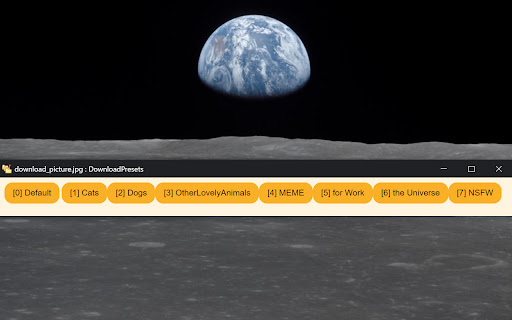
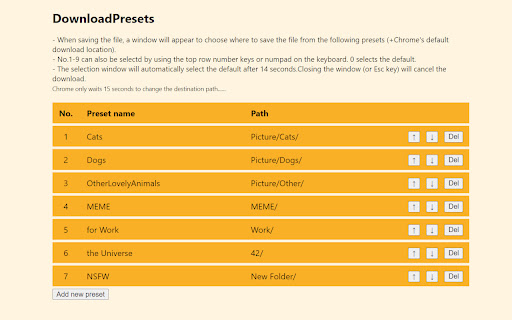
Download Presets --------------------------- This is an extension that allows you to set presets for download location. For those who save a lot. For those who save various things. Quickly categorize and organize your download folders. How to use --------------------------- 1. Register a destination folder as a preset on the settings page. 2. When saving a file, a window for selecting the destination presets opens. 3. Select the preset where you want to save. Features and Limitations --------------------------- - The destination locations that can be specified are limited to the folder under the default download location (Chrome's Settings - Downloads - Location). - The first 9 presets and the default can also be selected by using the numeric keys on the keyboard. - When the selection window is closed, the download is canceled. - The selection window automatically selects the default after 14 seconds. These are not a bug --------------------------- If there are other download-related extensions, they may conflict and not work properly. If there is a lag in processing on the browser side, the following may occur. - After selecting a preset, another window appears for a moment. - After selecting a preset, the save dialog may not appear for a while, and in some cases, downloading may not start. Change log --------------------------- 2.0 2022/08/01 Extensively modified for release 1.0 2019/06/02 Made for myself

accessibility.video
Enables accessibility options for various video players on the web based on user preferences At the user's request, this plug-in automatically enables subtitles or audio description when available in the videoplayer. The free plug-in features one-click installation and only needs to be set up once. The Video Accessibility Plug-in is compatible with all known browsers. More and more companies, governments, and organisations are making an effort to be accessible to all, both in the real world and online. Thanks to the global implementation of the UN Convention on the Rights of Persons with Disabilities, inclusive thinking and entrepreneurship is increasingly becoming the norm. Audio description and subtitles help people with a visual or hearing impairment to fully enjoy videos. Audio description consists of a voice that takes advantage of moments when there is no speaking to describe what is shown in the video. This way, people who are blind or visually impaired are well able to follow the whole story. The new Video Accessibility Plug-in does not require users to select one of these accessibility options every time they play an online video. Just downloading the plug-in once is all that is needed. automatically searches for and enables audio description and subtitles. A large majority of Internet users all over the world does not yet benefit from accessible videos. With this plug-in, we want to make a concrete contribution to changing this, directly in the interest of users. Especially for blind users, who need a screen reader and tab key to browse the page, a plug-in is extremely useful.

Magic Tab Group
Every Google search you perform it will automatically generate a separate tab group and any child tabs opened from your Google… Every Google search you perform it will automatically generate a separate tab group and any child tabs opened from your Google searches will be automatically added to the same tab group. 1. Automatic Tab Grouping: Each individual Google search you perform will automatically generate a separate tab group. No more manually organizing tabs. 2. Seamless Child Tab Integration: Any child tabs opened from your Google searches will be automatically added to the same tab group. 3. Efficient Group Closure: Tired of closing tabs one by one? "Magic Tab Group" offers a convenient shortcut – simply press Ctrl+q to close the entire tab group in an instant, saving you time and effort. 4. Expand and Collapse Tab Groups: "Magic Tab Group" allows you to effortlessly expand or collapse your tab groups, giving you the flexibility to focus on specific topics or keep a broad overview of your browsing sessions. 5. Streamlined Tab Management: With this extension, you can easily manage and navigate through your tab groups. Locate specific tabs within a group or switch between different groups with ease. 6. Custom Auto Grouping: Take control of your browsing experience by adding any other website for auto-grouping. All sites from the specified domain will be automatically added to the same group, ensuring a seamless browsing workflow. "Magic Tab Group" – the Chrome extension that revolutionizes the way you manage your tabs. Streamline your workflow, increase productivity, and never lose track of important information again. Get "Magic Auto Group" now and enjoy a clutter-free browsing experience like never before!

Nocodext for Bubble
This extension extends Bubble.io editor's UI with missing features. These features, also known as Widgets are the following : [2026-05] * ERD diagram : visual overview of all your tables schema and relations * Databrowser : Get your tables and props in a glance. Run a reverse search * CommandPalette : bookmark everything and reach any element in a snap * Designer : show all elements on the page preview [2025-10] * Designer : Reveal everything in a page Stop clicking on each of many elements to unhide * Elements tree : filter by type Show only the elements of type you want to see * API connector revamped Work with API Connector reimagined * API connector & Postman Leverage the power of Postman from insde Bubble. Handle endpoints in a snap * API Navigator Overview all your API connector queries. No endless scrolling v3.0.1 : fixed options panel content fixed : enabled : revamp api connector and navigator

English microsoft.com
Redirects to English version of learn.microsoft.com and azure.microsoft.com and support.microsoft.com.
