
anfeloimdjdeilmiklmpnckkpdgjehhp
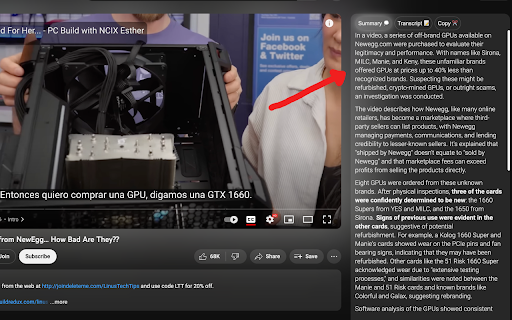
Adds OpenAI-powered "summary" and "transcript" sections to the YouTube UI. To generate a summary or transcript, press "Generate" on the panel that appears next to any YouTube video. Click on any part of the summary or transcript to jump to the corresponding part of the video! You may be asked to log in with Google first. This is to prevent abuse of our API, as each generation costs us a few cents.

Youtube Helper
YouTube Helper is a tool that can automatically summarize the content of a YouTube video, providing a brief summary of the main… YouTube Helper is a tool that can automatically summarize the content of a YouTube video, providing a brief summary of the main points or key takeaways. The summary would be in the form of text shown in the extension popup. It can also automatically translate the spoken or written text in a YouTube video from one language to another. Limitations * Does not handle the scenario where the maximum response character limit is reached. * Users do not have an option to stop generating responses.

Summatim
Introducing our revolutionary YouTube video summarization extension! Tired of wasting precious time watching long videos that may not even have the information you're looking for? Our extension solves this problem by using advanced AI algorithms to analyze the video's content and provide you with a concise summary of its key points. With our extension, you'll be able to quickly and efficiently get the information you need without spending hours watching videos. Save time and increase your productivity by installing our YouTube video summarization extension today!

YouTalk
Talk to your YouTube videos ... YouTalk: Interactive Q&A for YouTube Videos YouTalk is a revolutionary Chrome extension that transforms your YouTube experience by allowing you to interact with videos like never before. With YouTalk, you can ask questions directly to the video content and receive instant, relevant responses based on the video's content. Plus, get YouTube snippets containing the most pertinent information related to your query. Say goodbye to endless scrolling and searching for answers—YouTalk brings the information you need right to your fingertips! 🗣️ Ask Questions, Get Answers: Type or speak your questions while watching a video, and YouTalk will analyze the content to provide you with accurate and relevant answers in real-time. 🎯 Smart Content Extraction: Our advanced AI technology extracts the most relevant information from the video, ensuring that you receive precise and helpful responses to your questions. 📌 YouTube Snippets: Along with the answers, YouTalk provides you with YouTube snippets—short video segments containing the information you're looking for, so you can jump straight to the part that matters most. 🌐 Wide Range of Topics: Whether you're watching educational content, tutorials, documentaries, or any other informative video, YouTalk enhances your learning experience by making it interactive and engaging. 🔍 Save Time and Effort: No more rewinding, fast-forwarding, or scanning through video transcripts. YouTalk helps you find the information you need quickly and efficiently, so you can focus on learning and enjoying the content. 💬 Voice Recognition: Use your voice to ask questions and interact with the video, making your YouTube experience even more seamless and hands-free. Get ready to revolutionize the way you watch and learn from YouTube videos with YouTalk. Install the extension now and start enjoying a more interactive and informative YouTube experience!

Blenny - AI Vision Co-Pilot Powered by GPT-4V
Screenshot any part of a webpage, and Blenny will instantly help you summarize, translate, apply custom agents, and do more. 🔥 Access AI vision anywhere on the web. No more switching between AI platforms. Blenny adds AI vision to your browser and helps you analyze information from any part of the web. Take a snapshot of the screen area and perform quick actions such as instant AI summaries, translations, accessing the web, etc. 💻 Customize and build your own AI agents. Blenny is more than just stock prompts or actions. It works according to your needs, catering to several use cases you throw at it. For example, you can start a chat with the context in your screenshot or create quick actions and custom agents using your prompts. 🚀 How to get started with Blenny 💡 Step 2: Start using Blenny Snapshot a screen area, and choose from a list of quick actions to analyze the content. Our pre-built prompts allow you to instantly summarize text, translate words, recognize objects, and more. You can also save your own customized prompts as quick actions. Define triggers and responses to carry out tasks tailored to your needs. 🧑💻 Prompt Gallery Experience the convenience and efficiency of AI vision-assisted tasks like never before with the Prompt Gallery. Whether you're a researcher, student, professional, or simply curious, Blenny's Prompt Gallery empowers you to extract more value from the vast web information available on the web. Access it at https://www.blenny.ai/prompt-gallery ❇️ Custom API Key Currently, we offer a limited trial access to Blenny. Once you hit the trial limit, you are advised to add your own API key to continue using Blenny. We will introduce subscription modules down the road.
