
amgokbkbhplbkpjlknhglinkhghamagm

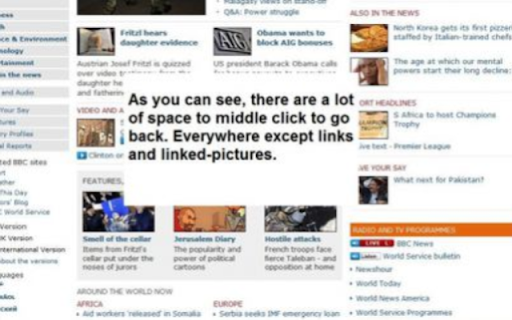
Go back with your middle mouse button. Enhance your browsing experience with the Middle Click To Go Back extension! Navigate effortlessly and customize your middle mouse button for intuitive actions. Features: - Click the middle mouse button on an empty space on a web page to go back in your browsing history. - Optionally, middle-clicking closes the current tab if there is no page to go back to. You have control over this behavior. - Default actions, such as opening links in a new tab or closing a tab with middle-click, remain unaffected. On Linux, you can also paste using the middle mouse button as always. - Seamless compatibility tested on both Windows and Linux operating systems. Release Notes: - Version 2: Updated to Manifest 3. - Version 1.8: Works on "tabless windows" too. - Version 1.7: Optional behavior for middle-click to close the current tab. - Version 1.6.3.3: Bug fixes. - Version 1.6.3: Improved stability by changing the onclick event to mouseup. - Version 1.6.2: Optional feature no longer closes the browser. - Version 1.6.1: Added options to enable/disable the feature. - Version 1.6: Middle-click closes the current tab if no page to go back. - Version 1.5: Now works seamlessly on Windows. - Version 1.4: Improved responsiveness and stability. - Version 1.3.1: Added "all_frames": true to the manifest and introduced icons. For Firefox users, check out our extension on Mozilla Add-ons: https://addons.mozilla.org/en-US/firefox/addon/5938 Explore a more intuitive browsing experience with Middle Click To Go Back!

ScrollAnywhere
Drag scrollbar with your middle mouse button anywhere on the page. Supports also "grab and drag" style. NOTE: ScrollAnywhere doesn't work on THIS page (all extensions are disabled on "Chrome Web Store" page due to internal security) Scroll Anywhere enables you to drag scrollbar with your middle / right / left mouse button without touching a scrollbar. Just hold the middle button and move mouse up-down or left-right. You can also change the behavior to simple "grab and drag" style. Features: - Momentum allows you to throw page to scroll it faster (just like on your phone) - Middle / Right / Left mouse buttons are supported, see the Options page - Customize scrollbars - make them thinner, change color or hide - Auto-disable on specified domains / sub-domains - Grab and drag scroll like on your phone - Multiplier to speed-up or slow down - On key down enable / disable - Custom scrolling cursor Contribution: - I'm full-time extension developer and your donations is my only income. There are no ads in my extensions! - Please support my work by: - Buy me a coffee - https://ko-fi.com/fastaddons - PayPal donation - https://paypal.me/fastaddons/ - Patreon - https://www.patreon.com/fastaddons Thank you! :) Your donation will help me keep this extension working in future versions of Chrome! Known issues: - does not work on https://chrome.google.com/webstore/ (blocked by Chrome) - does not work on browser specific pages like "chrome://extensions" (blocked by Chrome) - does not work on other extensions pages like options page of some addon (blocked by Chrome) - in Linux right click (context menu) cannot be canceled so only middle button is working correctly Recently added features: - The list of changes in last versions is available here: https://addons.mozilla.org/addon/scroll_anywhere/versions/

Scrollbar Anywhere
Click and drag anywhere to scroll the page. This extension makes it possible to to scroll pages as if the scrollbar was right under your pointer. Just press the right mouse button (or any other of your choice) and move the mouse. If you want grab-and-drag style scrolling, just set it up in the options. The extension is based on the Wet Banana extension and inspired by Scrollbar Anywhere for Firefox. Changes in 3.1: - Allows the extension to be properly enabled when disabled. Changes in 3.0: - Compatibility with future versions of Chrome with Manifest V3 Changes in 2.17: - Prevent the configured extra keys from interfering with scrolling. Changes in 2.16: - Stop gliding when a key is pressed or the mouse wheel is scrolled. - Fix a bug where the default mouse click actions were incorrectly prevented. Changes in 2.15: - Blacklist bug fix for file URLs. Changes in 2.14, 2.13 and 2.12: - Support for Chrome v60+.

Super Focus Tabs
Quickly find out tab/page. Reduce much more time while working with multiple tabs/pages. + Quickly find out tabs. + Quickly closing current tab by pressing double esc + Quickly find the page in your bookmark/history. + Quickly save the page by using shortcut key. + Quickly go back to previous active tabs by shortcut key. + Quickly go to latest created tab. + Support auto close unused tabs. + Support real time update. + Support page screenshots. + Support list view, thumbnail view and tree view, preview. + Support tabs, bookmarks, history, saved pages. + Support sorting, filtering, grouping, etc. + Support many functions such as saving and closing all tabs, merging windows, closing the duplicated pages, etc. + Many options for you to customize. Reduce much more time while working with chrome. Let try and experience.

close_tab(s)
Easily close tabs with in-page elements. More easy and fast way to close tabs. Allows you to easily close tabs with in-page elements. Features: ---------------- • You can close the active tab by clicking to the selected in-page edge element. • In-page element only appears when you move the mouse cursor to the selected edge. • You can change the features of the in-page element, like hover color, thickness, click event type and position. • Use toolbar icon or context menu to close tabs. Limitations: -------------------- Since Chrome is not allowing, we can't add in-page element into the following pages: chrome:// - chrome-extension:// - chrome-devtools:// - view-source: - data: - chrome.google.com/webstore/ - New tab page. But, toolbar icon and context menu options will continue to work on all pages without any limitation. Note on permissions: ----------------------------------- • with v4.0, new "scripting" permission request added. In previous versions, i was using "chrome.tabs.executeScript()" to reflect settings changes into pages, but with Manifest V3, it is moved to "chrome.scripting.executeScript()", which requires "scripting" permission. • "Read and change all your data on the websites you visit" - That is necessary to insert In-Page element into pages. I do not read your data from any website, nor do i modify it. New features: • Pinned tabs will not be closed (by default). • Store data in memory for faster access. Updates: • Upgraded to Chrome Manifest V3. • Closing multiple tabs is now faster. • The name of the extension has been changed to 'close_tab(s)'. • Some UI changes. Fixes: • Fixed an issue with slow-loading sites. v3.0.x New features: • New add-on features for bottom and right positions. • Tooltips now customizable. • In-page element opacity feature. • Right-click on the selected edge, shows selected options. • Context menu options added. • Auto maxizing new windows feature added. • Toolbar icon popup page added. • Spanish and Portuguese language support added. Updates: • Settings page redesigned. • In-page element positions restructured. • New toolbar icon images available. v2.0.x New features: • New in-page closer positions added. • You can change thickness of the in-page element. • Toolbar icon is added. Clicking to the toolbar icon will close the active tab. • You can change the toolbar icon image. • Multi language support is added, so please help to translate. • Preferences synced with Chrome (if signed in). Updates: • Renamed to 'Close This Tab'. • New Options/Settings page. • Injecting the element into dynamically loaded pages.
