
hdoplfhlfoagdghmfamhnakmjjffeila
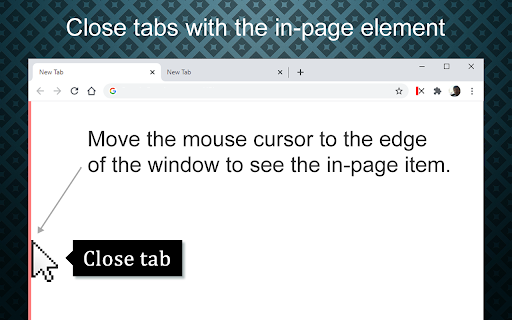

Easily close tabs with in-page elements. More easy and fast way to close tabs. Allows you to easily close tabs with in-page elements. Features: ---------------- • You can close the active tab by clicking to the selected in-page edge element. • In-page element only appears when you move the mouse cursor to the selected edge. • You can change the features of the in-page element, like hover color, thickness, click event type and position. • Use toolbar icon or context menu to close tabs. Limitations: -------------------- Since Chrome is not allowing, we can't add in-page element into the following pages: chrome:// - chrome-extension:// - chrome-devtools:// - view-source: - data: - chrome.google.com/webstore/ - New tab page. But, toolbar icon and context menu options will continue to work on all pages without any limitation. Note on permissions: ----------------------------------- • with v4.0, new "scripting" permission request added. In previous versions, i was using "chrome.tabs.executeScript()" to reflect settings changes into pages, but with Manifest V3, it is moved to "chrome.scripting.executeScript()", which requires "scripting" permission. • "Read and change all your data on the websites you visit" - That is necessary to insert In-Page element into pages. I do not read your data from any website, nor do i modify it. New features: • Pinned tabs will not be closed (by default). • Store data in memory for faster access. Updates: • Upgraded to Chrome Manifest V3. • Closing multiple tabs is now faster. • The name of the extension has been changed to 'close_tab(s)'. • Some UI changes. Fixes: • Fixed an issue with slow-loading sites. v3.0.x New features: • New add-on features for bottom and right positions. • Tooltips now customizable. • In-page element opacity feature. • Right-click on the selected edge, shows selected options. • Context menu options added. • Auto maxizing new windows feature added. • Toolbar icon popup page added. • Spanish and Portuguese language support added. Updates: • Settings page redesigned. • In-page element positions restructured. • New toolbar icon images available. v2.0.x New features: • New in-page closer positions added. • You can change thickness of the in-page element. • Toolbar icon is added. Clicking to the toolbar icon will close the active tab. • You can change the toolbar icon image. • Multi language support is added, so please help to translate. • Preferences synced with Chrome (if signed in). Updates: • Renamed to 'Close This Tab'. • New Options/Settings page. • Injecting the element into dynamically loaded pages.

Super Focus Tabs
Quickly find out tab/page. Reduce much more time while working with multiple tabs/pages. + Quickly find out tabs. + Quickly closing current tab by pressing double esc + Quickly find the page in your bookmark/history. + Quickly save the page by using shortcut key. + Quickly go back to previous active tabs by shortcut key. + Quickly go to latest created tab. + Support auto close unused tabs. + Support real time update. + Support page screenshots. + Support list view, thumbnail view and tree view, preview. + Support tabs, bookmarks, history, saved pages. + Support sorting, filtering, grouping, etc. + Support many functions such as saving and closing all tabs, merging windows, closing the duplicated pages, etc. + Many options for you to customize. Reduce much more time while working with chrome. Let try and experience.

Close Tab
A stationary button that closes the current tab. Clean up tabs with less effort. The "Close Tab" extension provides a stationary button that closes the currently selected tab. This saves time visually hunting down the active tab and provides consistency for the user. Very simple and useful on touch screens. The icon is designed to work with dark and light themes. *Note: If this extension gets hidden by Chrome, you can get your icon back by pinning it. It happens sometimes. :) *Tip: On PC you can also press Ctrl+W to close tabs (when keyboard input isn't being captured by a plugin). On Mac this is CMD+W. Please note that the options screen contains recommendations from me (ads) to help you support this software. P.S. Have you found a bug? Email address is provided in the options screen. Happy browsing.

Ultra Button
A button for everything. You can now access most of chrome features in one Ultra Button. Functions Including: Bookmarks, Extensions, Downloads, History and Tabs. Mouse Middle Button Behaviors Bookmarks: Open bookmark in background Extensions: Remove extension Downloads: Remove download record History: Open history in background Tabs: Close tab or window ~~~~~~~~~~~~~~~~~~~~~~~~~~~~~~~~~ The icons in this extension were downloaded from Noun Project. https://thenounproject.com/ v 0.9.0 add download notification You can enable it in the options v 0.4.1 add session control You can now restore closed tab or windows

MyMenu
Your personal menu ! Former name: Customize Menu. A collection of chrome pages with additional functions v1.3.0 customize font size fix edit item and delete item button v1.1.1 new feature: Cloud sync It is disabled for old user. (Because you may have different setting in different computer) To enable it, just go to Backup tab and check "Synchronous Setting". new feature: a lot of panels related functions Unless you use dev or canary channels, you should go to "chrome://flags/#enable-panels" and Enable Panels to make them work. v1.0.0 Chrome Style option page Remove Task Manager Remove script and custom item support(because of new chrome extension rule)
