
aljdeefkkcmonpckopdbbkbimeaflmhl

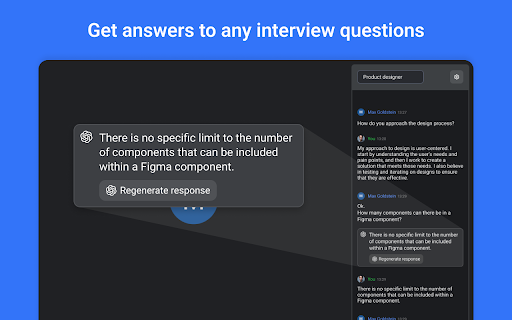
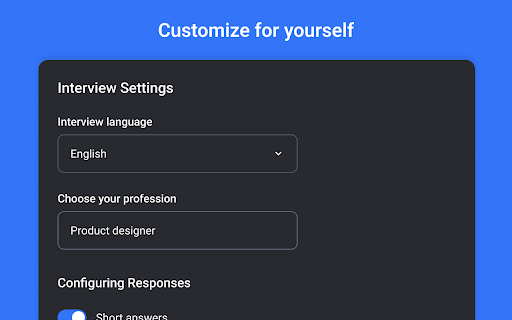
EasyInterview will help you pass the interview and answer any questions. EasyInterview will help you pass the interview and answer any questions. ChatGPT in your Meet.

ChatGPT Sheets – Use ChatGPT for Sheets
Boost your Google Sheets with ChatGPT! Get instant answers, copy-paste solutions, and easy shortcuts with ChatGPT Sheets! Looking to elevate your business using ChatGPT for Google Sheets?🚀 The ChatGPT Extension for Google Sheets revolutionizes your workflow. HOW DOES ChatGPT HELP YOUR BUSINESS? ➡️Get instant results. ⏱️Our ChatGPT for Sheets extension enables a swift conversation window. ➡️Efficient copy-paste solutions. 🗓️ChatGPT for Google Sheets easily transfers new knowledge to your spreadsheet. ➡️User-friendly shortcuts. 🎯Every feature of ChatGPT for Sheets was implemented with YOU in mind. Wait no longer to boost your business! Let our ChatGPT in Google Sheets Extension let your productivity soar!🚀📈 In today's digital age, businesses are constantly in need of seamless tools and technologies that can simplify data handling and analytics. Amidst a plethora of available extensions and tools, the ChatGPT Extension for Google Sheets stands out as a beacon of innovation. Let's dive deeper into what makes this extension a game-changer for professionals across industries.🌟 MAIN FEATURES AND ADVANTAGES OF ChatGPT: 1. Seamless Integration🔗: The data analytics landscape is constantly evolving, making it essential for businesses to be equipped with tools that enable smooth transitions. Enter ChatGPT Extension for Google Sheets. This tool allows users to seamlessly integrate AI capabilities into their Google Sheets environment, eliminating the hassles of shifting between platforms and ensuring effortless information interpretation. 2. Dynamic Data Conversations💬: Gone are the days when you had to manually interpret complex data. With the ChatGPT Google spreadsheet, real-time interactions with your data are now possible. Imagine having an intelligent conversation with your spreadsheets, asking questions and receiving answers in real-time. This revolutionizes data understanding, making it more intuitive and actionable. 3. Collaboration Made Easy🤝: Modern businesses thrive on teamwork. The ChatGPT Extension for Google Sheets acts as a bridge, connecting team members and enabling them to derive insights from shared data effortlessly. It fosters a collaborative environment where numbers tell a story that everyone can understand. 4. Top-Tier Security🔐: Data security is a top concern for businesses today. With the ChatGPT Chrome Extension, there's no need to compromise on safety. Your data remains under stringent protection protocols, ensuring that you can analyze, share, and interpret your data with total peace of mind. The age of AI-powered solutions is here. These intelligent systems are not just about automation; they redefine how we perceive and interact with data. Among the forefront of these advancements is the ChatGPT Extension for Google spreadsheets. HERE'S HOW: 🎯Tailored AI Responses: GPT for Google spreadsheets isn’t just another tool. It actively learns and provides customized answers, ensuring precision, relevance, and clarity in every response.🌠 ♟️Broad Compatibility: In a diverse data landscape, the GPT for Sheets Extension stands out with its ability to accept a wide range of data formats and structures. This versatility ensures that no matter how your data is structured, the tool can handle it. 📊 🏄🏻♂️User-Centric Design: Beyond its technical prowess, every facet of the ChatGPT Extension for Google tables has been meticulously crafted with users in mind. The design emphasizes a user-friendly experience, ensuring that even those without a technical background can harness its power effortlessly. 👤 WHY EMBRACE ChatGPT FOR GOOGLE SHEETS? 🤔 In an era where data is the new gold, having tools that streamline its analysis is invaluable. The ChatGPT Extension offers: 1. Intelligent Data Processing: This isn’t just another analytics tool. The AI for Google Tables delves deep, offering not just numbers, but valuable insights that can shape business strategies. 🧠 2. Plug and Play: Simplicity is at the core of the ChatGPT plugin for Google Sheets. Without any complex setups, it integrates smoothly into your workflow. ⚙️ 3. Diverse Use Cases: Whether you’re a budding startup or a multinational corporation, ChatGPT for Google Sheets adapts to your unique requirements, proving its versatility across varied business landscapes. CONCLUSION: 💡 We stand on the brink of a new era in information analytics. Integrating AI with traditional spreadsheet tools like Google Sheets isn't just about staying updated; it's about anticipating the future. By investing in the ChatGPT for spreadsheets extension, you’re not just enhancing your data interpretation abilities; you’re also paving the way for unprecedented insights and business growth. 🚀 Dive into the realm of advanced data analytics with ChatGPT for Google Sheets. Embrace the future, redefine your data journey, and witness the revolution. Join the revolution. Download and use with pleasure!🔥📥

PromptTube: An AI YouTube Assistant
PromptTube lets you talk to any YouTube video: ask questions, get summaries, and jump to the exact moment you're looking for! PromptTube transforms every YouTube video into an interactive conversation. Instead of scrubbing through timestamps, simply ask your question and let the extension find the answer in seconds. Why Install PromptTube? 🔍 Ask Anything: Type your question and get intelligent, context-aware answers. ⏱️ Jump to the Moment: Clickable timestamps take you straight to the exact second in the video. 📝 Instant Summaries: Quickly generate concise recaps of any video. 🌐 Multilingual Support: Ask in your language, get responses in the same. 🗒️ Generate Comparison Tables: Turn comparison videos into beautiful table summaries 💰 Completely FREE: No payments at all, use your own FREE Gemini API key 📌 How to Use: Download the extension from the Chrome Web Store Refresh any existing YouTube tabs—or open a new one Click the red button on the right side of the YouTube page to open the PromptTube sidebar Enter your Gemini API key (you’ll be prompted automatically) Start chatting with any YouTube video

Chat GPS: chat outline for navigating Chat GPT
Adds a minimap and chat ouline to Chatgpt. Helps users navigate through long chats. Bookmark your favourite chats. I made this extension because I kept getting lost in my ChatGPT chats, and I thought others might find it useful too! It gives you a chat outline so you can stay organized and move through long conversations easily. Features: 💬 Chat Outline: Jump straight to any chat on the page. 🧑💻 Copy Code Blocks: Quickly find and copy code from your conversations. 🔎 Code Filter: See only the code blocks if that’s what you need. Perfect For: Developers handling long code discussions Researchers diving into AI outputs Writers, students, and daily ChatGPT users This extension is free and open source, and I’d love your feedback on the GitHub repo 🙂. Install it and never lose track of your chats again! The extension is useful for chat gpt navigation, it includes a scroll minimap aswell as a chat outline for chat gpt.

ChatGPT AI assistant for Google Reviews and Questions
Use ChatGPT to automate answering Google Reviews, change tones, work with all languages, and more, all for free. Use ChatGPT AI to reply to Google reviews. Works on Google Map and Google Search. You can change tones, reply in all languages, and more, all for free and powered by MailMagic AI. Reply to Google reviews with ChatGPT AI (privacy-friendly). FREE to use forever and No Ads. 🆓 ✔️ Highest quality responses that outcompete all other tools in the market. ✔️ Select interest level for your response. ✔️ All languages are supported. ✔️ Most stable free AI tool on the market for Google Review. (Do not fully rely on ChatGPT) ✔️ Machine learning on your frequent ask questions. Popular ways our users are using MailMagic's AI Assistant For Google Reviews: ✍️ Reply to Google reviews: Effortlessly craft the perfect message. Convince bad reviewers to remove their reviews. 🔍 Grammar Fixes: Eliminate typos and grammatical errors with ease. 🌐 Translation: Translate an existing review to any language. 🔄 Rephrasing: Make your text clearer and more impactful. 📝 Summarization: Turn lengthy text into concise summaries in seconds. 💼 Tone Adjustment: Adapt the tones of your message in a click (Polite, Professional, Mean, etc).
