
alhjppeeeklkfjecgipijppbgnmgipnh
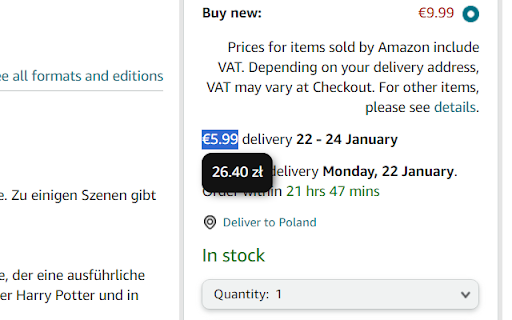


Welcome to the Currency Converter Chrome Extension! This extension simplifies currency conversion by automatically detecting the user's currency and providing support for 148 currencies. Enjoy a multilingual experience with language options in English, Polish, and German. The extension also features a light and dark theme for a personalized touch. Features ▪ Text Selection Conversion: Convert currencies by selecting text with currency values on any webpage. ▪ Automatic User Currency Detection: Detect the user's currency based on their location. ▪ Real-time Exchange Rates: Get up-to-date exchange rates for accurate conversions. ▪ Multilingual Support: Choose from English, Polish, and German languages for a customized experience. ▪ Light and Dark Theme: Toggle between light and dark themes to suit your preferences. ▪ User-friendly Interface: Intuitive and simple design for a seamless user experience.

Auto Currency Converter
This extension will convert the currency of the page to the desired currency Auto Currency Converter – Instantly Convert Any Currency on the Web! Tired of manually converting prices while shopping online? Auto Currency Converter automatically converts all prices on a webpage to your preferred currency, making online shopping, research, and browsing effortless. ✨ Features: ✅ Automatic Price Conversion – Converts all detected prices on any webpage in real time. ✅ On-Demand Conversion – Select any price, click 'Convert,' and get an instant conversion. ✅ Popup Calculator – Manually enter any amount to get a quick currency conversion. ✅ Supports 160+ Currencies – Uses up-to-date exchange rates for accurate conversions. ✅ Lightweight & Fast – No bloat, no tracking, just seamless price conversion. 🔹 How It Works: 1️⃣ Install Auto Currency Converter. 2️⃣ Select your preferred currency. 3️⃣ Visit any webpage – prices are instantly converted! 4️⃣ Highlight a price and click 'Convert' for manual adjustments. 5️⃣ Use the extension popup to convert any amount manually. 💡 Perfect for: 🛒 Online shoppers comparing international prices ✈️ Travelers checking local costs 💼 Business users working with multiple currencies

Currency & Crypto Converter with AI
Automatically convert within page prices to the selected currency using current rates. - Converts any currency to any selected currency. - No selection or click required. It entirely auto detects possible texts for conversion anywhere within the web page. - It has option to pick and choose websites to ignore some and auto-convert for the rest. - It updates the currency rates daily and even allows you to update rate at any given moment on request via Refresh Currency Rates button.

BestPrice Assistant
This extension will automatically (or not) convert prices (from major currencies) on any page to the selected currency. Features: - Whitelist or blacklist domains - Select among dozen of currencies to convert to - Detects prices in various formats - Supports 160+ currencies - Easily toggle between converted and original prices - Optionally set fee or tax % to be added extra to conversion - Quick converter (in popup) - Rates page - Handles ambiguous currencies - Many options - "100% CLEAN" AWARD from Softpedia: http://bit.ly/6cXrpR

Auto Currency Converter — Real-Time Currency Conversion on Any Website
Automatically detect and convert currencies on web pages using real-time exchange rates A Chrome extension that automatically detects and converts currency symbols and amounts on webpages to your preferred currency format using real-time exchange rates. Features - Real-time Currency Conversion: Automatically detects and converts currency amounts on webpages - 25+ Currency Support: Supports major currencies including USD, EUR, GBP, RUB, JPY, and more - Live Exchange Rates: Uses real-time exchange rates from exchangerate.host API - Smart Detection: Recognizes currency symbols, codes, and various formats - Dark Mode Support: Automatically adapts to light/dark page themes - Dynamic Content: Works with dynamically loaded content (Steam, e-commerce sites) - Easy Toggle: Enable/disable conversion with a single click
