
albldpmnhhhcjiladaacehfabibgbllk


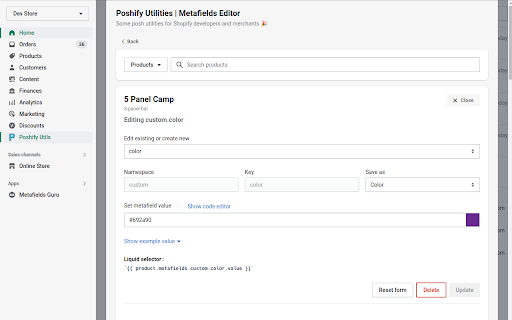


Some posh utilities for Shopify developers and merchants packaged as a browser extension 🎉 A browser extension to extend some Shopify functionalities, notably, editting metafields, yes, for free.. Without apps!

Shopify Theme File Search by EZFY
Search for text inside the files of your Shopify theme. Attention: with shopify's new editor, the extension is temporarily going through an update with even more feature - thanks for your patience! Easily find any text within the files of any of your Shopify themes. Regex support included! Do you ever wonder where a specific line of text is located inside the dozens of files of your theme? Then this extension is most definitely for you. Whether you're a merchant or a developer, a global search function for our themes can be very helpful and save a lot of time. This is exactly what this extension does. Features: - Search for any text inside every single file of your theme - Fast search - User-friendly interface - Regex-friendly Usage: 1. Log in to your Shopify store 2. Navigate to Online Store > Themes > Actions > Edit Code 3. You'll notice a text box load right above your theme editor 4. Login and type in any text you wish to locate 5. Wait for a few seconds, and the app will notify you whether the text was found or not

Outlink Product Importer
Import products from virtually any ecommerce site to your Shopify store in just a few clicks. The Outlink Product Importer Chrome Extension helps Shopify Outlink app merchants and affiliate marketeers import products from virtually any online site to their Shopify store. Step 1 - Signup for Shopify and install Outlink app from Shopify app store. Step 2 - Install Outlink Product Importer free Chrome Extension. Step 3 - Visit a product details page on any online store. Step 4 - Click the Outlink Extension (top right corner of the browser.) Step 5 - Outlink app will extract product data (title, description, images ...) and show it to you in a form. Step 6 - Verify and edit the data. Click 'Add product' button to import the item to your Shopify store!

Shopify Navigation Tool
Chrome extension to simplify Shopify navigation operations and save time!!! Shopify admin panel navigation operations, importing, exporting and duplicating, are daunting repetitive operations, that take so much time. the motivation for this extension is to make these operations easier, straightforward and save Shopify users so much time.

Arena Shopify Admin Extension
Lets you replace the default Shopify Theme Editor dashboard with a new UI to easily manage the Shopify Theme. Arena Shopify Admin Extension lets you replace the default Shopify Theme Editor dashboard with new UI to easy manage the Shopify Theme. - Admin Quick Links show in your Shopify website. This function will give you a board of shortcuts, each shortcut will lead you to editor page that you will use regularly, this function will help you save a lot of time. + Shortcut Section Contents : Go to Section Editors in Theme Customization. It's useful in Shopify theme with multi-page templates. + Shortcut Edit Content: Go to your Product, Pages Editors + Shortcut Edit Custom Field: Go to Edit your Shopify page, product meta fields if you are using Advanced Custom Fields App. + Shortcut General, Custom, Discount, Install Apps, Menu, Product, Code Edit, Sections: Go to Shopify General Setting - Advanced Theme Editor: Extended your Shopify Theme Editor, give you six addition tool for you to improve the way you configure Shopify theme: + Icon picker + Date picker + Header collapsed + Responsive spacing settings + Responsive carousel column settings + Advanced Text Editor - Content Editor: allows customers to easily add columns, buttons with the click of a button. - URL Filter: Filter your domain running Extension. - Import sample menus data by ArenaComemrce from Shopify Arena Dashboard app to your Shopify store. How to use : https://help.arenacommerce.com/admin-extension/ More detail about Arena Dashboard: https://help.arenacommerce.com/installation/dashboard.html Arena Shopify Admin Extension DOES NOT collect any of your data or your browsing activity on any websites. We are pretty fanatical about privacy ourselves, and your privacy is extremely important to us. Please visit this page for more info - When installing Arena Shopify Admin Extension for Chrome, you might see the following prompt: Install Arena Shopify Extension Extension? - It can access: + Your tabs and browsing activity to turn on & off depend on your settings with Domain Filter + Your Shopify store Menus to import sample menus from ArenaCommerce by Arena Dashboard Shopify app. Get in touch: privacy@arenacommerce.com Extension privacy: https://help.arenacommerce.com/admin-extension/privacy.html For more information on privacy and the security of your data visit https://www.arenacommerce.com/pages/privacy-policy
