
alapoalgafajhbbfedcboklbjocdbgcj
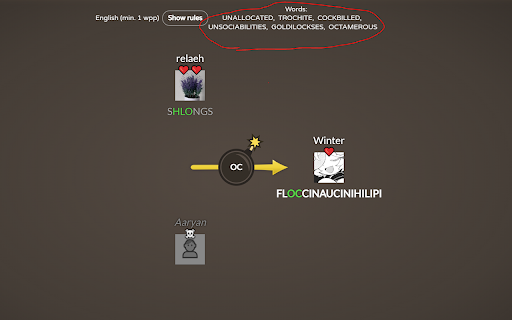
makes you better at bomb party Tool that helps in the bombparty minigame on JKLM.fun. Lists 6 random words that fit the syllable. English only currently.

Bomb Party Buddy
Helps you in bomb party by typing words for you! This will type words in a realistic way for you in the JKLM bombparty game. This is not a help, this is doing all the work. Press ALT + W to pause the buddy or to resume its help. Press ALT + ↑ to write faster. Press ALT + ↓ to write slower.

Chessvision.ai Chess Position Scanner
Analyze chess positions from any website, book, and video in Chrome Automatically analyze chess positions on any website and video you want. Do you like watching chess videos from Ben Finegold, Agadmator, PowerPlayChess, and others? Now you can analyze their moves and understand the reasoning behind them, all while watching the video! Click on the extension button to open it. Select the options you want and click Scan! The position will open in the Lichess analysis board where you can enable the engine, see the evaluation, and even play. You can also open an external analysis on either Chess.com or lichess.org. Open the extension on the Chess.com Analysis page or Lichess Analysis or Study pages and watch videos explaining the position on the board. Enable chess notation hiding behind spoiler tags, ensuring you're never spoiled while solving puzzles. Help us make Chessvision.ai the most accurate chess board image detector. If you have any suggestions or spotted any issues, email me at pawel@chessvision.ai version 3.6.1 - fixes issue where the Analysis Board was not displayed on some websites after a turn change version 3.6.0 - adds ability to select from multiple analysis boards, providing greater flexibility - adds fallback mechanism that defaults to the most promising analysis board if the selected one is unavailable, providing better usability version 3.3.0 - adds Options page, including settings for Video Search version 3.2.0 - adds Video Search to Lichess Analysis and Study pages version 3.0.0 The update introduces new major features, including: - searching for YouTube chess videos matching the scanned positions - adds Video Search to Chess.com analysis pages version 2.1.0 This update introduces quality of life updates, including: - new rotate board button - now you can rotate the board using the new button in the toolbar - improved initial board rotation detection - now the position will always load in the same rotation as the scanned diagram - updated Help and About sections version 2.0.0 The update introduces many new features and improvements, including: - "Select area" mode to scan manually selected area - finding games matching the scanned position - smart turn detection using the last move squares - modern design - improved scanning speed - quick FEN copying - diagram editor - resizable window

Gartic Pro for Gartic Phone
Additional features and tools for the Gartic phone web game! Gartic pro is an extension that will add additional feature to the already awesome game "Gartic phone". Current features: - Customizable keyboard shortcuts for every tool and pen size. - Quick color picker in the tool panel for non animation rounds. (Might not work with stylus, mouse click suggest) - Palette picker, this new button brings you the ability to choose from a bunch of alternative color palettes - Document colors, new colors you pick from the picker or sample with the eyedropper are now saved on top of the palette, right click to remove them, middle click to pin 'em! Many more features are planned in the near future as well as a public repository so that fellow developers can contribute their talents to the project. Latest update: Sketch layer was broken for a long time, finally got fixed and also polished the ui and functionality ----- This is a fan made extension and it has no affiliation with the developers of the game Gartic Phone.

Bombparty Defuser
A tool to help you pick better words in Bombparty Bombparty Defuser is a tool that helps you choose better words in the game Bombparty on the website jklm.fun. Once installed, join a game. Then, click on the extension icon to open the extension menu. Click the toggle button to activate the tool.
