
akiaafoeijpibmbbfaebhkhccepbdgfi

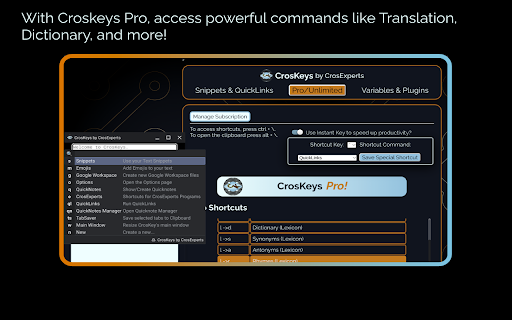
Unlock your Chromebook's potential with a powerful keyboard launcher! 🗝️ 𝗨𝗡𝗟𝗢𝗖𝗞 𝗬𝗢𝗨𝗥 𝗞𝗘𝗬𝗕𝗢𝗔𝗥𝗗 ⌨️ - Missing PowerToys & Alfred on ChromeOS? CrosKeys expands Search to include more timesaving commands. - Keep your hands on the keyboard by using any text field as a launching pad. - CrosKeys integrates with Google Workspace, Notion, Figma, and more! - You don’t need Android or Web specific tools. CrosKeys works everywhere!* 🔤 𝗧𝗘𝗫𝗧 𝗙𝗢𝗥𝗠𝗔𝗧𝗧𝗜𝗡𝗚 & 𝗙𝗢𝗡𝗧𝗦 - Change selected text to UPPERCASE, lowercase, and other formatting options. - Pro/Unlimited users get full access to Unicode fonts, allowing you to type in special fonts anywhere. - This includes 𝐼𝑡𝑎𝑙𝑖𝑐𝑠, 𝙼𝚘𝚗𝚘𝚜𝚙𝚊𝚌𝚎, 𝐁𝐨𝐥𝐝, and more! - Paste some randomly generated Lorem Ipsum text wherever you need it! 👍🏿 𝗨𝗡𝗜𝗖𝗢𝗗𝗘 𝗦𝗬𝗠𝗕𝗢𝗟𝗦 & 𝗘𝗠𝗢𝗝𝗜𝗦 - Tired of memorizing codes for characters? Access Unicode symbols with a quick command! - Search a massive library of Unicode emojis! - (╯°益°)╯彡┻━┻ Don't flip the table, Kaomojis are here too! - Match your emojis to your skin color in the Options page! - No more fighting with different emoji plugins, CrosKeys’ emojis work everywhere! ✂️ 𝗧𝗘𝗫𝗧 𝗘𝗫𝗣𝗔𝗡𝗦𝗜𝗢𝗡 - Tired of typing the same thing over and over? Want to avoid typos? Use text expansion! - Unlike Play Store apps or other extensions, CrosKeys works in both the Web and Android environments. And coming soon…Linux support! - Save up to 5 snippets of text for later, then recall them! - CrosKeys Pro members, get unlimited snippets for quick typing anywhere! 📋 𝗖𝗟𝗜𝗣𝗕𝗢𝗔𝗥𝗗 𝗠𝗔𝗡𝗔𝗚𝗘𝗥 - Press ALT + \ to access the CrosKeys Clipboard window. - Expand the Chrome OS Clipboard history with up to 20 items! - Highlight tabs and add them to the CrosKeys Clipboard with a click! - Drop text, images, and files into the Clipboard Manager to save for later! - Drag from the Clipboard Manager to send files between the Android, Linux, and Chrome Environments! - Sequentially paste by pressing Shift + Enter. - Search and share your Clipboard easily! - CrosKeys Pro members can save thousands of entries to their history! 📝 𝗤𝗨𝗜𝗖𝗞𝗡𝗢𝗧𝗘𝗦 - Jot down your thoughts for later from the Candidate Window! - Save up to 5 notes as a free user! - Share your notes with others, to Android apps on your machine, or download them as plain text files! - CrosKeys Pro members can save unlimited QuickNotes! 🔗 𝗤𝗨𝗜𝗖𝗞𝗟𝗜𝗡𝗞𝗦 - Keep your most important sites just a few clicks away! - Choose to open them in Tabs or Windows depending on your use-case. - Enter up to 5 links as a free user and an unlimited amount as a CrosKeys Pro member! - Become a true power-user by launching Deep-Links from any text-field! 🦾 𝗖𝗥𝗢𝗦𝗞𝗘𝗬𝗦 𝗣𝗥𝗢 Access pro features for $14.99 if you only need access to expanded Text Snippets, QuickNotes, QuickLinks, and up to 500 Clipboard History items. - Unlimited Text Snippets, QuickNotes, QuickLinks, and up to 9999 Clipboard history entries! 🔒 𝗦𝗧𝗔𝗬 𝗣𝗥𝗜𝗩𝗔𝗧𝗘 & 𝗦𝗘𝗖𝗨𝗥𝗘 - We use the latest, most secure extension technologies from Google to accomplish what we do. Manifest Version 3 keeps you safe from harmful extensions and we embrace it wholeheartedly. - Chrome extension keyboards like CrosKeys cannot log information typed in a password field, keeping you secure! - Still worried? Don’t be! Just turn off CrosKeys with a simple shortcut: “CTRL + Space.” When you need it again, turn it back on with the same keys! - CrosKeys Pro payments are handled by Stripe. This system is used and trusted by Google, Amazon, Zoom, and others. - CrosKeys Pro sign-ups are handled through ExtensionPay. This library is open-source, allowing you to read and verify every line of code contained within it. 𝗔𝗗𝗗𝗜𝗧𝗜𝗢𝗡𝗔𝗟 𝗜𝗡𝗙𝗢𝗥𝗠𝗔𝗧𝗜𝗢𝗡 - Some CrosKeys Pro features require an internet connection. - We developed CrosKeys for Chrome OS and it will not work on Windows, Mac OS, or Linux. For full patch notes and support, visit us on our subreddit: https://www.reddit.com/r/CrosExperts/

ChromeOS Diagnostics
The helper extension for the ChromeOS Diagnostics PWA. DiagChrome is a PWA for monitoring telemetrics data of a user's system in realtime. This app helps to fill the void of universal beautiful app which can be installed on ChromeOS for monitoring realtime data.

CrosManager - A Web-based System Monitor
Take charge of your Chromebook with focused monitoring tools! A System Manager Created on and for ChromeOS! 🏢𝗠𝗔𝗡𝗔𝗚𝗘 𝗬𝗢𝗨𝗥 𝗖𝗛𝗥𝗢𝗠𝗘𝗕𝗢𝗢𝗞 - Keep an eye on CPU, RAM, temperature, and more! - Change your browser font with one click. - Read in-depth information on default and attached screens. - Check storage space and network speeds from the pop-up window! 🧩𝗖𝗢𝗡𝗧𝗥𝗢𝗟 𝗘𝗫𝗧𝗘𝗡𝗦𝗜𝗢𝗡𝗦 & 𝗔𝗣𝗣𝗦 - Enable/Disable your extensions with a click on the pop-up window. - See all open PWAs in the Options page, then close them when you’re done. - Hover over extensions to stay aware of what permissions they’re using. 💨 𝗤𝗨𝗜𝗖𝗞 𝗖𝗢𝗠𝗠𝗔𝗡𝗗𝗦 - Run Quick Commands to enable/disable annoying web rules. - Share a link to your active webpage using Share Current Webpage. - Re-enable the Chrome context menu using the Context Menu Unblocker! - Website blocking your clipboard? Use the Copy/Paste Unblocker! ⏲𝗞𝗘𝗘𝗣 𝗔𝗟𝗘𝗥𝗧 𝗧𝗢 𝗬𝗢𝗨𝗥 𝗗𝗘𝗩𝗜𝗖𝗘'𝗦 𝗡𝗘𝗘𝗗𝗦 - Set audio and visual alerts to watch your battery, RAM, and CPU usage. - Customize your alerts to tell you what you want to know! - Watch the extension icon for changes in your battery, RAM, and more. - Get up to 3 alerts as a free user and an unlimited amount with CrosManager Pro! - Use the Optimize tool to disable unused browser tabs and web apps. 🦾 𝗖𝗥𝗢𝗦𝗠𝗔𝗡𝗔𝗚𝗘𝗥 𝗣𝗥𝗢 For just $2.99, you get: - Network monitoring: Read in-depth information on your browser traffic and recent downloads. - Quick Proxy Setup: Enable/Disable proxy settings from the pop-up menu. - App Editor: Customize bookmark apps & PWAs using the App editor. Want to create a shortcut with a personalized icon? Now you can! - User-Agent Switching: Customize your browser identity with pre-built and custom User-Agent profiles. - More alerts: Create an unlimited amount of alerts! - Make CrosManager your own by adding custom sounds to your alerts! 🔒 𝗦𝗧𝗔𝗬 𝗣𝗥𝗜𝗩𝗔𝗧𝗘 & 𝗦𝗘𝗖𝗨𝗥𝗘 - We use the latest, most secure extension technologies from Google to accomplish what we do. Manifest Version 3 keeps you safe from harmful extensions and we embrace it wholeheartedly. - CrosManager Pro payments are handled by Stripe. This system is used and trusted by Google, Amazon, Zoom, and others. 𝗔𝗗𝗗𝗜𝗧𝗜𝗢𝗡𝗔𝗟 𝗜𝗡𝗙𝗢𝗥𝗠𝗔𝗧𝗜𝗢𝗡 - Some CrosManager Pro features require an internet connection. - We developed CrosManager for Chrome OS and it will not work 100% on Windows, Mac OS, or Linux. For full patch notes and support, visit us on our subreddit: https://www.reddit.com/r/CrosExperts/

Tiling Window Manager for Chrome OS™
Tiling Window Manager for Chrome OS™ Automatically arranges your Windows to efficiently use your desktop space. Allows multiple tiling layouts, across one or more monitors.

GLaunch
GLaunch is a simple tool which provides a popup panel linking to various Google services - Chrome Extension. GLaunch is a simple extension that provide a popup link panel to numerous Google services. Services can be quickly filtered by typing the name of the desired service name. GLaunch can be used as your new tab page, opened as a new tab or standalone window along side the Chrome extension panel. Features: - Improved Material based Design. - Quickly search and find Google Services (+ Quick actions to common functions). - Ability to add custom links. - Filters services as you type. - Links open in a new tab (+ Incognito window support). - Open with Key binding (CTRL + SHIFT + Y) or customise to your own preference. - Discover Google Services you did not know existed! - Right click context menu based quick searches for Google Maps and YouTube. - Select & Search; you can use GLaunch to highlight an address and right click to search Google Maps. - Select & Search; You can also highlight sentences and search Youtube for videos. Please note that the icons used to represent each service are the official icons by Google they were sourced from the service itself. Any of the trademarks, service marks, collective marks, design rights or similar rights that are shown, mentioned or cited on the extension are the property of their respective owners and not of Integrated Brands, its contributors or visitors. The word mark, "Google" and the logo, and any associated service logos are copyright. The copyright is held by Google.
