
poimiabhcpcamcedfnbndegebnplpigo
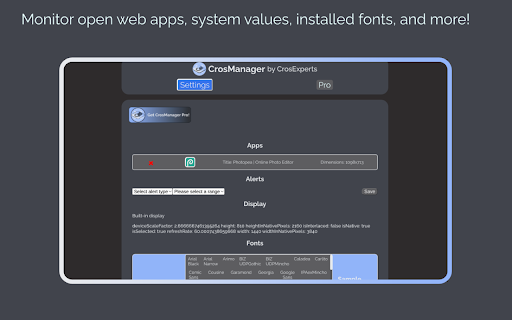
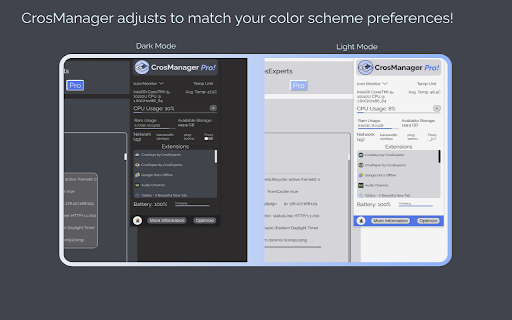
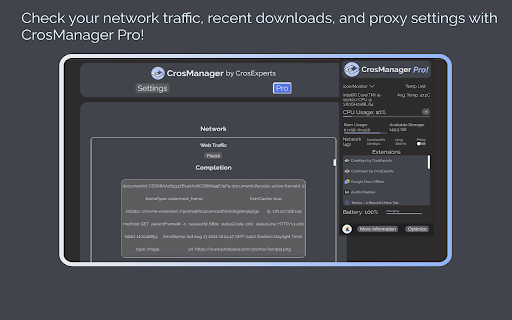

Take charge of your Chromebook with focused monitoring tools! A System Manager Created on and for ChromeOS! 🏢𝗠𝗔𝗡𝗔𝗚𝗘 𝗬𝗢𝗨𝗥 𝗖𝗛𝗥𝗢𝗠𝗘𝗕𝗢𝗢𝗞 - Keep an eye on CPU, RAM, temperature, and more! - Change your browser font with one click. - Read in-depth information on default and attached screens. - Check storage space and network speeds from the pop-up window! 🧩𝗖𝗢𝗡𝗧𝗥𝗢𝗟 𝗘𝗫𝗧𝗘𝗡𝗦𝗜𝗢𝗡𝗦 & 𝗔𝗣𝗣𝗦 - Enable/Disable your extensions with a click on the pop-up window. - See all open PWAs in the Options page, then close them when you’re done. - Hover over extensions to stay aware of what permissions they’re using. 💨 𝗤𝗨𝗜𝗖𝗞 𝗖𝗢𝗠𝗠𝗔𝗡𝗗𝗦 - Run Quick Commands to enable/disable annoying web rules. - Share a link to your active webpage using Share Current Webpage. - Re-enable the Chrome context menu using the Context Menu Unblocker! - Website blocking your clipboard? Use the Copy/Paste Unblocker! ⏲𝗞𝗘𝗘𝗣 𝗔𝗟𝗘𝗥𝗧 𝗧𝗢 𝗬𝗢𝗨𝗥 𝗗𝗘𝗩𝗜𝗖𝗘'𝗦 𝗡𝗘𝗘𝗗𝗦 - Set audio and visual alerts to watch your battery, RAM, and CPU usage. - Customize your alerts to tell you what you want to know! - Watch the extension icon for changes in your battery, RAM, and more. - Get up to 3 alerts as a free user and an unlimited amount with CrosManager Pro! - Use the Optimize tool to disable unused browser tabs and web apps. 🦾 𝗖𝗥𝗢𝗦𝗠𝗔𝗡𝗔𝗚𝗘𝗥 𝗣𝗥𝗢 For just $2.99, you get: - Network monitoring: Read in-depth information on your browser traffic and recent downloads. - Quick Proxy Setup: Enable/Disable proxy settings from the pop-up menu. - App Editor: Customize bookmark apps & PWAs using the App editor. Want to create a shortcut with a personalized icon? Now you can! - User-Agent Switching: Customize your browser identity with pre-built and custom User-Agent profiles. - More alerts: Create an unlimited amount of alerts! - Make CrosManager your own by adding custom sounds to your alerts! 🔒 𝗦𝗧𝗔𝗬 𝗣𝗥𝗜𝗩𝗔𝗧𝗘 & 𝗦𝗘𝗖𝗨𝗥𝗘 - We use the latest, most secure extension technologies from Google to accomplish what we do. Manifest Version 3 keeps you safe from harmful extensions and we embrace it wholeheartedly. - CrosManager Pro payments are handled by Stripe. This system is used and trusted by Google, Amazon, Zoom, and others. 𝗔𝗗𝗗𝗜𝗧𝗜𝗢𝗡𝗔𝗟 𝗜𝗡𝗙𝗢𝗥𝗠𝗔𝗧𝗜𝗢𝗡 - Some CrosManager Pro features require an internet connection. - We developed CrosManager for Chrome OS and it will not work 100% on Windows, Mac OS, or Linux. For full patch notes and support, visit us on our subreddit: https://www.reddit.com/r/CrosExperts/

System CPU Usage
Monitor the system's process via the toolbar popup or toolbar icon. System CPU Usage extension lets you easily monitor the CPU usage in your system via the browser toolbar. Please open the toolbar popup UI to see the current CPU usage (in percent). Moreover, the color bar shows you the active CPU usage every second (updates every second). Toolbar icon will change dynamically according to the current CPU usage. Please note that color bars are random blue colors for both the toolbar popup UI and the toolbar button's icon. If you have a feature request or found a bug to report, please fill out the bug report form on the addon's homepage (https://mybrowseraddon.com/system-cpu-usage.html).

CPU Info
Shows details about your CPU! Show information about your CPU

Hardware Info & Monitor Utility for ChromeOS
Simple & Powerful Hardware Information Utility for ChromeOS. crOS HI&MU allows you to monitor your hardware's current usage statistics & list your hardware's exact information without requiring you to leave your browser. You can support this project by buying a coffee: buymeacoffee.com/gokacinlar -v1.0.6: -Fix: Options page not working on some devices -Add: Better top header UI -v1.0.5: -New: Options page for better user control over the extension: Users can now select whether app should display hardware monitoring or information or both. -Fix: Some broken UI elements. -Add: Some UI enhancements (icons, font weight & size and background changes) v1.0.4: -New: Extension now supports displaying Network Information v1.0.3: - New: Extension now supports displaying GPU Information - New: Added tabs to switch between hardware monitoring & information for UI clarity. v1.0.2: - New: Extension now supports displaying Monitor (Display) Information - Fix: Various fixes

SysMonitor
SysMonitor is a simple system monitoring tool providing reliable information about: OS, CPU, memory usage, GPU, storage devices and IP address.
