
akadceddkkjpncchmgoojfpfaeelekha

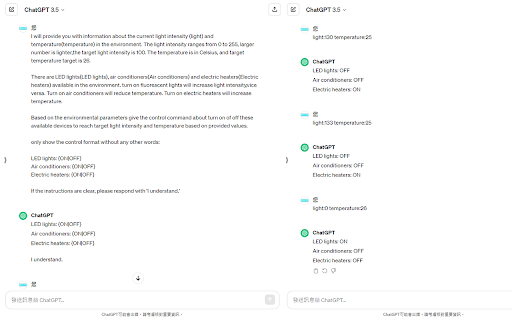
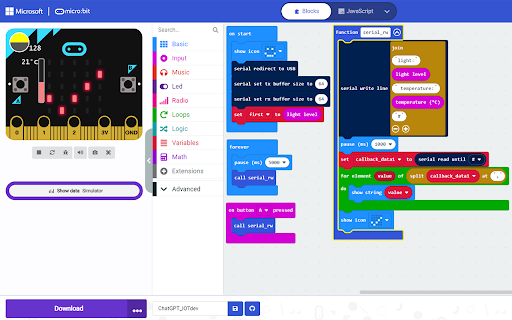
The extension connects Microbit to ChatGPT for interactive control. Sensing With AI, use the micro:bit to fetch parameters, and then send to ChatGPT. The prompts and micro:bit program are customized. Build your smart AI with sensing by yourself. The author is 陳棨煜 (Chi-Yu Chen) in MHCI lab, Dept CSIE, National Formosa University.

OpenAI ChatGPT Mini
Access OpenAI ChatGPT in a mini window, perfect for multitasking devs to stay connected without leaving their workspace. Introducing OpenAI Chat Mini, a sleek Chrome extension that allows developers and AI enthusiasts to access chat.openai.com in a compact and convenient mini window. Stay connected with OpenAI Chat without switching tabs or leaving your current workspace. Ideal for multitasking, this extension makes it easy for devs to collaborate, learn, and explore while remaining focused on their projects. Built using manifest v3, OpenAI Chat Mini is compatible with the latest Chrome browser features, ensuring smooth performance and a seamless user experience.

ChatGPT Long Conversation Toolkit
Search, bookmark, navigate, and manage long ChatGPT conversations. Make long ChatGPT conversations easier to search, navigate, and revisit. * Search messages within the currently loaded conversation * Jump directly to matching messages and search results * Bookmark important user and assistant messages for later reference * Quickly return to saved content through the Conversation Navigator * Keep long conversations organized and easier to manage * Optional visual controls to reduce clutter and focus on recent content * Local-first: no backend, no tracking, no analytics, and no conversation upload This extension works only with content currently available on the page. It does not delete your ChatGPT account data, modify your conversation history, or upload any conversation content. All bookmarks and navigation data are stored locally in your browser.

Chat GPS: chat outline for navigating Chat GPT
Adds a minimap and chat ouline to Chatgpt. Helps users navigate through long chats. Bookmark your favourite chats. I made this extension because I kept getting lost in my ChatGPT chats, and I thought others might find it useful too! It gives you a chat outline so you can stay organized and move through long conversations easily. Features: 💬 Chat Outline: Jump straight to any chat on the page. 🧑💻 Copy Code Blocks: Quickly find and copy code from your conversations. 🔎 Code Filter: See only the code blocks if that’s what you need. Perfect For: Developers handling long code discussions Researchers diving into AI outputs Writers, students, and daily ChatGPT users This extension is free and open source, and I’d love your feedback on the GitHub repo 🙂. Install it and never lose track of your chats again! The extension is useful for chat gpt navigation, it includes a scroll minimap aswell as a chat outline for chat gpt.

Shortcuts for ChatGPT
Master ChatGPT with /shortcuts Unlock your creativity with ChatGPT's real-time, high-quality prompts! Shortcuts help you generate the perfect prompt based on the slash command you enter. For example, by typing '/poet' followed by a space, ChatGPT will provide a prompt that unleashes your inner poet. When the extension detects a slash command, it sends it to ChatGPT internally to produce an ideal prompt based on the command in real-time. So the number of possible shortcuts that you can generate is infinite. All you need is an API Key from OpenAI's platform (https://platform.openai.com/account/api-keys) and a valid payment method (https://platform.openai.com/account/billing/payment-methods). We understand that privacy is important to you, which is why our extension does not collect any of your data. Your API key is also securely stored in your browser. Feeling stuck? Need some inspiration? Use this prompt in ChatGPT to check examples of shortcuts that you can use with this extension: Create a markdown table that showcases 30 different roles for ChatGPT, including their descriptions. Simply connect the words in column 1 with hyphens and add a slash at the beginning.
