
ajpgdoifdfgncpfgmnmbliigmckenlij

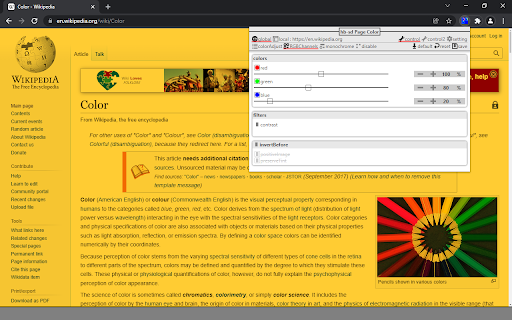
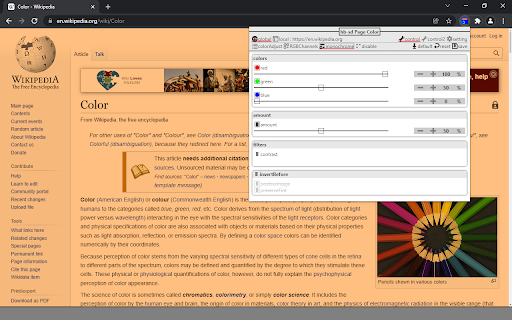


You can apply 3 types of filters : - Filter stack among brightness, contrast, saturate, hue-rotate, invert and sepia. - Set Red, Green, Blue color channels. - Monochrome or monochrome+normal intermediate color. Can simulate dark mode page by applying invert color for background+text and normal color for images. Can use dynamic icon on toolbar to quickly view filter state of the current tab page. Save settings globally or by domain. Dark/light + old/modern + font size and more theme for extension UI.

Video Ustaad
Fine-Tune The Visual Settings Of Any Video On The Web To Your Liking. Adjust Brightness/Contrast/Saturation And Much More !! The Video Ustaad is a Chrome extension designed to give users greater control over their video viewing experience. Whether you're watching tutorials on YouTube, catching up on the latest news on Twitter, or viewing professional content on LinkedIn, this extension lets you fine-tune the visual settings of any video to your liking. From your late night black-out movie marathons to sensory overloaded video; Video Ustaad comes to rescue every👏🏻single👏🏻time. 1. Adjustable Brightness: Easily adjust the brightness of videos to suit your preferences. Whether you prefer a brighter or darker display, you can customize it in real-time. 2. Customizable Contrast: Fine-tune the contrast of videos to enhance image clarity and detail. Find the perfect balance between light and dark elements for an optimal viewing experience. 3. Vibrant Saturation: Enhance the colors of videos by adjusting the saturation level. Bring out the richness and vibrancy of hues to make videos more visually appealing. 4. Classic Sepia Tone: Apply a classic sepia tone to videos for a nostalgic or artistic effect. Transform modern videos into vintage masterpieces with a simple slider adjustment. - Universal Compatibility: Works seamlessly across popular video-sharing platforms like YouTube, social media sites like Twitter, professional networks like LinkedIn, and more. - Real-time Preview: See the effects of your adjustments in real-time as you tweak the brightness, contrast, saturation, and sepia settings. Fine-tune until you achieve the perfect look. - With Video Ustaad, you can take control of your video viewing experience and tailor it to your personal preferences. Whether you're watching educational content, entertainment videos, or professional presentations, this extension empowers you to optimize the visuals for a more enjoyable and immersive viewing experience.

Web Color Filter
Apply color filters to your web pages. Multiple dark mode themes. Ajust the brightness, contrast, saturation, etc. # Note : After installing the extension, reload any open tabs or restart the chrome browser for the extension to work. ∘Turn any website to dark mode by adjusting the invert option or choose a filter which suits you. ∘Photoshop like effects for your websites. ∘Filter options like Turbulence and X-rays change the look of the web page and make them look unique ∘Use Hue Rotate to change the website color. ∘Easily reset the filters if not satisfied

ColorVeil
Add your own customized color filter (veil) over any website or document to help with dyslexia, visual stress, eye strain, and more. Meet ColorVeil. It's a simple screen filter for your web browser. If you've used our Windows app, you'll love this Chrome extension. It puts a color veil, or filter, on your screen. This helps make reading on the web easier on your eyes. ColorVeil is here to help with eye comfort. It's especially good for people with dyslexia or Scotopic Sensitivity Syndrome. But anyone who wants a more cozy web reading experience can use it. You choose the color and how strong it is to suit your eyes. • Color Filter — Add a color overlay over web pages or documents. Choose the color that's best for you. • Easy Use — Click the ColorVeil icon to turn the filter on or off. Simple! • Your Choice — Pick a color and make it as strong or light as you want. See changes right away. • Helps Reading — Aids people with dyslexia and Scotopic Sensitivity Syndrome. • Works Everywhere — The color veil shows on all web pages when it's turned on. • Private — We don't take or use any of your data. • Free: Use ColorVeil in all places - home, school, or work - without paying a penny. ColorVeil is easy, free, and made to make web reading better for you. We'd love to hear how it's working for you, and if you need help, we're here.

Color Changer
Change a page's text, background, and link colors to your liking. Summary: Some sites have good information, but don't always choose the best colors for text, background, and links. With this extension, you can change a page's colors to make it more readable. This extension isn't meant to be used as a global theme for the web and will not work well on all sites. In cases where it doesn't work, you could try creating a custom theme for that site with the Stylish extension. How to use: When you first install the extension, please refresh any tabs you have open so that the CSS styles from the extension are loaded on the page. 1. Click the Text, Background, or Link Color button. A border will appear around the button letting you know it's active. 2. Choose a color on the color wheel to change the color. You can see your changes live. 3. Now whenever you want to change the colors on a page, just click Change Colors. You can also change colors via a right-click context menu. The extension will remember hosts where you changed colors so you don't have to click it again. The Reset button at the bottom will reset the extension to default settings and resets all pages that were changed. About the color wheel: Colors are less saturated (more gray) near the center and more saturated (less gray) on the edge. There is a separate swatch that says "Gray", meaning 100% gray. This extension doesn't use Google Analytics. To view code: https://github.com/rokit/web-extension-color-changer
