
ajniphjinhppblnkeolojgopecjlnecn
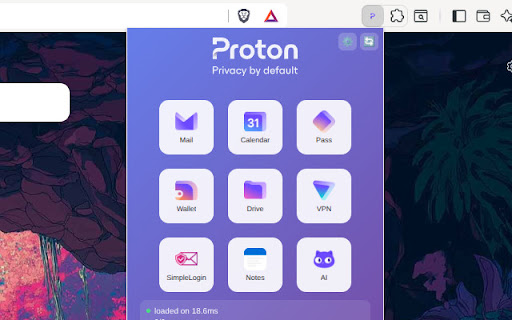


**This is not an official extension of Proton AG** Just a simple popup that shows the apps in the Proton ecosystem and opens them in a new tab. And link (on bottom) to Service Status page and to the official download apps page. No login, no data, no collection of anything... just the link to the Proton websites in a new tab. Just a neat way to have links to Proton services in your extension bar like as bookmarks. Under development to be a “config all sets to personlize your extension with your websites and icons by editing just one file”. Only local html, css, js and json.

G App Launcher (Shortcuts for Google™)
The best access to Google™ Services and Websites G App Launcher helps optimize your workflow by letting you open your most commonly-used websites from the browser toolbar. It opens shortcuts in a new tab so you can stay productive your own way. Easy to access Open the launcher extension from any page with just a click or through a keyboard shortcut. Packed with more than 1,000 shortcuts Add any Google website to the launcher or create your own shortcut to sites that you visit often. Over 1,000 shortcuts are available, including really obscure websites and action-based shortcuts. You can also add apps from Google Workspace. Customizable Personalize the launcher with shortcuts of your choice, with many options for layout and appearance. Dark theme is supported. Integrated Launch shortcuts with the same account as the page you’re currently on. Replace the default Google app launcher with this extension to bring your shortcuts with you on Google websites. Synced and secure Carry your personalized launcher across devices with support for browser-based extension sync. This means only you have access to your shortcuts; these are never sent to our system. Thoughtfully designed Feel at home with the familiar design based on the original app launcher. Your shortcuts are accessible through keyboard navigation. Note on permissions We value your privacy and security. G App Launcher requires additional permissions which the browser will inform about this on installation or first use. G App Launcher only uses these permissions for: - automatically getting the icon for websites you add manually, - making sure the shortcuts launched for Google websites are for the same account that you’re currently signed in on, and - correctly triggering action shortcuts related to the website you’re on (such as ‘Gmail send this’ or ‘Bookmark this’). - the permissions for google websites is needed for replacing the default app launcher on Google websites with G App Launcher.

Open in Perplexity
Seamlessly search experience with Perplexity 'Open in Perplexity' provides users with quick access to navigate to 'Perplexity' or perform related actions directly from the browser, enhancing convenience and efficiency. By adding this plugin, users can seamlessly access 'Perplexity' without the need to navigate through multiple pages, streamlining their browsing experience and enabling swift interaction.

ProtonDB for Steam
Adds the ProtonDB rating to games in the Steam store so you get an idea of how it will run before you buy it! ProtonDB for Steam adds proton badges to the Steam game pages. This way, you know how well a game runs on Linux before you actually buy it. The extensions shows you the proton rating, if available, and also if a game has a native Linux version alongside it. The project is open-source and can be found on GitHub. Credits to MostwantedRBX on GitHub for founding the project Version 1.6.4 Changelog: - Added the ability to toggle badges in a new settings page - Added the ability to change badge colors in the settings page - Added steamdeck verification badges - Fixed some broken features Coming Soon: - Badges on the front page

ProtonMail Assistant
ProtonMail Assistant - Provides quick access, unread email reminders, desktop notifications, and more. ProtonMail Assistant - A smart email notification tool with customizable filters, helping you stay focused on important emails with unread reminders and desktop notifications. 🎯 Who Is This For? • ProtonMail users who need to stay on top of important emails • Professionals who want to filter out noise and focus on what matters • Users who value email privacy and efficient notification management ✨ Core Features 1. Smart Email Notifications • Real-time unread email counter on extension icon • Desktop notifications for new emails • Click notifications to jump directly to ProtonMail • Customizable notification duration (default: 10 seconds) 2. Powerful Filtering System • Filter notifications by sender email addresses • Filter by email subject keywords • Customize which emails trigger notifications • Stay focused on what matters to you 🔒 Privacy First • Runs completely locally • No personal data collection • All settings stored in your browser • Minimal permissions required: - Notifications - Tab management - Local storage - Status checking 💻 System Requirements • Chrome 88 or higher • Works on Windows, Mac, and Linux • Internet connection required 🌟 Perfect For • Staying informed while working on other tasks • Filtering out non-essential email notifications • Quick access to your ProtonMail inbox • Managing email notifications efficiently Usage: 1. Install the ProtonMail Assistant extension 2. Click on the ProtonMail Assistant icon 3. Log into your ProtonMail account Start using ProtonMail Assistant today and take control of your email notifications!
