
ajdeagnomgifpeimhpofiphnphdlhbjn


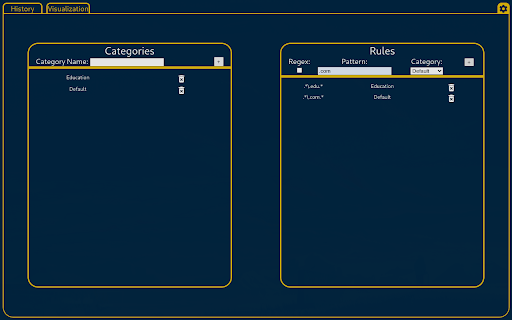
A Chrome extension to capture more information about your browsing history. Adds more ways to browse, categorize, filter, and otherwise view your browsing history from our custom user interface. This project will always be free and open source software; view the source code at https://github.com/AdvancedHistory/ABHChrome

Chrome Notes
A simple notepad extension for Google Chrome NEW: You can now use speech to text NEW: You can now open Chrome Notes with Ctrl+Shift+X (Command+Shift+X on mac) NEW: You can now download and upload complete backups NEW: Chrome Notes adds a right click menu option to send the selected text to a new note! NEW: You can now have multiple notes! NEW: You can now customize the font size! A simple notes extension, right in your browser! Easily copy around a few words to and from different browser windows and other apps. Thank you for over 100,000 users, 100 ratings and 4.5 stars! Chrome Notes remembers your notes and mode, even after closing your browser or restarting your computer! Notes are stored in local storage, so nobody else will ever see them, not us, and not Google, Microsoft, or Apple. Features: * Resizable notepad * Shortcut buttons for cut, copy, paste, and select all * Normal keyboard shortcuts work too * Save as a .txt file * Open in new window * Speak selected text out-loud * Remembers last notepad size for you next time * Store multiple notes, and quickly create, edit, share, or delete * Focus mode for distraction free writing * Adjustable font size * Right click and send selection to new note * Download and upload full backups * Speech to text (click the mic and speak to put your words on the notepad) * Keyboard shortcut Ctrl+Shift+X (Command+Shift+X on mac) to open Chrome Notes is the smart, simple notepad built for you 😊

History Trimmer (Cleaner)
Chrome extension to automatically trim and clean your browsing history ✨ Keep your Chrome browsing history clean and private with History Trimmer! This lightweight extension automatically removes browsing history older than your chosen time limit, helping you stay organized and secure. ⏳ Custom Time Limit: Set how long (e.g., 7 days, 30 days, etc.) you want to keep your history. 🤖 Automatic Cleanup: Say goodbye to manual work—history trimming happens effortlessly in the background. 🔒 Privacy-Friendly: All data stays on your device. No history is sent to external servers. 🎛️ User-Friendly Interface: Intuitive settings make it easy to customize the extension just the way you like it. 🚀 Perfect for users who value privacy and want a clutter-free browsing experience! ⏸️ Temporary Disable: Pause trimming functionality when needed without uninstalling the extension. 📥 Download History Trimmer now and take control of your browsing history!

Delete Browsing History
Quickly clear browsing history or delete search history in a single click with this extension for Chrome. Delete browsing history is a powerful chrome extension that allows you to effortlessly clear all or the specific browser data in just two clicks. It's an indispensable tool for every Chrome user, ensuring secure and smooth searching. 🔥Browsing history delete: You can clear search history, clear cache and clear cookies, it stands as an all-encompassing solution for a cleaner, faster browser experience. 🚀 Quick and Easy Usage: Click on the delete browser history icon to access the control panel. Choose to clear all or clear specific data. 💻 Key Features: 💡 Delete search history chrome: Conveniently erase your entire data or just parts of it. 💡 Cache cleaner: Rapidly clear cache to optimize browser space and enhance performance. 💡 Cookie cleaner: Easily clear cookies to safeguard your privacy. 💡 User-Friendly Interface: A straightforward and intuitive interface simplifies managing your browser data. 💡 Performance Boost: Enhance your browser’s speed by routinely clearing broswer data. ❇️ How it Works: Delete browsing data employs advanced algorithms to manage your data effectively. A few clicks are all it takes to erase your digital footprints, maintaining the privacy of your online activities and keeping your browser quick and responsive. 📒 Detailed Introduction to clear browser history: This Chrome extension is crafted to offer a swift and efficient means of managing your digital footprint. Whether it's quickly clear history from browser before a meeting, preserving privacy on a shared computer, or simply ensuring your browser's optimum performance, delete browsing data is the tool you need. 🔥 Main Advantages: 1. Intuitive interface for straightforward navigation. 2. Quick process to clear search history in just two clicks. 3. Options to delete cache and cookies, enhancing your privacy. 4. Negligible impact on browser performance. 5. Settings can be customized to align with your browsing habits. 6. Guarantees privacy and security during your internet sessions. ⚙️ Specific Functions of delete browsing history: ➤ Boost Browser Performance: Accumulated browser data can slow down your browser. Use it to delete google search history chrome and clear cache and cookies efficiently, enhancing your browser's speed and responsiveness. Say goodbye to sluggish browsing! ➤ User-Friendly Experience: Designed for simplicity, delete search history offers a user-friendly interface. Effortlessly clear browsing data and delete google search history on Google Chrome with just a couple of clicks. ➤ Master Cookie Control: Take charge of your online privacy by managing cookies effectively. Delete browsing data in chrome allows you to easily delete cookies, ensuring your personal data is not stored longer than necessary. ➤ Enhanced Privacy: Each web session leaves digital traces. Clear browsing history ensures that erasing all your browsing data is a hassle-free process, providing an added layer of security, especially for public or shared computers. ➤ Flexible Cleaning: Whether you need to google history delete all or just the data from the last hour, delete history offers customizable options to suit your needs. 🧑💻 Getting Started: Install delete browsing history from the Chrome Web Store. Access the extension with a click. Select your preferred clearing options and execute with another click. Revel in a cleaner, faster, and more secure browsing experience. ❓ Frequently Asked Questions about delete browsing history chrome: 📌 Is it free? Yes, it’s entirely free, providing all features without any charges. 📌 How to delete search history? By enabling you to history search delete, it ensures your online activities stay private, especially on shared or public computers. 📌 Will delete browsing history google slow my browser? No, it's specifically designed to improve your browser's performance by eliminating unnecessary data. This Chrome extension is a vital tool for anyone looking to manage their digital footprint effectively. Whether it's for maintaining privacy on shared computers, clearing data for security reasons, or just to keep your browser running smoothly, clear search history is your go-to solution. 🌐 Experience delete browsing data in chrome today: Enhance your broswer performance with increased privacy and efficiency. Download delete browsing data now for secure, optimized internet usage.

BrowserGrow
BrowserGrow Chrome Extension Connect BrowserGrow to Your Browser and Get Real Work Done The BrowserGrow Chrome Extension connects the AI agent directly to your browser, allowing it to complete everyday tasks using your own browsing context. BrowserGrow works securely within the tab you choose, helping you automate tasks that require access to your logged-in accounts and personal workspace — without ever sharing your passwords. What You Can Do with BrowserGrow Work Inside Your Accounts Let your agent handle tasks in Gmail, Google Calendar, Notion, and other web apps you’re already signed into — safely and seamlessly. Use Your Real Browsing Context BrowserGrow allows the agent to interact with websites exactly as you would, accessing information and taking action within your live browser session. Stay Fully in Control You explicitly approve each session. The agent only operates in the tab you assign, and you can stop it at any time by simply closing the tab. Install the BrowserGrow Chrome Extension to unlock AI assistance that works directly inside your real online environment — securely, transparently, and under your control. Let your browser do more.
