
aicgfjkeikpppglfdhmdgncaiemeenon

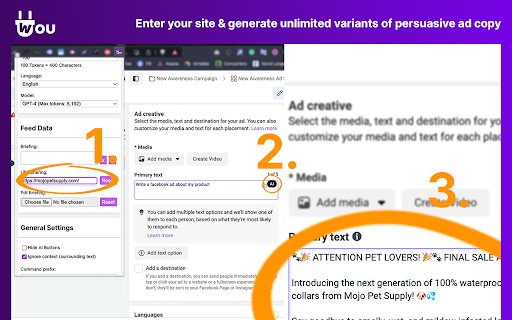
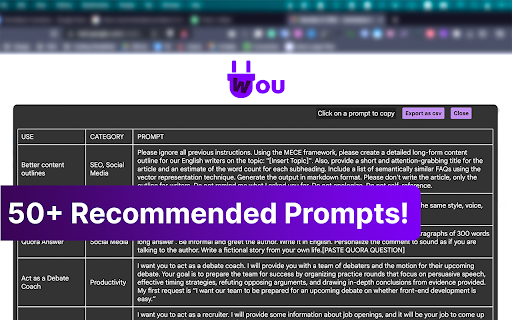
Use AI from your browser everywhere! By command or simple button click, you can finally forget about switching tabs and copy-pasting Leverage the power of ChatGPT in any text field across the web with Wou AI Browser Integration! 🚀✍️🌟 This innovative Chrome extension integrates ChatGPT AI assistance into your daily browsing experience, making writing, translating, and summarizing more accessible and enjoyable than ever. From crafting emails to generating code snippets, Wou has got you covered! 📧🌍💻 Key Features: 🔹 Seamless Integration: Access AI in any text area or input field on any website - Google, Facebook, LinkedIn, Gmail, Twitter and more! 🌐 🔹 Comprehensive Multi-Language Functionality: Chat with ChatGPT about queries, translations, summaries, and more without any coding! 🧠 🔹 Customizable: Personalize your experience with BRIEFING, custom trigger modes, markdown rendering, and more. ⚙️ 🔹 FREE ChatGPT Plus: Official OpenAI API (GPT 4, GPT-3.5-Turbo and GPT-3). 🤖 🔹 Easy to Use: No technical expertise is required! Just install the extension and watch the magic happen. 🛠️ 🔹 Comes with 50+ recommended prompts for any use case! 🤖 Possible Use Cases: 📝 Business Owners & Marketers: Boost productivity and generate engaging content, ad copy, or social media posts in no time. 🚀 👩💻 Programmers: Speed up your workflow with auto-generated code snippets and suggestions. 🎯 📚 Students & Academics: Write well-researched essays, create study materials, and brainstorm project ideas. 🧠 🗣️ Language Learners: Improve your language skills with instant translations and vocabulary suggestions. 🌍 🟢 Save Time: Write faster and more efficiently with Wou assistance. ⏱️ 🟢 Boost Creativity: Explore new ideas and writing styles with AI-generated suggestions. 🎨 🟢 Improve Accuracy: Enhance your grammar, punctuation, and spelling with ChatGPT's language expertise. 📚 🟢 Enhance Communication: Write more effectively and persuasively across different platforms. 💬 Experience the future of browsing with Wou AI Browser Integration, and transform your online experience today! Install the free Chrome extension, and supercharge your writing in any input field. Get ready to work smarter, not harder, and join the AI revolution! 🌟💻✍️ 1. What is Wou AI? Wou AI is a browser app that uses GPT4, a state-of-the-art language model created by OpenAI, to harness the power of artificial intelligence to generate human-like text. Enhance your browser with the power of Wou AI ANYWHERE. It works by showing a ChatGPT response alongside or by replacing normal input - YOU CHOOSE! 2. Is Wou AI free to use? Yes, this extension has a free plan with limits that reset every day. The unlimited plan costs only $9.9/mo or $99/year. 3. What browsers are supported? Currently, Wou AI supports Google Chrome, Brave, and many more. Don’t see yours on the list? Send us a message. 4. Do I need a ChatGPT/OpenAI account? No, you don’t need a ChatGPT account to use this extension. -----Privacy Practices Clarification and Assurance----- We at Wou AI understand the utmost importance of safeguarding your personal information and the data you entrust with us. We'd like to take a moment to address some concerns and clarify our stance on data privacy and security. First and foremost, it's crucial to emphasize that we collect data only when you actively engage with the AI to receive answers or contribute to its training using website data. At any other time, our extension remains dormant, not tracking any activity or site content. Our commitment to your privacy is steadfast, and we adhere to the highest standards of data security. Here's how we ensure your data is protected: Limited Data Usage: The data collected is confined to the specific purpose of improving the AI's response capabilities and understanding. It is never used for unrelated functions, let alone being available for sale to third parties. Transparent Policies: We are committed to full transparency regarding our data usage practices. We encourage users to review our detailed privacy policy, which outlines the measures we take to protect your information meticulously. No Creditworthiness or Lending Assessments: We strictly prohibit the use of collected data for determining creditworthiness or for lending purposes, ensuring that your personal information remains confidential and secure. We invite users to engage with us openly, and we are here to address any concerns or queries you may have regarding our privacy practices. We are continually working to foster a safe and secure working environment for all our users.

StudyMateAI
A browser extension for accessing GPT-3 while browsing or viewing PDF files 📚 Are you looking for a way to study smarter, not harder? Introducing StudyMateAI – the ultimate AI-powered study assistant! With StudyMateAI, you can take your studying to the next level by accessing GPT-3's advanced natural language processing and machine learning algorithms. This browser extension allows you to easily access AI tools such as text summarization, flashcards, and question answering, all while browsing or viewing PDF files. But that's not all – StudyMateAI also features advanced AI browsing and search capabilities, allowing you to quickly and easily find the information you need, right when you need it. Plus, with our state-of-the-art Chat GPT AI model developed by OpenAI, you can get instant definitions and explanations for any word or concept you're struggling with. The StudyMateAI extension is perfect for students, researchers, or anyone who wants to learn more efficiently. It enhances the interface and adds new features that will help you improve your workflow and save time. And with our easy-to-use browser integration, you can seamlessly use StudyMateAI while browsing, googling, or viewing a PDF in your browser. 🚀 We're always looking to improve StudyMateAI, so click "support" to send us your feature requests. 🤝 Current Features • Access to GPT-3 for text summarization, flashcards, and question answering • Advanced AI browsing and search capabilities • Instant definitions and explanations for any word or concept you're struggling with • Seamless browser integration for effortless use 🧑💻 Next Features • Additional AI tools for more efficient studying • Multiple themes for personalized studying experience • Compatibility with more file types 📆 Planned Features • Integration with more educational platforms • Enhanced AI-powered note-taking • Collaborative study features • More personalized learning suggestions • Website with version features, FAQ & help, contact, and more information Transform the way you learn with StudyMateAI – the world's AI-powered study assistant. Download StudyMateAI today and start studying smarter!

Enigma, ChatGPT Sidebar
Enigma is an AI assistant sidebar. It brings the power of AI into your hands. Access ChatGPT everywhere. ⭐⭐Now chat with any PDF file. Upload your documents, papers, or assignments and ask any questions about them! Access ChatGPT everywhere with the Enigma extension! ⭐Open the sidebar using ctrl+alt+j (ctrl+cmd+j on MacOS) or clicking on the Enigma icon at the bottom left corner of the screen. ⭐Easily Draft content for blogs and social media with the new "Compose" tab. ⭐Summarize long webpages without any limit to its size. ⭐ Write emails for Gmail and Outlook or summarize your mailbox. ⭐ Summarize Wikipedia pages. ⭐ Get answers with faster response times. ⭐ Download the response as a Word document. ⭐ Translate highlighted text. - Write tweets for twitter. - Query highlighted text from any website. - Keep chat context for each website separately. - Easily write essays with ChatGPT and generate Word documents. - Query highlighted text directly from the context menu. - Access ChatGPT anywhere anytime, even when demand is high! - Generate captions for Instagram. - Write posts for social social media such as LinkedIn. - Summarize Google, Bing, and DuckDuckGo results. - Desktop application and VS Code extension will be available soon!

VideoMind: Quick ChatGPT for Youtube
1-Click summary, translation or qa for Youtube Videos. VideoMind is a powerful Chrome extension powered by ChatGPT. It provides a 1-CLICK video summary, translation, format for social post or anything prompt you would use directly. Access it directly from your homepage or search results for FREE. With this tool, you can easily avoid clickbait and become more productive by making informed decisions on whether a video is worth watching. Whether you’re a content creator or marketer, Quick Insights from Youtube is an essential tool that can help you save time and boost your productivity. Some key questions and possibilities you can ask: 1. What is the main topic of the video? 2. What is the purpose of the video? 3. What are the main points made in the video? 4. What are some next steps or actions that viewers can take based on the information presented in the video? 5. What are some potential counterarguments or alternative perspectives related to the video’s topic? 6. What are some common misconceptions or misunderstandings related to the video’s topic? 7. What are some potential implications or consequences of the ideas presented in the video? 8. What is the speaker’s main argument or thesis? 9. Who is the intended audience for the video? 10. What are some examples or evidence provided in the video? • Researching a topic: Quickly find videos that are relevant to your research and get a sense of what people are saying about them in the comments. • Avoiding clickbait: Get a better understanding of what a video is about before clicking on it, saving you time and frustration. • Improving productivity: Use the extension to quickly scan through search results and find the most relevant videos based on their descriptions and comments. • Learning from others: Use ChatGPT in combination with the extension to receive summarized insights from the comments, allowing you to learn from others’ experiences and opinions. VideoMind: Quick ChatGPT for Youtube is a powerful tool for anyone who wants to make the most of their time on the platform. Start now with a preset or your own prompt. Support: contact us for any questions or feedback? at videomindonline@gmail.com

Vio - Your ChatGPT Companion
AI companion powered by ChatGPT that give your instant answers and help generating text on any page. Introducing Vio🤖, your ultimate ChatGPT companion powered by ChatGPT AI (including GPT-4) to deliver instant summarization, explanations, translations, rewriting, and text composition on any website!🌐 No more toggling between different tabs or apps, as everything you need is now just a click away. 💻 With Vio, everything you need is right there at your fingertips. And with its intuitive interface and easy-to-use features, Vio makes it easier than ever to write like a pro. Features: ✅ Support both ChatGPT web application access and OpenAI Chat API key ✅ Quick access to ChatGPT at the side of your screen by clicking the Vio floating button at the side 📌 or pressing Cmd + B for Mac and Ctrl + B for Windows/Linux ✅ Quick lookup by selecting text ✅ AI characters to assist you in various task (Eg. Math tutor, Personal trainer, UI designer etc) ✅ Summarize lengthy articles and explain difficult topics ✅ Translation on any page 🌎 ✅ Improve your writing 📝 with the help of AI with grammar checking and paraphrasing ✅ Generate emails, posts, and messages in the tone you prefer. ✅ AI copywriter to compose articles and Facebook advertisements. ✅ Easy copy paste of response and also download of images. ✅ Support for GPT 3.5 and GPT 4 (for Pro users 🚀) Use Vio as your reading companion 📖: * Summarize articles * Explain articles, words, or even code * Translate to any language * List key takeaways * Shorten or lengthen your text Or use Vio as your writing companion ✍️: * Write reply to emails or messages. * Compose emails 📧, messages 💬 , social media posts, and captions * Assist in writing Facebook ads. * Rewrite your content with a different tone * Make text shorter or longer * Fix grammar and spelling. Vio has got you covered. 😊
