
ahmecpcieaahajlckfhifdgelgdjbkab

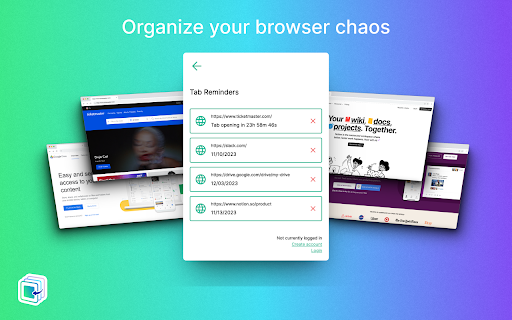
Tab Reminder allows users to set calendar dates for when they'd like URL tabs to reappear on their browser. Never lose track of important tabs again. Tab Reminder automatically reopens any website at the exact date and time you choose. Schedule deals before they expire, deadlines before they pass, and tabs before you forget. Schedule Tab Reminders Set any URL to reopen on a specific date and time. Perfect for flash sales, application deadlines, event registrations, limited-time deals, or anything you need to come back to later. Quick Reminders One-click presets to remind you in 1 Day, 1 Week, 1 Month, or 1 Year. No date picking required. Custom Reminders Choose a specific date and time with the built-in calendar and time picker. Set it and forget it. Repeat Reminders Schedule recurring reminders on a daily, weekly, or monthly basis. Choose specific days of the week for weekly repeats. Set an optional end date. WHO IT'S FOR • Deal hunters: Schedule sale pages to reopen before deals expire • Students: Set class portals and assignment pages to reopen before class • Online shoppers: Save flash sales and restocks for later • Professionals: Schedule reports and dashboards for Monday morning • Researchers: Revisit articles and references without cluttering bookmarks • Bill pay: Set banking tabs to reopen before due dates Save your entire browser window (all open tabs) as a collection. Restore saved windows with one click. Great for organizing project tabs, research sessions, or daily workflows. Share a saved window with anyone via a unique link. Recipients can view the tabs and import the collection into their own Tab Reminder account. Sign in with Google to sync your reminders across devices. Your reminders are backed up to the cloud so you never lose them. • Dark mode and light mode toggle • Pause and resume all reminders with one click • Expanded view for managing saved windows • Chronological sorting of reminders (upcoming and past) • Favicon previews for each saved tab • Works with any website URL 1. Click the Tab Reminder icon in your browser toolbar 2. The current tab URL is automatically filled in 3. Choose a quick preset or set a custom date and time 4. When the time arrives, the tab reopens in your browser • Tabs: Required to read the current tab URL and restore saved windows • Alarms: Required to trigger reminders at the scheduled time • Storage: Required to save your reminders locally • Identity: Required for Google Sign-in and cloud sync Tab Reminder is free forever. No ads. Sign in with Google to enable cloud sync and cross-device access. Tab Reminder may append affiliate tags to supported retailer URLs (such as Amazon) when reopening your saved tabs. This helps support the extension at no extra cost to you. No browsing data is collected or shared.

SuperReminder - Reminder of websites
Do you struggle with managing your web browsing and staying on top of important deadlines? Do you ever forget to visit an important website at the right time? Our Chrome extension can help you improve your productivity and stay organized! With our extension, you can create reminders for any URL and set the exact time when you want to be alerted. Whether you're a busy professional, a student, or just someone who wants to make the most of their time, our extension can help you stay focused and get more done. Our customizable notifications let you choose the message, behaviour, and buttons for each reminder, and you can even snooze the notification for a specific amount of time. That means you can set up the perfect reminder for your needs and preferences. With all your URL reminders organized in one place, you'll never lose track of what you need to visit. And by setting reminders for important websites and deadlines, you can stay on top of your web browsing and accomplish your tasks efficiently. Some of the keywords related to productivity and reminders that we incorporate in our extension include time management, productivity, reminders, notifications, organization, scheduling, web browsing, deadlines, and efficiency. Install our extension today and start taking control of your web browsing and tasks! - Free extension - Unlimited number of notifications to create - 🔁 Recurring reminders: 1️⃣ Any Interval 2️⃣ Hourly, Daily, Weekly, Monthly trigger 3️⃣ Choose weekdays or month days - Add any URL and optional note - Choose from the set of predefined alerting times - Or add your custom time - Customize the notification appearance: click, snooze behavior, sounds, persistence - Quickly look up all past and future reminders - More features to come soon.

Pondr: Tab Manager & Bookmark Reminder
The extension that manages bookmarks and finds the best time to remind you to revisit. Bookmarks are meant to be consumed, not clog up your browser as an open tab. Save tabs and ACTUALLY remember to visit them. 💡 Simply save a tab and keep working See an interesting article or video suggestion while researching something? Queue the tab with Pondr and alleviate the pressure of having to remember to view it later. 💡 Relieve the mental toll of planning With the Google Calendar™ integration, all you need to do is pick the tab you want to save, we'll do find the time for you. No more combing through your schedule and setting an alarm/reminder. Nothing's worse than an endless list of bookmarks or too many tabs open at once. It's hard to look at and a pain to comb through. Pondr's clutter-free tab display gives you simple oversight of what matters. View tabs in a grid view or list view. 💡 An easier way to remember deadlines Have a job application or assignment deadline coming up? Queue the submission page to the specific date, and the tab will reappear on the day it's due! 💡 Save and view all corners of the internet Pondr can be accessed anywhere within the Chrome browser. From articles, videos and anything else under the (digital) sun. 💡 Stop emailing yourself links Access Pondr on any page just by opening the pop-up. Now you can spend more time doing work while queuing up all of your favorite articles to read later. Instead of keeping open tabs or making tons of bookmarks for tasks, you hope to do later, easily save articles, videos, or any webpage on your browser while simultaneously scheduling the reminder with only one click. Your tabs will miraculously appear when it's show time🕺! Get back to what's important and your tabs will be patiently waiting for you out of sight! For users with Google Calendar™, connecting with Pondr allows you to take reminders a step further by automatically finding the best time to remind you to revisit your bookmark. Pondr identifies the best time to remind you based off certain criteria in your calendar such as open time slots. ⚡ Automated bookmark reminders Simply hit the Pondr button on a tab you want to save for later and Pondr will find the best time to remind you via your Google Calendar 🎨Customizable Preset Reminders Have a frequent time you’re available? Simply turn it into a preset reminder time to assist your tab management 📌 Pinned Tabs Not all tabs are meant to be visited only once! Pondr lets you speed dial into the websites or apps you use on a daily basis. 🔍 Search for Tabs Get instant access to the tabs you need to get the job done. Pondr is able to search for any website inside your library, letting you find exactly what you’re looking for in seconds. 📅 Agenda View Get actionable oversight of what’s coming up today with Agenda View. You don’t need to be bombarded with every single bookmark you’ve queued just when you want to see whats upcoming. 🗓️ Reschedule Reminders Something come up? Seamlessly reschedule your tab for another day within your library. ⌨️ Keyboard Shortcuts Easily Pondr a tab without touching your mouse! ✅ Private Library Passcode-protected library for sensitive tabs and data Who is Pondr for?: ✓ Students ✓ Help Desk & Customer Support ✓ Sales CRM ✓ Sales Representatives ✓ Task Management ✓ Finance ✓ Operations ✓ Human Resources and Recruiting ✓ Project Management ✓ Onboarding ✓ Marketing ✓ Remote Work ✓ Those with too many tabs!! HELP & SUGGESTIONS Help Center Email: support@pondr.app Suggestions: https://pondr.canny.io/feature-requests If you have any problems or find a bug - please write to us at pondr.extension@gmail.com. We will definitely help! PRIVACY AND PERMISSIONS https://www.pondr.app/privacy-policy DISCLAIMER Please note Pondr is not made by Google™ or affiliated with Google™. Google™, Google Calendar™, and Google Chrome™ is trademarks of Google Inc. Use of this trademark is subject to Google Permissions. to be temporary, not clog up space on your browser.

Delayo
Temporarily put tabs to sleep and have them reappear when you need them Delayo – The Smart Tab Postponer Too many tabs open, but no time to deal with them right now? Delayo is here to help. It allows you to "snooze" tabs and bring them back when you're ready — simply, efficiently, and without distractions. ✓ Postpone any tab with a single click ✓ Schedule automatic returns using alarms and notifications ✓ Quickly access your list of postponed tabs ✓ Clean and modern UI for fast interaction ✓ Stay organized even with dozens of tabs open • Reduce tab overload and mental fatigue • Never lose important tabs again • Focus on what matters now — revisit later • Build a better and more intentional browsing flow Delayo collects **no personal data**, uses no telemetry, and stores everything locally in your browser. It’s free, open-source, and always will be. • Articles you want to read later • Research tabs for future reference • Shopping guides, comparisons, research • Pages that will be useful later in the day 💡 Built With Delayo is powered by modern technologies: React + TypeScript + Vite + TailwindCSS = fast, efficient, and easy to maintain. Ready to regain control of your browser? Try Delayo today.

Tab Snoozer - Snooze tabs in a click
Easily snooze tabs with a click! Set timers to hide distracting tabs and automatically bring them back when you need them again. Extension to Snooze Tabs for later. - Tab Snoozer is a Chrome extension that helps you manage your browser tabs by allowing you to "snooze" them for a set period. Once snoozed, the tab will close and reopen automatically at the specified time. Click the popup and select how long the tab should be snoozed. We only use the following permissions to allow the extension to work. - activeTab: Allows the extension to access the URL of the active tab. Ensures that the extension only interacts with the tab you choose to snooze. - storage: Used to store the snoozed tabs' URLs and their snooze schedules. Data is stored locally in the browser and is not shared or synced externally. - alarms: Used to schedule the reopening of snoozed tabs at the selected time.
