
aglggobkfpbjcgkhchdcflocblfbadfa

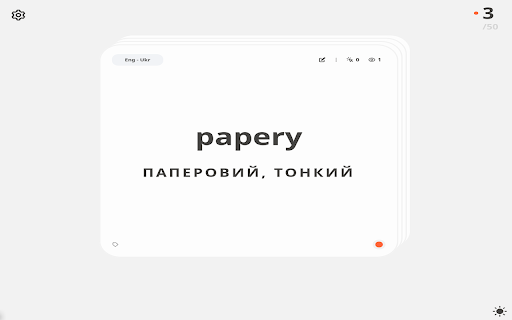
Repeat your knowledge with flashcards on each new tab Extension replaces a new tab in the browser. Each time you open the browser/new tab, you will see a new random card. - No permissions - No analytics - No frameworks - Multiple decks - Support for different types of cards - Local data storage - Open-Source

Vaulto Cards
Turn selected page text into study cards with AI, optional Anki export, and Vaulto sync Vaulto Cards helps you turn selected text on any web page into high-quality study flashcards in seconds. Key Features: - Smart AI Generation: Instantly create cards using advanced AI models. Contextual Content: The extension automatically generates accurate translations, usage examples, and AI-powered illustrations for better memorization. - Cloud Sync: Optionally sync your progress with your Vaulto account to study across devices. Simply select text, click the icon, and let AI do the heavy lifting for your studies.

Flashcard Lab: Vocabulary & Language Learning
Extract vocabulary, text, and definitions straight to Google Sheets to study anything as flashcards while browsing the web. Flashcard Lab easily copies vocabulary, text and definitions from websites into Google Sheets™ in order to make flashcards as you are browsing the web. It also automatically grabs the definition for you from dictionary.com, all for free! 🎉NEW: Now you can review the flashcards with various study modes directly in the Chrome Extension! Unlimited review requires PREMIUM functionality. 📌How To Use: First, create a new Google Sheets™ spreadsheet (or select an existing one) from the Flashcard Lab Extension options page. Select any text from a webpage, right click and click "Save to spreadsheet". That's it! 🧪Core Features: ✔️Auto-insert words from webpages to Google Sheets™ with one click ✔️The extension will find the definition for you from Dictionary.com ✔️Free and add unlimited words, text, and definitions! ✔️Randomized review of flashcards ✔️Study with spaced repetition mode ✔️Reverse (answer/prompt) study mode ✔️English pronunciation ✔️Add synonyms, mnemonics, and more! 🎁More apps in the Flashcard Lab app suite: Google Sheets™ add-on: https://workspace.google.com/marketplace/app/flashcard_lab/934660656831 🔒Permissions: We understand there may be questions regarding the permissions needed to use the extension. We aim to be as transparent as possible hoping to inform you that we have absolutely no intent of using the access you grant to your browser maliciously. Follow the link below to read on: 📘 Change log: 4/16/2025: Improve purchase flow 1/27/2025: Improve latency 12/24/2024: Dictionary.com definition automated-retrieval bug fix 11/22/2024: Support images on back of card from F.L. add-on 9/17/2024: Add card animations. Improve log in process 9/9/2024: Add hot keys for toggling hints and synonyms 8/27/2024: Implement in-review card editing 7/31/2024: Minor bug fix 6/6/2024: Improve error logging, minor bug fixes and UI improvements 6/5/2024: Add save hot key shortcut ("Ctrl+Shift+S", mac: "Cmd+Shift+S") 4/4/2024: Add flashcard review directly in the Chrome Extension 3/24/2024: Handle when user is not synced in Chrome 3/21/2024: Improve sign in/out UIUX, minor bug fixes 11/9/2023: Add iOS link for Flashcard lab 9/26/2023: Update to not require Drive permissions. 7/31/2023: Fix definition extraction bug, alert user of Google account sync bug 3/30/2023: Update context menu creation. 3/17/2023: Initial publish

Multi-sided Flashcards
Flashcard app with multiple sides, so you can check what you need, when you need. A flashcard app that brings a whole new functionality: testing more than one side! Sometimes two sides just isn't enough. If you're studying a language, for example, you might want three sides, to study a word, its meaning, as well as some examples of how it can be used. Multi-flashcards brings that functionality, with an easy way to create new flashcard decks of however many sides you choose, followed by the functionality to customize your testing, allowing you to select how many sides you'd like to study and the order the sides appear in. This way, you'll be able to fully control the way you study, and only ever have to record the information once.

NoteGPT: AI Flashcard for Quizlet and Cram
🚀Features: Study smarter with NoteGPT. Create personalized flashcards powered by AI, designed to enhance your memorization process through active recall and spaced repetition. With seamless Quizlet integration, you can import your flashcards with ease and study efficiently. Key features include: ● One-click import: Easily import Quizlet flashcard decks with just one click. ● Knowledge integration: Automatically identify key points, important facts, and concepts from your materials. ● Convenient studying: Start reviewing your flashcards anytime, anywhere with minimal distractions. 🚀How to Use : ● Install the extension. ● Pin the extension and click on the logo. ● Navigate to the flashcard details page on Quizlet (must enter the flashcard page, unable to import card decks from Quizlet homepage). ● After successful import, visit the NoteGPT website to review your flashcards anytime, anywhere. 💡 Q&A Q1: What is Flashcards? A1: Flashcards are a tool for active recall, used to help with memorization and review. Each card typically has a question on one side and an answer on the other, helping to reinforce memory retention through repetition. Q2: What is an Article summary? A2: With NoteGPT, you can generate flashcards from articles, videos, PDFs, and more, saving time and improving study efficiency. NoteGPT:The intelligent learning tool that helps you study smarter. We're continuously expanding our integrations with other flashcard platforms to bring you even more ways to enhance your learning experience!
