
agddpmjdjmkhhhohlijdccbnceidonab
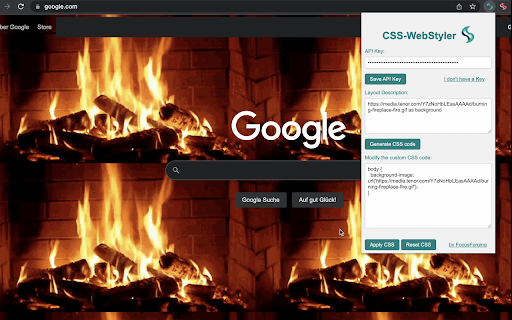
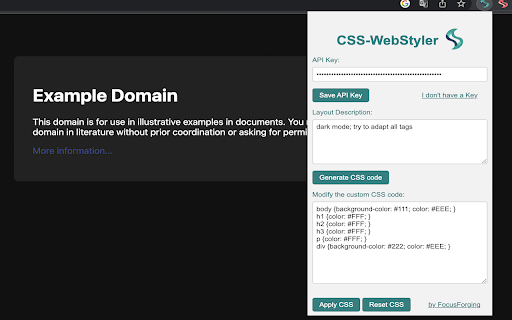
AI powered Web Customizer. Customize the design of all websites with this Chrome extension. "CSS-WebStyler" is a Chrome extension that allows users to modify the design of websites they visit by applying custom CSS code. The extension focuses on providing a simple and functional solution for those who want to have a consistent and personalized browsing experience across different websites. Instead of using a one-size-fits-all approach, it offers the freedom to create a unique design tailored to individual preferences. The extension has two main components: 1. Custom CSS application: Users can manually create and apply their own custom CSS code, enabling them to change the appearance of every website they visit. This includes altering colors, fonts, layout, and other design elements, providing complete control over the look and feel of each site. 2. AI-powered CSS generation: For users who may not be familiar with CSS or prefer a more streamlined approach, the extension offers to generate custom CSS code based on a user-provided design description. This allows users to easily implement their desired design changes without having to manually write the code themselves. To utilize the AI feature, users need to supply their own API key for access to OpenAI's AI capabilities. Once the API key is integrated, the extension is ready to use, and users can begin personalizing their browsing experience. In summary, "CSS-WebStyler" is a functional and versatile Chrome extension that enables users to create a personalized browsing experience by applying custom CSS code to all websites they visit. With the additional option of AI-generated CSS code, it caters to a wide range of users, regardless of their technical expertise, making it an accessible and efficient solution for customizing the web.

Custom CSS by Denis
Minimal and secure way to add custom CSS per-domain The extension does not require permissions to access all data on all websites all the time. Once you start editing CSS on a page, you get a permission prompt specific to that domain. Later, if the CSS for a domain is not used, the permission will be dropped. There is no UI clutter of any kind. The entire extension consists of a big editable area for CSS code for the current domain.

CSS Scanly - Copy CSS | Tailwind & Bootstrap
Copy CSS properties from any web element with CSS Scanly. Supports Tailwind & Bootstrap, Helpful for developers and designers CSS Scanly: Inspect, Analyze, and Edit CSS in Real-Time Discover the power of advanced CSS inspection and editing with CSS Scanly, the must-have tool for web developers, designers, and CSS enthusiasts. This Chrome extension transforms how you interact with web page styles, providing an intuitive and feature-rich environment for exploring and manipulating CSS on any website. Hover over any element to instantly view its applied styles See computed styles, including those from stylesheets and inline CSS Explore pseudo-class styles etc. without leaving the page Edit CSS properties on-the-fly and see changes immediately Experiment with styles without affecting the original page Perfect for prototyping and troubleshooting design issues Automatically detects and highlights Bootstrap and Tailwind CSS classes Gain insights into how popular frameworks are used on different websites Pin multiple CSS information boxes for easy comparison Ideal for analyzing styles across different elements simultaneously 5. Copy-to-Clipboard Functionality Quickly copy any CSS styles with a single click Streamline your workflow by easily transferring styles to your projects View applied media queries for responsive design analysis Understand how styles change across different screen sizes Intuitive control bar for easy navigation and tool management Keyboard shortcuts for enhanced productivity Pause and resume the scanner as needed Move the control bar to your preferred location on the screen Perfect For: Web Developers seeking to debug CSS issues Designers looking to analyze and draw inspiration from other websites Students learning web design and CSS QA testers verifying style implementations Anyone curious about the styles behind their favorite websites Elevate your web development and design process with CSS Scanly. Download now and start scanning the world of CSS like never before!

Webpage Word Counter
Analyze your website text with style with the Webpage Word Counter chrome extension 🚀 Webpage Word Counter Extension for Chrome: Instantly Count Words on Any Website! 🚀 Introducing the Webpage Word Counter Chrome Extension – a sleek, lightweight, and powerful tool tailored for Chrome users who need to count words on a website quickly and effortlessly. This word counter for websites delivers accurate word counts for any webpage you visit, plus it even counts words for specific text selections. A must-have for content creators, SEO experts, researchers, students, and every Chrome user looking to optimize their work. 1️⃣ Visit any webpage you need analyzed. 2️⃣ Click on the Webpage Word Counter Extension icon. 3️⃣ Instantly see the total word count for the entire website page. 📄 4️⃣ Want a count for a specific section? Simply highlight it and click the Word Counter icon – you'll see both the webpage’s total and the highlighted segment’s word count. 👉 Effortless to Use: One click activates this webpage word counter tool. 👉 Flexible Counts: Get word counts for the entire page or any snippet with ease. 👉 Real-Time Analysis: Instant in-browser word counts, with all your data staying private. 👉 SEO Boost: An ideal companion for SEO analysts, helping with keyword density and competitive insights on any website. 💡 Why wait? Enhance your Chrome browsing with the Webpage Word Counter Extension! Start using this word counter for websites today to stay ahead in your content game! 🔒 Privacy Matters: This Chrome extension operates entirely on your device. Your data remains private, as we do not store or access the contents of the analyzed webpages. Frequently Asked Questions (FAQ) Q: How can I check the word count of highlighted text? A: Simply highlight the text you want to analyze, click on the Webpage Word Counter icon, and the extension will show both the total word count for the page and the word count for your selected text. Perfect for SEO word count analysis or finding total word count for specific sections! Q: Can I count words on a specific webpage or website only? A: Absolutely! This extension counts words for any webpage or website you visit. Just click the extension icon to see the web page word counter in action for the entire page, or highlight specific text to get a segmented count. Q: Is this SEO word counter useful for analyzing web content? A: Yes, it’s ideal for SEO professionals who need quick insights into keyword density or total word count on competitor sites. This SEO word count tool provides accurate word counts for entire webpages, helping you make informed content and keyword decisions. Q: Can I use this as a total word counter for any site I visit? A: Definitely! It’s designed as a total word counter for any webpage you access on Chrome. Whether it’s a blog, an article, or a competitor's webpage, it shows the total word count instantly. Q: Is my data safe with this extension? A: Yes, privacy is our priority. The Webpage Word Counter operates entirely on your device, meaning no data is stored or accessed externally. Enhance your productivity and optimize your SEO strategy effortlessly with the Webpage Word Counter Extension! Start using this tool today to count words on any website and stay ahead in your content game.

Web Inspector
Use Web Inspector tool as a CSS viewer and website inspector for any page. It is a browser plugin for google chrome inspect element. Want to inspect element for chrome like a pro? This tool helps you master front-end basics with ease. It's more than just a chrome inspector — it's your all-in-one dev assistant. Use our inspection chrome tool when you need full control over any website. 1. Access to change history. 2. View styles via css scan. 3. Real-time page updates. 📦 What Do You Get This chrome browser inspector simplifies the exploration of website structures, providing valuable insights from the very first click. Know, inspecting elements in chrome helps both beginners and professionals easily uncover details that might be overlooked. • Hover over an element to highlight its css viewer for a clear view of styles. • See spacing with margin and padding indicators that show how they affect layout. • Inspect Google Chrome to understand their structure and interactions in design. • Get detailed information about font size and family for better typography insights. 📚 Where You Can Apply It This web page inspector works on any website—there are no limits. Just click or hover and you will see a lot of details. It's time to experience the difference that the google web inspector offers. Install the extension now! 🔥 Common With CSS Peeper Extension ➣ Easily components viewing. ➣ View class attribute values. ➣ Retrieve font information. ➣ View media file sources. ➣ Extract the web color palette. ⭐ ️The ability to pick pixel colors in HEX, RGB, or HSL while inspect element chrome. ⭐️ The ability to seamlessly add, remove and change properties and their values. ⭐️ Directly edit the visible text content with web inspector app with great ease. 🧠 Frequently Asked Questions Q: Can I use this as a css plugin chrome? A: Yes, it's a full-featured plugin for the browser. Q: Is this plugin user-friendly for beginners? A: Absolutely! It has very easy navigation. Q: What is the advantage of a web inspector? A: It simplifies viewing and layout testing. 🌐 Where It Works The inspect chrome feature works seamlessly with any public resource. Test directly inside the browser. No more hunting through devtools tabs! Developers will love our browser inspector chrome. 1. Edits are live — see results immediately on the web. 2. Handles complex nested elements effectively. 3. The google chrome web inspector for various tasks. 🧩 Perfect Combo for Developers This tool brings speed and clarity to design edits and front-end tweaks. With the css chrome extension, you can change styles instantly. The web inspector app adds precision when analyzing layout behavior and structure. 💪🏻 What Can You Do 1️⃣ Grasping responsive web layouts. 2️⃣ Copying web styles with CSS scan. 3️⃣ Knowing modern website structure. 4️⃣ Isolating bugs in front-end code. 🧪 Who May Use Ready to try the full power of advanced web page inspection Chrome? It was built for developers who want speed, clarity, and direct interaction. Let the transformation of your workflow. The web inspector tool is suitable for different tasks. ❓ Quick FAQ ➤ Where can I download it? Is it available in Firefox? ✱ You may download Web Inspector from the WebStore. ➤ Can I save the changes made during the editing process? ✱ No, changes made during editing are temporary. ➤ What makes this tool different from google inspect tool? ✱ It adds a real-time editor with simplified visuals. 📥 How to Get Started After installation, simply hover over any element and hit the spacebar to activate the web page inspector. This feature allows you to easily examine specific parts of your design. Whether you're clicking buttons or headers, Google inspect with Chrome brings precision and ease to your workflow. 🔎 Explore With Google Web Inspector - Typography styles. - Detailed settings. - Element padding. - HTML classes. - Web colors used. - Margin values. Use our css extension when you need quick access to attributes. There's no need to open bulky DevTools — it's all right at your cursor. This chrome inspect tool provides an efficient way to streamline your workflow. 🌟 What You Get With Chrome Browser Inspector ✔️ Live previewing. ✔️ Grid inspector. ✔️ Color palettes. ☀️ Connect to Our Unique Experience This is your solution! Start inspect element in Chrome today. Try our web extension — a more visual way to work with styles. Create freely with a powerful, user-friendly website inspector.
