
afmhgmnnjpeopienmpgmhfaiokhblanl
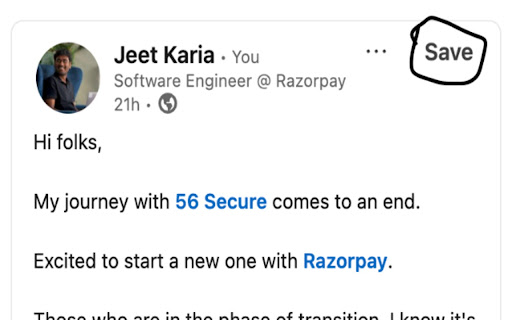

Actually save LinkedIn posts at your personal collection. Also making them searchable over its content, and its author. There are 2 problems that this extension solves: 1. Easily access saved linkedin posts without going into the linkedin profile. Why is it a problem? Because of distraction and chances of time getting wasted when trying to go inside linkedin profile to access your saved posts. 2. Searching over linkedin saved posts content and post author. Why? Because it allows to easily search your very old posts which are of particular topic and want to revisit again. Most of the times, linkedin is not able to load all of saved posts.

AuthoredUp – No. 1 LinkedIn ™ Content Tool
Boost your LinkedIn ™ growth with the secure platform designed for creators. Create and analyze your content in clicks, not hours. Write, schedule, and analyze your LinkedIn content in one secure workspace. It keeps everything in one place so you can focus on creating posts that develop your personal brand or drive business growth. 𝗖𝗿𝗲𝗮𝘁𝗲 𝗰𝗼𝗻𝘁𝗲𝗻𝘁 • Format text with bold, italics, bullets, and check readability before posting • Preview posts on desktop and mobile to ensure they look right everywhere • Use 200+ hooks and endings templates (available in English, German, Dutch) 𝗣𝗹𝗮𝗻 𝗮𝗻𝗱 𝗼𝗿𝗴𝗮𝗻𝗶𝘇𝗲 • Plan with a calendar view, best-time-to-post insights, and reminders • Collaborate with clients or teammates by sharing drafts for fast feedback. • Manage multiple company pages and groups under one profile license 𝗠𝗲𝗮𝘀𝘂𝗿𝗲 𝗮𝗻𝗱 𝗶𝗺𝗽𝗿𝗼𝘃𝗲 • Track results with full post history and profile growth • Use analytics to see what works and adjust your content strategy • Export data or connect the API for reporting and deep analysis. Just install this extension, and you are ready to go. 𝗢𝗽𝗲𝗿𝗮𝘁𝗶𝗼𝗻𝘀 𝗮𝗻𝗱 𝗰𝗼𝗺𝗽𝗹𝗶𝗮𝗻𝗰𝗲 • AuthoredUp is not affiliated, associated, authorized, endorsed by, or in any way officially connected with LinkedIn Corporation, registered in the U.S. and other countries. LinkedIn is a trademark of the LinkedIn Corporation. • We do NOT use cookies or automate your activity on LinkedIn, so your account stays safe while you work. • AuthoredUp cannot access your or anyone else's private data (passwords, emails, web browsing history), etc. • AuthoredUp is fully compliant with GDPR. • All data is hosted in Germany.

Private Notes for LinkedIn
This free extension allows you to save your private notes for any profile on Linkedin. Only you can see these notes. This extension allows you to take private notes on LinkedIn user profiles, visible only to you. All notes are securely stored in Google Chrome Sync Storage. The extension does not transmit any data to third parties. 🔒 Please note: This extension is not affiliated with LinkedIn and is not an official LinkedIn product.

LinkOff - Filter and Customizer for LinkedIn™
LinkOff cleans and customizes LinkedIn. It filters out the junk, leaving behind the posts and page elements that you want to see. Make your LinkedIn experience better, instantly! With fewer distractions and better filtered content your sales, lead generation and networking will be a smoother and more enjoyable experience. No more seeing unwanted likes and comments by your connections. Block the feed or filter it using custom keywords and find the connections and posts you want more easily. Job seeking? Advanced job filtering coming soon. While you are waiting, clean up your inbox - it can do that too! 🚀 Features - Option to hide the whole feed - Post filtering by content (polls, videos, promoted, shared, etc) - Hide posts by companies or specific people - Filter by custom keywords (politics, coronavirus, vaccination, Noah Jelich, whatever) - Hide posts shown due to interactions (comments, reactions, followed by connections) - Hide irrelevant old posts (older than an hour, day, week, month) - Select messages for mass deletion (clean your inbox) - Message filters (COMING SOON) - Unfollow all collections - Job filtering (COMING SOON) - Block ads on LinkedIn (banners and sidebar) - Hide LinkedIn learning and course recommendations - Hide community panel and follow recommendations - Stop LinkedIn premium upsell pestering - Fully configurable to suit your need! - Completely FREE and with NO ADS - Made with ❤️ by Noah Jelich :) > Are you going to make a Tampermonkey/Greasemonkey script? > What about Vivaldi/Brave/Edge/Opera and other browsers? The extension can be natively installed on all chromium browsers. > What about Safari and MacOs? The store charges 100$ per year to post apps, which I cannot afford. Since neither Chrome or Firefox allow for extensions in mobile browsers, you need to install a chromium distribution that does. I recommend Kiwi Browser (if you have any issues, please report them, still testing mobile support).

Delete Linkedin Messages 2026
🧹 Effortlessly bulk 🗑️ delete and 🗂️ archive all your LinkedIn messages in just one click! 🚀 Streamline Your LinkedIn Messaging with Ease! Is your LinkedIn inbox overflowing? 📩 Our powerful “Delete All Messages & Archive on LinkedIn 2026” extension helps you declutter and organize your messages effortlessly—all in just a few clicks! ✅ 🔥 Key Features: ✅ One-Click Cleanup – Instantly delete or archive all LinkedIn messages. ✅ Full Control – Start or stop the deletion process anytime. ⏸️ ✅ Real-Time Tracking – Monitor the deletion progress live in the extension popup. 📊 ✅ Free Version Limit – Delete up to 5 messages for free before upgrading. 🎉 💡 Why Choose Our Extension? Designed with an intuitive interface, this tool ensures a smooth and efficient experience. Whether you're decluttering your inbox or starting fresh, this is the ultimate solution to keep your LinkedIn messages organized. ⚙️ How It Works: 1️⃣ Add the extension from the Chrome Web Store. 2️⃣ The extension operates in English 🌍. 3️⃣ Click the extension icon. 4️⃣ Press "Go to LinkedIn Page" if LinkedIn isn’t open. 🔗 5️⃣ Choose: Delete All Messages 🗑️ or Archive Messages 📥 – you can also Stop anytime! Say goodbye to inbox clutter and hello to a cleaner, more organized LinkedIn experience! 🎯 Download "Delete All Messages on LinkedIn 2026" now and take control of your inbox today! 🔹 Note: This extension is not officially authorized by LinkedIn.
