
aenhmmfelkmdlihmaiblnhdmfopmbonc

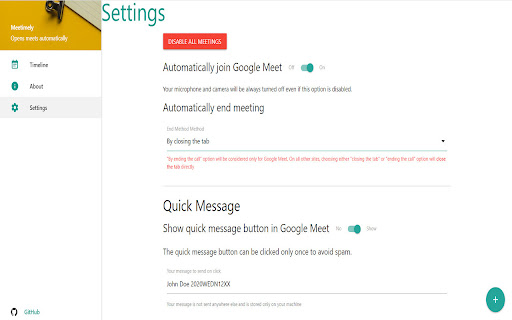
An extension to start meetings automatically Meetimely is the extension for online classes. Avoid fumbling with meeting links and times and missing your important lecture. Avoid that moment when you realise you forgot to leave the meeting when it ended hours ago. Just add your meeting link, time and duration and sit back as it is handled for you. New: Save and share your meeting details with others!

G-Meet Auto Join
Who the hell loves attending 8 A.M classes ? Someone else can do this job more efficiently. Just save the meeting specifics (URL, time, duration...). The extension enters the meeting automatically, with audio and video turned off. It departs the meeting and closes the tab when the user-specified duration is achieved. Because this is a reoccurring event, the user will not have to save the meeting information every week. Note - The extension will not work if the browser is closed (basically true for all extensions). Atleast one browser window needs to remain open for the extension to work correctly.

PS Companion
Chrome Extention for the students of BITS, Pilani to upload their preferences easily to the Practice School Division's Portal. A simple extension that helps the user to upload a CSV file and rearrange elements of the preference table (in the Practice School Portal - http://psd.bits-pilani.ac.in/) using the contents of the csv file. The need of this application is to eliminate the need to drag and drop rows in a table to arrange them which wastes a lot of time. This extension adds new tools when you're present on http://psd.bits-pilani.ac.in to help you upload your CSV file and rearrange the list with a click of a button which saves you a lot of time! Steps to use this extension: - Visit psitseasy.ml Project bank page and download the latest CSV file. - Sort the rows of the sheet in the preference order you want. - Do not change/delete any columns. Only rearrange with the rows. - Now you are ready to upload it in the Fill station preferences page. (http://psd.bits-pilani.ac.in/Student/StudentStationPreference.aspx) - Click on the extension icon and a new section will appear in the page for you to upload your CSV file.

POCU Proctor
This extension enables POCU to view your screen, and collect webcam and audio feeds when you take an online examination on POCU - https://test.pocu.academy. We only collect this information on pocu.academy, and we do not have access to your screen, webcam and audio feeds if you are not on pocu.academy domain. POCU collects the student's screen, webcam and audio feeds to detect plagiarism or cheating during an online exam. By installing this extension, you are giving POCU permission to view your screen, and collect webcam and audio feeds during an examination.

Glider Proctoring
This chrome extension allows you to share full screen of your computer privately and securely. The Glider AI Talent Quality Platform guarantees the high-quality hire on every role, across any industry, whether full-time or contingent, for both talent acquisition and talent development (L&D) teams. Glider proctoring chrome extension enables screen sharing to support https://hire.glider.ai for the duration of test. Glider seeks candidate's explicit permission to track screen activity during the test period. On test submission, hiring teams are provided with a detailed report on candidate competency and integrity with evidence.
