
fmnjbaiongfjhonkncinpegdeamhmbpo
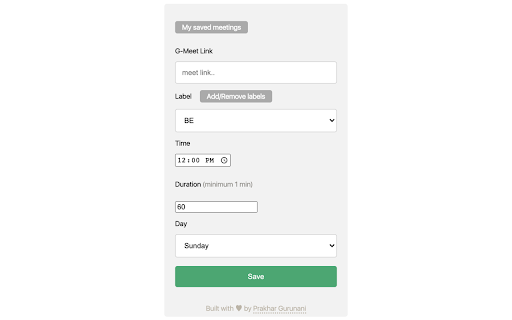
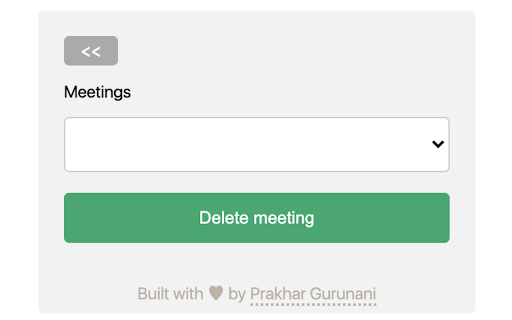

Who the hell loves attending 8 A.M classes ? Someone else can do this job more efficiently. Just save the meeting specifics (URL, time, duration...). The extension enters the meeting automatically, with audio and video turned off. It departs the meeting and closes the tab when the user-specified duration is achieved. Because this is a reoccurring event, the user will not have to save the meeting information every week. Note - The extension will not work if the browser is closed (basically true for all extensions). Atleast one browser window needs to remain open for the extension to work correctly.

YouTube Bookmarker
Bookmark your YouTube video timestamps Keep track of your timestamps with this handy little tool. No need to forget where you left off in that lengthy YouTube video anymore. Just click on the plus button in the player options and you can access that timestamp anytime using the extension. Features: - Easy to Use - Fast and minimal package size - Unobtrusive UI - Easy way to track all the timestamps you have saved - Theme based on your preference. Leave a star if you liked my work. https://github.com/nirzon47/youtube-bookmark-extension/

Meet on Time - Join meetings on time, automatically
Never miss a meeting again. Join meeting waiting rooms on time, every time. Works with Google Meet, Zoom, Microsoft Teams, and more. Meet on Time is your reliable meeting companion that ensures you're always on time for your virtual meetings. By automatically opening meeting links just before they start, you'll never miss another important call or be late scrambling to find the right link. 🎯 Key Features: • Automatic Meeting Links: Opens your meeting links 1-5 minutes before start time • Multi-Platform Support: Works with Google Meet, Microsoft Teams, Zoom, and more • Smart Calendar Integration: Syncs with your Google Calendar • Customizable Settings: Choose when to open meetings • Clean Interface: See your upcoming meetings at a glance • Privacy First: Your calendar data stays secure, no data is transmitted to our servers. 👩💼 Perfect for: - Busy Professionals - Never miss important client calls - Stay on schedule all day - Reduce meeting stress ✨ Smart Meeting Detection - Automatically detects meeting links in your calendar - Supports various meeting platforms - Intelligent link extraction from event details 🔒 Privacy & Security: - Works directly with Google Calendar - No data stored on external servers - Secure OAuth authentication - Minimal permissions required 💡 Getting Started: 1. Install the extension 2. Sign in with your Google account 3. Choose your preferences 4. Let the extension handle the rest! Pro Tips: - Set your ideal lead time in settings - Keep the extension running for automatic opens - Check the popup for meeting previews - Use the quick join buttons for instant access Never worry about being late or missing a meeting again. Install Meet on Time and transform how you handle virtual meetings!

PromptSync
Ask ChatGPT, Bard AI, and Bing Chat with one single prompt! Unlock the power of four dynamic chat platforms with a single prompt! Introducing PromptSync, your all-in-one solution for chatting with ChatGPT, Bard AI, and Bing Chat, through a convenient Chrome extension. Multi-Platform Chat Engage in conversations effortlessly with ChatGPT, Bard AI, and Bing Chat from a single prompt. Get diverse perspectives and responses to your queries. Customizable Experience Tailor your chat experience to your liking! Enable or disable individual chat platforms according to your preferences through the settings menu. Efficient Workflow Streamline your workflow by accessing multiple chat services without switching tabs. Save time and stay productive as you harness the combined intelligence of four powerful chat systems.

Google Meet Auto Join Pro
Join your Google Meet conference / class / meeting at a scheduled time. By using this addon you can join Google Meet at a specific / scheduled time. Features: --------------------- 1. Create a new slot / Make a schedule for auto-join to Google Meet. 2. Save the slot/meet schedule with Title and short description. 3. Customize icon and color for every slot for a better look in every slot. 4. Set date, and time for joining. 5. Set “From Date” and “To Repeat Date” if you want to join automatically every day at a certain time. 6. Join to scheduled meet date-wise or join continuously weekly/day basis. 7. Automatically join from individual or multiple Google accounts at the same time. 8. Get notified when a tab created to join the meet automatically. 9. Control camera and microphone on the automatically joining moment. 10. Control joining preference e.g. [Present Now] or [Companion Mode] (If needed). 11. Leave / End call at a specific / scheduled time. 12. Set meeting duration and left from the meeting automatically. 13. Leave / End call if the meeting has below a certain number of participants. 14. Access additional features like “Auto accept participant requests” (For the meet host only). 15. The meet host can access automatically join, and accept participant requests at the same time. 16. The meet host can also just use the ‘Accept participant requests’ feature only. 17. Automatically retry/refresh if internet connection makes occurs on the joining moment. You can set minutes a minimum of 6 and up to 15 minutes to automatically retry/refresh. 18. Re-join request options are available if ‘Join request is Denied’ or ‘No respond to the join request’. 19. You can set different times for sending up to 5 messages after joining automatically. 20. View every action log on the options page with warning, success, failure status, and more details. 21. Turn on/off controls later on in the `Options` page view slot section. 22. Generate Javascript code as an alternative to creating a new slot. Use this option anytime or in case creating a new slot option does not work. 23. Get log report to the browser console to see what action was completed, when 24. started, who joined, the meeting closed, and many other logs. Generate code option is also available for participants and meet host both.
