
aejceaoiihcbldjlhlcnknheccjbagpi
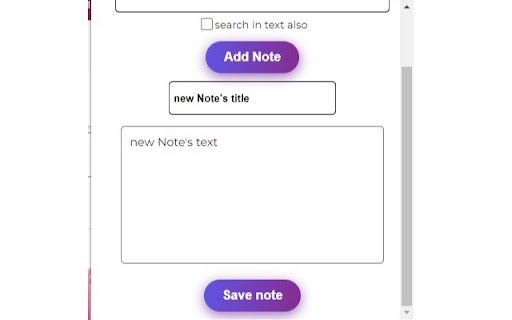

a versatile, powerful tool for staying organized. Sync notes across devices, accessible via Chrome Store—ideal for task management. With the NoteKeeper extension and its backend server, you can access your notes from anywhere that allows access to the Chrome Store. This means that as long as you have access to a device with a Chrome browser and the NoteKeeper extension installed, you can easily view and manage your notes. The extension's seamless syncing and cross-device functionality make it a convenient option for anyone who needs to access their notes on the go. Whether you're traveling, working remotely, or simply prefer to switch between devices throughout the day, the NoteKeeper extension has you covered. In addition, the extension's customizable features, such as font choices, colors, and formatting options, ensure that your notes are easy to read and visually appealing, no matter where you access them from. Overall, the NoteKeeper extension is a versatile and powerful tool for anyone who wants to stay organized and productive. Its ability to sync notes across devices and be accessed from anywhere that supports the Chrome Store makes it an excellent choice for busy individuals who need to stay on top of their notes and tasks, no matter where they are.

Side Notepad
Rich text notepad in your Chrome sidebar. Take notes, organize ideas, and sync across devices — without switching tabs. Side Notepad - v1.2.0 — Pro cloud sync now live • New: Pro cloud sync — notes across all your devices • New: Sign in from the side panel — anonymous notes merge into your account automatically • New: Realtime cross-device updates + web dashboard at sidenotepad.com • New: Offline note taking with auto-sync, plus full-text search across all your notes Side Panel Notepad helps you write and manage notes while browsing. Open the notepad in a convenient side panel to take notes alongside your work, research, or general browsing without switching between tabs. Features: 📝 Side Panel Integration: Take notes directly next to your browser content, making it easy to reference websites while writing 📂 Note Management: Create and organize multiple notes to keep your thoughts structured 💾 Auto-Save Functionality: Notes save automatically as you type, ensuring your work is preserved 📄 DOCX Export: Download your notes in DOCX format for sharing or backup purposes 🌗 Theme Options: Switch between dark and light modes for comfortable viewing in any environment ⌨️ Quick Access: Open the notepad instantly using the toolbar button or keyboard shortcut 🔒 Browser-Based Storage: All notes are stored locally in your browser for privacy ✨ Streamlined Experience: No account creation needed, no advertisements Side Panel Notepad integrates smoothly with your browsing experience, letting you capture thoughts and information without disrupting your workflow. Add it to your browser to enhance your note-taking process. Technical Details: - Works offline - Supports text formatting - Keyboard shortcuts available - Compatible with Chrome browsers - Regular updates for improved performance - Minimal browser resources used - Data backup options included - Customizable interface settings Get started with Sidebar Notepad to transform your browser into an efficient note-taking workspace.

Tab Keeper - Chrome Tab Manager & Sync Tool
Efficiently save and synchronize tabs across devices without the need for personal logins. A passion project dedicated to better browsing, Tab Keeper will always remain free. - GitHub: https://github.com/justine-george/tab-keeper-react-chrome-extension Say goodbye to a cluttered browser with Tab Keeper, your free, open-source solution for managing numerous tabs. Easily save, organize, and sync your tabs across Chrome desktop browsers, improving your productivity and browser performance. - Efficient Tab Management: Easily organize a large number of tabs - Multi-Language Support: Available in 10 languages - Device Sync: Sync tabs across Chrome desktop browsers - Privacy First: Operate securely without user logins - Quick Search: Instantly find saved tabs - Custom Themes: Personalize your browsing experience - User-Driven Updates: Regular improvements based on your feedback Join the Tab Keeper community for a streamlined browsing experience. Your feedback is invaluable – if you love Tab Keeper, consider leaving a rating! Improvements: • Search functionality now supports searching by tab group and window titles • Bug fixes and stability improvements Improvements: • Timestamp shown in tab group cards now reflects the time of update • Dependent packages updated to latest versions Improvements: • Newly created chrome tab now opens right next to the current tab • Bug fixes and stability improvements (Sessions saved using multi-monitor setup now restorable) Improvements: • Improved iconography • Updated translations • Bug fixes and stability improvements

Time Keeper
A simple time logger for work. Track tasks, boost productivity, and stay organized with this Chrome extension. 💪 Time Keeper is your all-in-one solution for tracking work hours, managing tasks, and boosting productivity! Whether you're working remotely, freelancing, or managing a busy schedule, Time Keeper helps you keep everything on track. With our intuitive work hour tracker and progress timer, staying on top of your projects has never been easier. 🤔 Why Choose Time Keeper? 🕒 Time Keeper is more than just an activity timer; it's a complete time logger for work that empowers you to: 📝 Stay organized with a task list with time estimate free feature. ⏱️ Track your productivity with a work hour tracker. 📈 Monitor your progress effortlessly using the progress timer. ⚖️ Balance your workload and maximize efficiency with a workload tracker. 🌱 With Time Keeper, you can say goodbye to missed deadlines and chaotic schedules, and hello to a more organized workday. ❤️ Features You'll Love 1. Task List with Time Estimate Free - Create a detailed task list with date estimates for each activity. - Easily organize tasks by priority and manage them at your own pace. - Get a clear overview of your workload and ensure nothing falls through the cracks. 2. Activity Timer and Progress Tracker - Start the activity date for any task and see how much effort you've spent on it. - Track your progress with a visual progress timer that keeps you motivated. 3. Comprehensive Work Hour Tracker - Log work hours seamlessly and understand how much hours you're dedicating to different projects. - Use the work hour tracker to stay compliant with your working schedules and achieve your schedule management goals. 4. Detailed Analytics and Insights - Gain insight into your productivity trends with time logger for work statistics. - View detailed charts showing how your moment is distributed across different activities. 🌍 Stay Productive Anytime, Anywhere 🏡 Whether you're at home or on the go, Time Keeper is your perfect companion for effective activity management. Keep track of your tasks, manage your workload, and make each workday count with features like: ⌛ Customizable Activity Timer 🔄 Automatic Logging and Syncing 🗂️ Detailed Task List with Time Estimate Free 👥 User-Friendly Workload Tracker 🎁 Benefits of Using Time Keeper 📊 Better Schedule Management: Use our activity timer and work hour tracker to better allocate activity to important tasks. ⚙️ Effortless Planning: Create a task list with date estimate free to plan your day, week, or month in minutes. 🛠 Optimize Productivity:The workload tracker helps you analyze and manage how much attention you're spending on each project, so you can optimize your efforts and stay focused on the right activities. 📝 How Does Time Keeper Work? 1. Add Your Tasks: Start by adding all the tasks you need to work on. The task list with time estimate free feature will help you visualize your workload. 2. Set the Timer: Use the activity timer to begin tracking the work you spend on each task. It's simple and precise! 3. Track Your Hours: The work hour tracker automatically logs all the activity you put into work, giving you accurate data for review. 4. Analyze and Adjust: Use the workload tracker and progress timer to understand where your work is going and make adjustments to boost efficiency. 🗝️ Key Advantages of Time Keeper 🔍 Precision Tracking: Whether you're using the activity timer or the work hour tracker, you’ll get precise activity logs to analyze how your workday is spent. 💸 Boost Productivity: By utilizing the progress timer, you can visualize your achievements and set clear targets to accomplish your tasks. 🌐 User-Friendly Interface: Navigate easily between features like time logger for work, workload tracker, and task list with time estimate free. 🤖 Automation and Notifications: Get notified when it's moment to switch tasks or when you're nearing your effort limit for an activity, thanks to Time Keeper’s smart reminders. 🌟 Get the Most Out of Time Keeper 🎯 Stay Focused: Avoid distractions by setting goals and estimate limits for each task using the activity timer. ⚡ Measure Efficiency: Use the work hour tracker and see which tasks are eating up most of your effort, allowing you to adapt and become more efficient. 📅 Plan Your Workday: With the task list with time estimate free feature, plan and estimate the required effort for each task to help distribute your workload effectively. 🤔 Who Can Benefit from Time Keeper? 1️⃣ Freelancers: Keep track of billable hours with the logger for work and maintain client transparency. 2️⃣ Remote Workers: Use the work hour tracker to ensure you're hitting your targets and maintaining productivity. 3️⃣ Project Managers: Monitor your team’s progress using the progress timer and ensure everything stays on schedule. 4️⃣ Students: Track study hours and manage your academic workload with ease. ⏳ Seamless Time Management 🏆 The key to productivity is effective schedule management. Time Keeper brings you everything you need, from a task list with time estimate free to an activity timer that keeps you accountable. You'll enjoy: ✉️ Email Reports: Receive detailed weekly summaries of your work. 🌟 Goal Achievement: Set milestones and celebrate when your progress timer reaches 100%. 🧠 Smart Scheduling: Let Time Keeper automatically suggest date blocks based on your work patterns. 🎨 Intuitive Design and Flexible Functionality 🖥️ With Time Keeper, you don’t need to be a tech expert to manage your work hours effectively. Simply start the activity timer, input tasks into your task list with time estimate free, and watch as Time Keeper does the rest. ⚡ Boost Your Efficiency with Time Keeper 📏 Ready to boost your productivity and track every minute effectively? Time Keeper is here to help you manage your time, whether for personal projects or work-related activities. Use the work hour tracker to log time effortlessly, and get a clear picture of your daily progress. ⌛ Time Keeper is the ultimate date logger for work. Manage your workload, optimize your tasks, and keep track of every moment that matters. 🚀 Install Time Keeper today and transform the way you work!

TabBud - Smart Tab Manager & Workspace
Save memory, organize tabs into spaces, and sync devices. The professional workspace manager for Chrome. Stop drowning in tabs. TabBud reduces memory usage and organizes your browser chaos into clean, synced workspaces. 🚀 Save 95% Memory by decluttering active windows 📂 Organize Tabs into dedicated Project Spaces 🔄 Sync Instantly across all your computers Meet TabBud, the intelligent workspace manager that turns browser chaos into calm, organized focus. Whether you are researching a project, planning a trip, or just have too many tabs open, TabBud keeps everything neatly sorted and instantly accessible. 🌟 WHY TABBUD? TabBud is the modern, privacy-first alternative to clutter. No more juggling windows—just clean, structured Spaces and Collections built for high-performance productivity. 🧩 Spaces & Collections Organize tabs by project, topic, or goal. Create a hierarchy that works for you. Drag & Drop: Reorder Spaces, Collections, and Cards instantly. Quick Launch: Open a single card or launch an entire Collection as a Tab Group with one click. 💾 One-Click Save Save your current tab or "Save All Open Tabs" instantly to clear your memory. No more copy-pasting URLs. 💻 Sync Across Devices Your workspace follows you. Access your organized Spaces on any computer with secure, real-time cloud sync. 📝 Smart Context Notes Don't just save a link. remember "why" you saved it. Add rich notes to any saved tab. (Toggle notes off for a minimalist view). 🔗 Share & Collaborate Share Spaces with colleagues or friends. Control access with Read-Only or Edit permissions - perfect for team research or shared projects. 🔖 Access existing browser Bookmarks in to the TabBud! ⚡ New Tab Dashboard Transform your "New Tab" page into a clean productivity hub showing your Spaces and Notes exactly where you need them. 📊 Widgets & Insights Visualize your browsing habits and resource usage with clean analytics widgets. 🌐 Secure & Private Your data belongs to you. We use enterprise-grade encryption and never sell your data. 🧠 PERFECT FOR Everyday Users: If you have more than 10 tabs open right now, TabBud helps you declutter without losing anything. Students: Organize thesis research and study materials. Developers: Manage documentation, GitHub repos, and staging links. Freelancers: Keep client projects separate and switch contexts instantly. Content Creators: Collect inspiration and assets without browser lag. ✅ 100% Free: No credit card required. ✅ Login Your Way: Google or Email login. ✅ Intuitive: Minimalist interface that feels native to Chrome. ✅ Safe: Cloud sync with local backup options. AI Smart Insights: Auto-organization tips and summaries. Team Plan: Enhanced collaboration features. More Themes: Expanded visual customization. COMPARISON & COMPATIBILITY TabBud functions as a comprehensive session manager and workspace organizer. It is designed as a modern, cloud-synced alternative to Toby, Tabextend, Onetab, Tab Manager Plus, Tablerone, Tabbs, Toast, Workona, Session buddy and Browser bookmarks. If you are looking to reduce Chrome memory usage, manage bookmarks effectively, or simply speed up your browser, TabBud is the ideal productivity extension for your workflow.
