
aejadpineckaeejjgcolffhcklckfclh

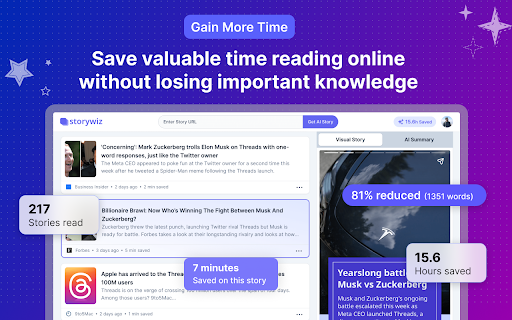
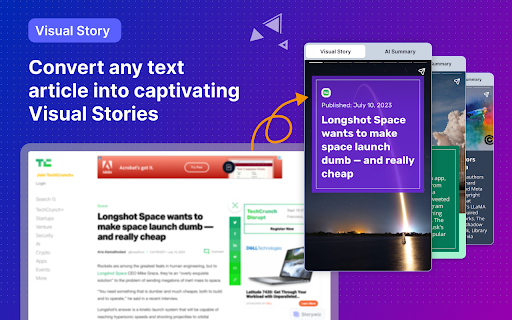
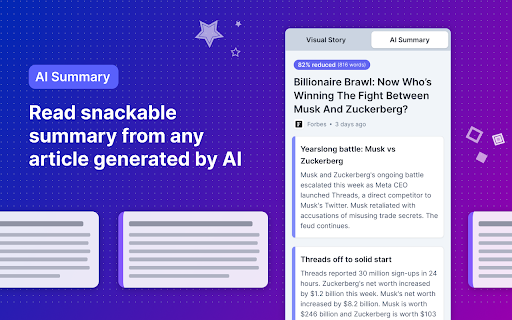
Storywiz instantly converts any text articles into immersive visual Stories and bite-sized AI Summaries. Storywiz instantly converts any text articles into immersive visual Stories and bite-sized AI Summaries so you can get through the information faster, and thoroughly enjoy your reading process. Use the free Storywiz Chrome Extension to get visual stories and summaries for any text articles you read online, within seconds. ⭐ Key Features ⭐ Here are the top features offered by the Storywiz extension powered by AI: 1️⃣ Captivating Visual stories from text articles Convert any traditional text article into a visually-stunning social story format that we all enjoy. The combination of text and visuals has been proven to help retain information. We used that concept, powered by AI, to help our users read through lengthy articles within seconds with stories. Immerse into your reading with our innovative visual stories. 2️⃣ High quality AI-powered summary from stories Instead of struggling to stay focused on long paragraphs, get a bite-sized summary and gain information faster. The AI summaries will get rid of the fluff so you can focus on reading the information that really matters. It’s like your own reading assistant that summarizes articles for you so you can read faster and read more. 3️⃣ Truly enjoyable and productive reading experience Save hundreds of hours every year while reading online by absorbing information faster and more effectively through a combination of AI summaries and visual stories. The visually stunning stories allow you to immerse in the content and truly enjoy your reading experience, while also saving a lot of reading time. ⭐ Benefits of using Storywiz ⭐ ✅ Boost your reading productivity by gaining key information faster ✅ Have a more enjoyable reading experience with visual stories ✅ Efficient reading with bite-sized and high-quality AI summaries ✅ Gain productivity and save hundreds of hours every year in online reading ✅ Skip the clutter of poor website experience and focus on the content ✅ Stay ahead in your field by effortlessly consuming information faster 🏁 Steps to Get Started 1️⃣ Hit the "Add to Chrome" button at the upper right corner and Install extension 2️⃣ Signup for Storywiz account, if you haven’t already, and log in to the Storywiz site 3️⃣ Click the Storywiz bubble on the bottom-right of any article page and view AI story ℹ️ FAQ (Frequently Asked Questions): 🤔 Does Storywiz offers a free plan? 👉 Yes, you can sign up for Storywiz Starter plan without adding card details and it offers 20 story credits for free. 🤔 How do I use the Storywiz Chrome Extension? 👉 Simply install the Chrome extension and pin it on your browser toolbar. On every article page you’ll see the Storywiz bubble on bottom-right section of the page. Simply click on it and use the extension 🤔 Why is the extension asking for all websites permission? 👉 Storywiz extension processes the articles and stories in your browser to generate the visual story and AI summary. In order to do this it needs access to the page URL and content. That’s why the extension needs access to all website permission, so that it works seamlessly on any website. 🤔 Do you collect any data? 👉 No, we do not collect any user data or analytics from the Chrome extension. The extension does not have access to any of your personal data saved in your browser. 🤔 Storywiz extension is not working for me, what should I do? 👉 Storywiz extension works best on web page with articles, stories, and longer text content. Sometimes, the web page may obstruct seamless working of the extension and in most cases re-opening the webpage in your browser will solve the issue. If you face any issues while using Storywiz, feel free to write to us through feedback form on the web app or write to us at support@storywiz.io

FunBlocks – Your All-in-One AI assistant | Sidebar | Monica
Available anywhere. Write emails, optimize text, assist with writing, read articles, answer complex questions, boost thinking skills Overview: Your AI Assistant powered by Gemini-3.1, Claude-4.6, GPT-5. Answers complex questions. Writes emails, reads articles, summary youtube, optimize writings. Usable everywhere. We offer assistance in various tasks including researching, reading, writing, translating, exploration, critical thinking, and more. Also support generate mindmap from web page texts, PDFs or youtube video subtitles. 💪 Key Features: 👉 Write: ✔️Compose: use 'compose' for quick, tailored writing of emails, blogs, social media posts, and more, with control over size, style, and tone. ✔️Write agent: provide a topic, and we'll auto-draft outlines with expanded content and references. ✔️Email reply: in Gmail/Outlook, we suggests reply options based on email content, allowing click-based responses without typing. ✔️Social reply: in popular social platform, we suggests reply options based on posts or comments, allowing click-based responses without typing. ✔️Grammar check: helps you find the words you need to write that tricky email, to get your point across, to keep your work moving. 👉Read and Summary ✔️Chat With Image: upload an image or screenshot and ask questions, powered by GPT-4V, Claude, and Gemini pro. ✔️Webpage Summary: get summaries and highlights without reading entire webpages. ✔️YouTube Summary: get summaries without watching entire videos. ✔️Error and Bias Detection: identify misinformation and biases for a more accurate understanding. ✔️Question Extraction: extract critical questions to deepen comprehension and thinking. 👉 Generate Mind Maps Instantly ✔️For quick understanding and deep exploration ✔️From web page texts, PDFs, YouTube videos, screen-shots and images ✔️More expressive and interactive than plain text 👉Translation ✔️Text Translation: translate selected text on webpages instantly. ✔️Writing Translation: write in your native language, then effortlessly polish and translate it into any language of your choice. 👉 Explore: ✔️AI Mind Flow: Elevate your thinking and creativity with AI-powered visual tools. ✔️Innovative Reading: Dive into articles and ideas using a mind-map approach, driven by LLM. ✔️Topic Breakdown: Receive AI-driven support for brainstorming and mastering any topic. ✔️Question Generation: Expand your thinking with AI-generated, insightful questions. ✔️Visual Exploration: Visually navigate and explore topics through intuitive mind-mapping tools. 👉 AI Memo: ✔️Memo is an AI knowledge base where you can save webpages, content clips, chats. It enable you save generated results from the AI assistant with a click. As it grows, we can offer more tailored and accurate responses for you. ✔️Further, at FunBlocks workspace, it offers a note-taking and writing experience similar to Notion. 👉 Prompt Library: ✔️Customize your AI Assistant by writing or adding any prompts to your toolkit, making it your personal tailored assistant 🎯 Complimentary Access: ✔️Use FunBlocks AI Assistant for free if you have an API Key from any major LLM provider, including OpenAI ChatGPT 4, Anthropic Claude 3.5, Google Gemini 1.5 Pro, or Groq Mixtral-32k & Llama3. ✔️FunBlocks AI also provides ready-to-use LLM services—just log in to access them, with daily free usage limits. 💻 How to uses: 🔸Click the "Add to Chrome" button and pin it to the toolbar. 🔸Log in to your account. 🔸Wake up FunBlocks at any page with text selection or from sidebar. 🔸Start working with AI! 🔥 Benefits: ✔️Save time and effort by automating writing and reading tasks. ✔️Improve writing skills by learning from the AI's suggestions and examples. ✔️Communicate more effectively with clear, concise, and persuasive content. ✔️Become a more informed and critical reader, able to discern facts from opinions and misinformation. ❓ Frequently Asked Questions: 📌 Do I need a ChatGPT/OpenAI account? - No, you do not need to have a ChatGPT account to use this extension. You can create a free account and then use with all mainstream LLMs, not limited to OpenAI ChatGPT. 📌 ChatGPT is banned in my country. Does it work in my country? - Yes. Our extension works in all countries. 📌Is it free to use? - Yes, we offer limited use for free. For unlimited access, you can choose the Premium Plan. - Or, you can use it for free with your self-owned LLM API Keys from OpenAI GPTs, Claude, Gemini, Llama, or any OpenAI compatibles APIs. 📌Do I need to pay for using my own LLM API Key? - No, you just pay the service provider for using their API Key, without any additional charges from this Extension. 🔥 FunBlocks AI is the ultimate productivity tool for students, writers, researchers, and anyone who wants to study, work and communicate more effectively. It helps you think critically, understand and evaluate information wisely, communicate and express confidently. 📪 Contact us: Any questions or suggestions? Please contact us at feedbacks@funblocks.net Try it now and experience the powerful features of LLM-driven AI assistants!

Ausum
Turn any article into a short audio summary, with just one click. Ausum is a free Chrome extension that turns every article into a short audio summary, with just one click. When you find an article you want to summarize, just click the Ausum icon and listen to the summary, instantly. * No Sign-Up Required: getting an audio summary is always a click away. * Avoid Ads: avoid all the distractions and annoying ads on the article, with a better, cleaner experience * Instant Smart Summaries: smart summarization technology ensures you get the most important, accurate highlights of any story. * Save Time: with audio, you’re free to do other tasks, listen while walking, or deep-diving the web. * Download Audio Summaries: all your articles so you could listen anytime, anywhere * Natural Voice: high-quality text-to-speech technology, for a natural listening experience. * Share: share summaries with others. Ausum turns text into lifelike speech. Users can automatically summarize any webpage into audio, as you browse. With just one click, Ausum generates a summary including the important ideas and facts of any long article, research report, document, essay into a downloadable recording you could take with you. Save time and read smarter, with audio. Next time you’re reading the news, science research journals, health reports, or sports analysis… Ausum will convert all your long text into a short-form audio summary so you can listen for the most important, accurate highlights. We are constantly optimizing and improving our text to audio summary extension, so if you see bugs or have suggestions to make Ausum better, please don't hesitate to provide feedback.

Dive: AI Summarizer for YouTube, PDF & Web — Interactive & Privacy-First
Consume content 10x faster with an AI summarizer that lets you skim where you want, then deep dive where it matters. 🤓 Interactive summary with sections, line references, adjustable lengths, highlighted key terms & more ✅ For YouTube videos, PDFs, & webpages 💬 Q&A chat — ask anything with line references 🦘 Line/timestamp references — for every summary bullet, chat reply, & more 🌐 Multilingual — 60+ languages supported 🧠 Uses the latest models from OpenAI GPT-5.4 / ChatGPT, Anthropic Claude, & Google Gemini 🔒 Privacy-first — Extension can't access your browser data except when you use it on a webpage Dive can't read your browser data except when it's used. Unlike most extensions, we DON'T request permission to "Read and change your data on all websites." We believe great tools put privacy first. - Blogs - YouTube videos - PDFs - Long articles - Academic papers - Financial/legal documents - and more!

read-this.ai
Transform any articles into podcast-quality audio with just a click. Rediscover the Joy of Reading with Read-this.ai Do you constantly feel like you should read more substantive content, but can never find the time or focus? Are you tired of wasting time on empty social media instead of enriching your mind? The Read-this.ai Chrome extension turns any online article into an immersive audio experience with just one click. Our AI assistant instantly converts text into natural, human-quality narrations so you can absorb more content hands-free. Listen to long-form articles during your commute, workout, or while plowing through emails. Rediscover the joy of reading without the eye strain. I built Read-this.ai out of frustration with robotic text-to-speech services. Our smooth narrations bring the written word to life and let you get lost in the content. Using Read-this.ai is effortless and intuitive, designed to fit seamlessly into your web browsing routine: - Simply hold "r" + "t" (as in 'read this') on any web page. Our smart reader will instantly read the entire page or the text you've selected, bringing the content to life with high-quality voice narration. - Right-click on any page or selected text. Our extension will then read the whole article or just the selected text, based on your preference. This feature is perfect for when you need a quick summary or specific information from a lengthy article. - Or just click on the Read-this.ai extension icon. It will activate the speech synthesis for the entire page, transforming the text into an audio format. Whether it’s long-form articles, blog posts, etc, With Read-this.ai, the convenience extends beyond your browser. Every piece of audio generated by our Text-To-Speech Chrome Extension can be effortlessly downloaded through our website. This feature allows you to save narrations for later, making it perfect for offline listening or archiving important articles. But that's not all – for an even more versatile experience, take your audio narrations on the go with our dedicated iOS and Android apps. Whether you're commuting, exercising, or just relaxing, our apps ensure that your favorite articles are always just a tap away. Listen to high-quality voice narrations anytime, anywhere, bringing a new level of flexibility to your content consumption. Embrace the future of web interaction with Read-this.ai. From seamless integration in your Chrome browser to portable audio access across devices, we're redefining the way you experience the web – one article at a time.
