
aecodjadibpbgapelmdheknchoeplfgi
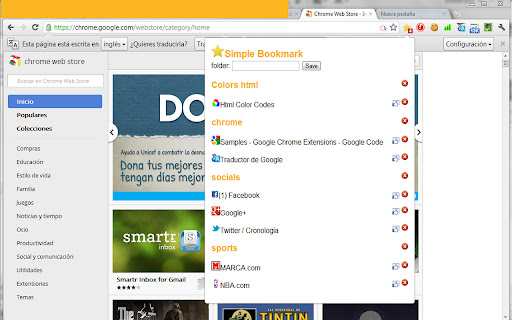
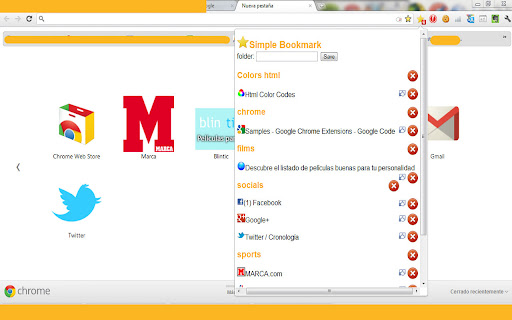
Save your favorite websites or save opened tabs, if you may need them in future, with a single click. Save all your currents tabs with one click! Open all webs of a folder also with one click. Easiest way to search and organize your bookmarks.

Bookmark For Me
Bookmark your favorite site and quickly view it! This extension will let you bookmark your favorite websites instantly along with features like edit and delete. With a simplistic and minimalistic look it still gives you the instant performance. Hope you all enjoy it!

Quick Bookmarks Menu
Just click on the toolbar button to access your bookmarks. Main feature: 1. Browse bookmarks with a breadcrumb navigation. 2. Enter a folder when mouse hovering over it automatically. 3. Search bookmarks easily. 4. Set startup folder by clicking current folder title. 5. Hide any items by right clicking on it. (Only hide in Quick Bookmarks Menu) 6. And many other customizations!! Includes horizontal layout, dark mode etc. If you have any questions or suggestions, you can go to the support page and tell me, thanks!😀 [0.6.0] - 2021-10-12 - Add options page. - Add context menu. - Add middle button and keep showing customization. [0.5.1] - 2019-09-14 - Rewrite all code for better maintainability. - New feature: Hide items by right click.

Popup my Bookmarks
A more efficient way to view and manage your bookmarks menu. - Search bookmarks when you type - Do what Bookmark manager can do and more (e.g., Sort bookmarks by name, Add separator) - Save 24px of your vertical workspace (Rock on Chromebook!) - Take as few permissions as possible, we never put your privacy at risk - No background running application, save computer memory and your privacy!

Smart Bookmarker (Save bookmark to folder)
Save bookmarks smartly to folders, with smart bookmarker and see your bookmark's folder structure. Smart Bookmarker (Save Bookmarks to Folder). An extension to add bookmarks with custom details and folder selection. Adds super power of searching folders before adding bookmark instead of manually looking for 100s of folder accumulated over years... Transform your bookmarking experience with the Smart Bookmarker extension. Effortlessly add bookmarks with personalized titles, URLs, and organized folders right from your browser's context menu. No more generic bookmarks feature distracting from actual work. Search folder with name and add bookmark quickly in that folder. **Key Features:** Seamless Bookmarking: Quickly add bookmarks for the current active tab by right-clicking and selecting "Add Bookmark" from the context menu. Customizable Titles and URLs: Edit the title and URL of the bookmark to match your preferences and make your bookmarks more meaningful and easy to find. Intelligent Folder Management: Select existing folders for your bookmarks, or create new folders on the fly, all while maintaining a structured and organized bookmark tree. Smart Folder Search: Easily search through your existing folders to find the perfect place for your new bookmark. Also see through your folder structure to better recall your bookmarks memory. Default Folder Option: If no folder is selected, bookmarks are saved to a default folder, ensuring your bookmarks are always organized. Quick Mode: Now, by default it comes with quick mode enabled. Open popup, start typing and hit enter to save the bookmark in first search result. Search functionality supports to look for words in any order, so no need to recall exactly whether it is 'smart bookmarker' or 'bookm mart', you can search with any word as long as one single word exists in folder name. Improved User Experience: Search and hit enter, and you folder will be saved in first search result. Alternatively just look through the folder tree to identify exact folder inside folder tree, and double click to bookmark active tab as bookmark in that folder. Quick Mode with Cache: Displaying Bookmarks from extension is expensive process, but it can be avoided using cache from the options menu at the top of window. Added Shortcut option (default: Alt + Shift + A) to open popup. Can be changed from manage extensions setting from browser. Save link from page or selected text as bookmark: Added option to save link as bookmark by right clicking and selecting 'Add Link as Bookmark'. Added option to save selected text as bookmark and automatically extract link from selected text. **How It Works:** Right-Click to Add Bookmark: Simply right-click on any webpage and select "Add Bookmark" from the context menu to open the bookmark creation popup. Ensure to refresh page if add bookmark page was already open. Customize Your Bookmark: The popup will automatically fetch and display the current tab's title and URL. Modify these fields as needed. Organize with Folders: Use the search function to quickly find the appropriate folder or create a new one for your bookmark. Save and Organize: Click "Add Bookmark" to save your new bookmark to the selected folder or the default folder if none is selected. **Perfect For:** Users who want a more organized and customized bookmarking experience. Those who frequently bookmark pages and need a quick, efficient way to categorize and quickly save links to appropriate folders. Anyone looking to enhance their productivity by keeping their bookmarks structured and easy to access. Enhance your browsing experience with Custom Bookmark Creator and keep your bookmarks neat, organized, and tailored to your needs. Update v1.1 bug fixes and optimizations Update v2.0.1 - Added Quick Mode - Improved User Experience - Added Shortcut option (default: Alt + Shift + A) to open popup - Option to enable and disable quick mode - Performance optimization - and more Update v2.1.0 - Added option to save link as bookmark by right clicking and selecting 'Add Link as Bookmark'. - Added option to save selected text as bookmark and automatically extract link from selected text. - Performance optimization Update v2.2.0 - Bug fixes - Added navigation for selecting folders using Up and Down Arrow buttons. - Better cache handling Update v2.3.0 - Performance improvement. - UI/UX Improvement for more intuitive design. - Added cache option in full mode. - Ability to check folder in which current tab link (http:// and https://) is saved. - Alt + Key (1-5) to save to recent 1 to 5 folders. - Alt + G (suggested default, can be changed from settings) to save current tab as bookmark in most recent folder if interacted earlier, else in browser's default folder for boomarks - (Quick Mode) Option to see folder path right below the folder name (need to enable from options) - (Quick Mode) A yellow colored highlight and a star icon besides folder name that indicates the current link is already saved in the folder. Clicking on star icon can unbookmark the url. (In case of multiple bookmarks in a folder, click the icon removes one bookmark at a time.) - Better highlight to indicate current folder selection... - Removed smooth scrolling while traversing folders with arrow keys to improve performance.
