
aeblbpjamlpjfedjbkhnbiecmepbgkdo
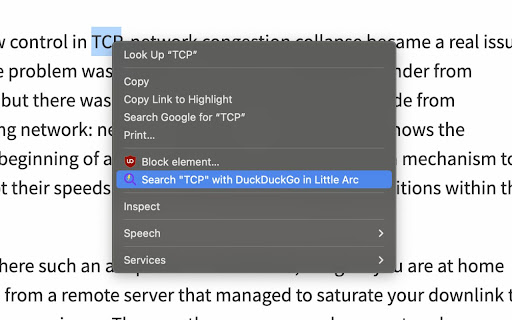
Search the web distraction-free with SnapSearch SnapSearch - Better Search on Arc, is the ultimate browser extension for Arc Browser users who value efficiency and focus. SnapSearch is designed to revolutionize your online search experience, offering a seamless, distraction-free way to find information without ever leaving your current page. ⭐️ Key Features: ➡️ Instant Search Capabilities: With SnapSearch, you can quickly search the web directly from your current webpage. Just select text, right-click, and choose SnapSearch from the context menu. SnapSearch instantly presents search results in a compact, non-intrusive Little Arc window. ➡️ Customizable Search Engines: While Google is the default search engine, SnapSearch gives you the freedom to choose your preferred search engine. Whether it's Bing, DuckDuckGo, or others, SnapSearch adapts to your preferences. ➡️ Minimalistic, User-Friendly Design: The sleek and simple design ensures that your focus remains uninterrupted. The clean interface of SnapSearch promotes productivity and reduces cognitive load. ➡️ Built for Arc Users: Specifically designed for Arc Browser, SnapSearch integrates seamlessly, enhancing your browsing without slowing down your computer. ➡️ Distraction-Free Environment: SnapSearch ensures a serene and focused browsing experience. Say goodbye to the hassle of multiple tabs and enjoy the convenience of in-context searching. ➡️ Privacy-Focused: We respect your privacy. SnapSearch doesn't track your searches or personal information, ensuring your browsing remains private and secure. ➡️ Easy Installation and Use: Installing SnapSearch is a breeze. With just a click, you can add this powerful tool to your Arc Browser and start searching smarter. SnapSearch is not just a search tool; it's an enhancement to your daily browsing. Whether you're a student, professional, researcher, or just a curious mind, SnapSearch is built to cater to your quest for information without distractions. In the digital age where every second counts, SnapSearch is your companion in the vast world of the internet, providing quick, relevant, and distraction-free search results at your fingertips. Upgrade your search experience with SnapSearch - Better Search on Arc. Try it today and experience the difference in your browsing efficiency and focus!

Arcify: Arc like vertical tab spaces
A sidebar extension that replicates Arc browser's tab management system 🌟 Arcify: Arc-inspired Tab Management for Chrome Transform your Chrome browsing experience with Arcify, a powerful tab management extension inspired by the innovative Arc browser! 📚 Key Features: • Organize tabs into spaces (using Chrome tab groups) • Pin your favorite tabs for quick access • Create folders to organize bookmarks within spaces • Drag and drop tabs between spaces and folders • Keyboard shortcut (Cmd/Ctrl + K) for quick access • Auto archive inactive tabs • Rename tabs by double clicking 🎯 How It Works: • Spaces help you organize tabs by context (Work, Personal, Shopping, etc.) • Pinned tabs stay at the top for easy access • Bookmarks are automatically synced with Chrome • Folders help you organize related bookmarks within spaces • Smooth drag-and-drop interface for effortless organization 🔄 Seamless Integration: • Uses native Chrome bookmarks for data persistence • Works with existing Chrome tab groups • Minimal performance impact • Clean, modern interface Keep your browsing organized and boost your productivity with Arcify - the Arc-inspired tab management solution for Chrome! 🚀

0tab AI
Type 0 → Tab → your shortcut → Enter. Any bookmark, instantly, without lifting your hand off the keyboard. ──────────────────────────────────────────────── THE 10-SECOND DEMO ──────────────────────────────────────────────── 1. Click the 0tab AI icon on any site you visit often. 2. Give it a 2-3 letter shortcut (e.g. "wrk" for Google Workspace). 3. From now on: 0 → Tab → wrk → Enter. You're there. ▸ Omnibox launcher Type "0" + Tab in Chrome's address bar and live suggestions appear, ranked by how often you actually use them. Match by shortcut name, bookmark title, tag, or URL. ▸ Ask 0tab AI — built-in chat Powered by Gemini Nano, on-device. Talk to your bookmarks in plain English: "open gmail", "find that React article", "show me unused bookmarks", "delete the second one", "undo that". The chat keeps context across messages. ▸ Command-center dashboard ⌘K / Ctrl+K opens a spotlight that searches every shortcut, bookmark, folder, and action. Home view shows your dock, smart suggestions ("clean up 14 duplicates?"), recent activity, and folders at a glance. ▸ Folder shortcuts Assign one keystroke to a whole folder. Type "0 + Tab + work" and your eight Monday-morning tabs open at once, grouped in a Chrome tab group named for the shortcut. ▸ Insights that actually do something Weekly opens with trend deltas, an 84-day daily heatmap, ranked top shortcuts, "trending" vs "gone cold" lists, and a one-click cleanup for the dead pile. ▸ Smart shortcuts (up to 15 chars), partial-match fallback ▸ Drag-to-pin in the popup — pinned tiles bypass usage sort ▸ Drag & drop bookmarks between folders, in popup or dashboard ▸ Tags (auto + custom, up to 5 per bookmark) for fuzzy search ▸ Smart name suggester — picks a short, unique shortcut from your bookmark title and domain ▸ "Already saved" detection — never duplicates a URL by accident ▸ Two-way Bookmarks ↔ Shortcuts sync — every Chrome bookmark becomes a 0tab shortcut, and every shortcut lives in a single "0tab AI" bookmark folder ▸ History-mining onboarding — find frequent sites you haven't bookmarked yet, convert in one click ▸ Trash with 30-day restore + undo for chat-driven deletes ▸ JSON import/export (per folder, with conflict resolution) and CSV export for the whole library ▸ Grid + list view in the popup, preference remembered ▸ Dark and light themes ▸ Keyboard shortcut: ⌘+Shift+0 (Mac) / Ctrl+Shift+0 (Win/Linux) opens the dashboard from anywhere Everything stays on your device. Bookmarks, shortcuts, tags, usage stats, chat history — none of it leaves Chrome. AI runs locally via Gemini Nano (no API keys, no cloud, no usage caps). The only outbound request is to Google's favicon service for site icons. No analytics. No tracking. No remote code. Open the source on GitHub: https://github.com/kavilrawat/0tab-AI • Works on Chrome and all Chromium browsers (Edge, Brave, Arc, Opera, Vivaldi). • If ⌘+Shift+0 doesn't fire after install, set it manually at chrome://extensions/shortcuts (Chrome won't auto-bind if another extension already claimed the combo). • Gemini Nano is optional — 0tab works fully without it. The chat and AI naming features upgrade automatically once Chrome downloads the on-device model. Setup: chrome://flags → "Optimization Guide On Device Model" → Enabled. • Migrating from Slash Space Go or an older Tab0 build? Existing shortcuts are preserved and your bookmark folder is renamed to "0tab AI" automatically — nothing to do.

letmefix browser - Tab manager, Search bookmarks, Search history
Spotlight search for browser - streamlined browser extension for power users letmefix browser is an all-in-one browser extension to boost productivity by quick search & switch to tab, managing tabs, search bookmarks, search history, and performing various actions through a spotlight search kind of interface. Key Features: - Quick and easy search with a single click or shortcut. - Play Games to sharpen your focus and relax for regulars - Indexed URLs for faster searching. - Access your most visited and recently closed pages easily. - Refresh individual or all tabs with one click. - Search, switch, and manage tabs effortlessly. - Duplicate tabs for better multitasking. - Quick calculator - Shortcuts for popular apps like notions, linear, google workspaces, figma, etc

Arc Peek: Link preview
"Arc Peek" allows users to preview links, similar to the functionality in the Arc browser. 1. Preview links in current sliding window. 2. Use shift + click link or drag link to open links for preview. 3. Click outside the preview window to close it. 4. Click the expand button to open in a new tab. Some websites may not function properly due to service workers' onfetch handlers, while others disable drag or Shift + Click events, limiting options for link previews. Additionally, links might fail when redirecting to sites with strict Content Security Policies (CSP).
