
adkappjdekgefnmlalhahdnnhiifkgof
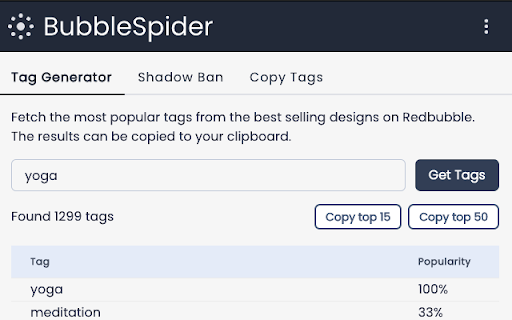

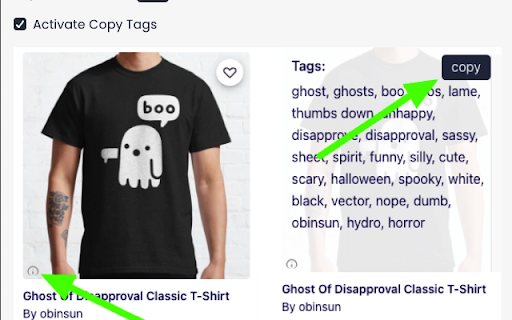
Collection of tools for Redbubble® designers: Tag Generation, Tag Copy, Shadow Ban Indicator. Collection of tools for Redbubble® designers • Tag Generation: grab the tags of the best selling designs on Redbubble • Tag Copy: easily copy the tags of individual design to your clipboard • Shadow Ban Indicator: find out if your designs are shadow banned or indexable on Google • Tag Spam Indicator: see which designs are using tag spamming

Copytasker - Copy Tags Redbubble and Autofill Listings
Gets Tags from Redbubble and generates Titles so you can list your products faster. Want to show up at the top of Redbubble? It's easy. You just need the right tags. Copytasker for Redbubble gets all the top tags for any Redbubble keyword search. Bonus: it also Generates a Title for you and has a Trademark searcher. Do your Redbubble keyword research faster than ever before! ✔ Get Top Tags from Redbubble ✔ Generates Titles ✔ Trademark search (Highlight text and Right click) ✔ Print on Demand dashboard (Click on the extension and hit 'Options') BONUS: Includes a Print on Demand dashboard with a directory of POD fulfillment sites that is constantly being added to. Just right click on the extension and hit 'Options'. - Search any keyword at Redbubble.com - Then, click the extension and choose if you want to generate a title, get the top tags, all tags, etc. - They will automatically be copied to your clipboard so all you have to do now is paste. Extract tags from given searches with ease, because having relevant tags will boost your SEO. This is because the Redbubble algorithm is based on "relevancy". Have you ever noticed 'Most Relevant' is the default setting for showing products on Redbubble? Your relevancy score is based on keyword usage for your design, and alignment or keyword parallelism. Increasing your relevancy means your design show up in the top of search results AND show up as a recommended product alongside the #1 design. For example: If your design has a set of keywords which are 90% relevant to the top ranking result, your design has the highest probability of being seen in association with it, due to it having the highest relevancy score. As a Redbubble seller, the best way to get more sales is to get more traffic. Let Copytasker start helping you with your Redbubble store today!

Redbubble Tag Grabber
Copy Redbubble Tags with a single click! Use this extension to copy all tags on any REDBUBBLE product easily and with a single click! The Redbubble Tag Grabber is an extension that allows you to copy tags that are separated by commas, which means you can directly paste them in your product, without the worries of formatting them first. The extension adds a "Copy Tags" button right underneath the Product Tags section. You can simply click that button and it will copy all the tags right away!

Redbubble Favs Automata
This extension implements Reciprocal Favoring. Reciprocal Favoring - When users favorite your work, in hopes of receiving favorites back from you on one of their works. Top Sellers are using this strategy favorites on their artworks. When you favorite other sellers artworks they will favorite your artworks back. This will help you rank higher among other sellers. How To Use The Redbubble Favs Automata: There are 2 ways to activate this extension: ⌛1. With a 7-days trial 📝2. With a monthly subscription 👉 Steps on how to use: 1. Install The Extension and start a 7-days trial or buy a monthly subscription 2. Go to Redbubble and search for any keyword, wait until the products are shown. 3. Open the Extension 💜 and configure your Settings. 4. Select The "Start Automation" Button! ⚙️ Settings: Favorites - The number of artworks to favorite per session. Random Time - ON/OFF if time between each favorite action is randomized Start Automation - Button to start a favoring session. ⌨️Got questions or feedback? Make sure to email us at ionutkjdlf@gmail.com if you have suggestions of additional features or want to report bugs.

ZazzleHunt
Chrome Extension for Zazzle Marketplace Know Upcoming Zazzle product trends estimated sales/month, copy tags, and much more! The ultimate Zazzle keyword tool. 🤘 TL;DR A tool to see how well all products and keywords do on Zazzle, as well as, see top searched data and copy product tags. Want to learn from your competitors? Want to see how well keywords and products do? As easy as a click of a keyword, see how well products With has a Niche score of green, a good to yellow to mid competition, and red hard to compete 🤘 Features: 🔑 Get data on the top-performing keywords, products, and trending keywords. 📈 See a keyword's popularity trend over time. 🤖 leverage the power of AI for you Zazzle store using Zazzlehunt
